Diagnosis via Micro-USB Port
For diagnosis purposes, you can connect the device to a PC directly via the micro-USB (type_B) cable and record a debug log by using the DeviceAnalyzer software.
For cable specifications, see Diagnostics Cable.
Note
The connection via the micro-USB port is not suitable for carrying out a configuration update.
For detailed information on how to carry out a configuration update, see Chapters Safe Remote Updates Guideline and Configuration Update.
Record the Debug Log
-
Install the following software from the Download Center:
CANlink® mobile 3000 DeviceAnalyzer Setup.exeunder:03_Proemion Tools Software > 01_Software > 08_CANlink mobile 3000 DeviceAnalyzer- and the USB driver under:
05_Utilities > 06_USB Drivers - for the software manual, navigate to:
03_Proemion Tools Software > 01_Software > 00_Documentation
-
Connect the device to a PC using the USB cable (USB-A to micro-USB-B, 1.6 m).
- Connect the device to the power supply.
-
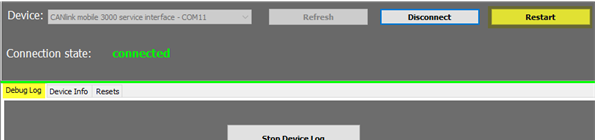
Create a device log with the DeviceAnalyzer software. While the device log is recorded, click on Restart. This will allow the support team to also evaluate the initialization phase of the device.
-
If required, send the generated
*.glogfile to the support team for further analysis.