Power Management
To protect the device from damage and data loss, a correct wiring and configuration of the power management settings is mandatory. The main purpose of the power management settings is that the device has a safe shutdown before the supply voltage (terminal 30/31) is disconnected.
The required variables belong to the DEVICE VARIABLES > POWER MANAGEMENT object dictionary group. For detailed information on creating objects, see Creating Object Dictionary Groups and Objects.
The following subsections provide an overview of the individual power management functions.
Note
Wake up of the device is possible when at least one of following condition is fulfilled:
- The IO - Clamp 15 (Ignition) State is at level
high(> 6 V) - A CAN message is present at the CAN 1 or CAN 3 interface
- The Power Management - Acceleration Sensor Wake-up Force is enabled and the configured threshold is exceeded
- The Power Management - Cyclic Wake-up Time is enabled and the configured time is elapsed
Power Management - Shutdown Delay Time
The Power Management - Shutdown Delay Time is required for the terminal 15 monitoring. After recognizing ignition input (terminal 15) and CAN off-state, the device will continue operating for the specified time and then go to sleep mode.
Note
The terminal 15 monitoring is only active if the value for the shutdown delay time is > 0
Note
Make sure that there are no CAN messages present on the CAN bus anymore before the Shutdown Delay Time is elapsed. Otherwise, the device would either not switch to sleep mode or immediately wake up.
You can enable the Power Management - Shutdown Delay Time as follows:
- Ensure that terminal 15 voltage from the machine is connected to the terminal 15 (input ignition signal) pin at the CANlink mobile device. See Switching the Device On/Off.
- Open the latest device configuration with the Proemion Configurator software.
- Add the device variable Power Management – Shutdown Delay Time to your configuration.
-
Write the desired time in seconds into the parameter value input field.
Note
The configured shutdown delay time should not be too short. It must be ensured that there is enough time for the device to finish its internal jobs, complete the latest clf file and transmit the file to the DataPlatform.
-
Save the updated configuration file with a new Device Configuration Version String.
- Write the updated configuration to the device.
- Perform a reset of the device.
- Check if the new power management settings are applied correctly.
Power Management - CAN sleep Time
The Power Management - CAN sleep Time is to be used when the device should be automatically set to sleep mode in case that there is none of the configured CAN messages received by the device within a specified time period.
Note
To set the device to sleep mode by the device variable Power Management - CAN sleep Time, the IO - Terminal 15 (Ignition) State must be low.
You can enable the Power Management - CAN sleep Time as follows:
- Open the latest device configuration with the Proemion Configurator software
- Add the device variable Power Management - CAN sleep Time to your configuration
- Write the desired time in milliseconds into the parameter value input field.
- Save the updated configuration file with a new Device Configuration Version String.
- Write the updated configuration to the device.
- Perform a reset of the device.
- Check if the new power management settings are applied correctly.
Power Management - Time to Sleep
The Power Management – Time to Sleep is used when the device needs to be set to sleep mode by a connected controller with additional power management logic functionality.
Note
Power Management - Time to Sleep is a volatile device variable and therefore considered as a one-time function.
Note
The device will only enter sleep mode when the terminal 15 is at level low and no configured CAN message is left on the connected CAN bus.
Note
While the countdown timer for Power Management – Time to Sleep is active, there is no reception and transmission of CAN messages possible
You can trigger the Time to Sleep by the controller as follows:
- Ensure that the terminal 15 is at level low
- Ensure that configured CAN message are not present on the connected CAN bus.
-
Write the desired count down time in seconds via your controller and a CANopen SDO message to Object Index
0x3333, SubIndex0x08,UInt8.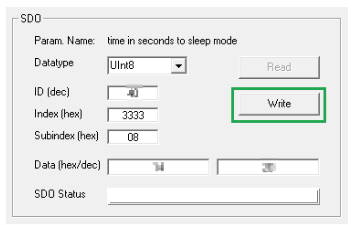
Figure 1: CANopen SDO -
Check that the device is set to sleep mode after the specified time is elapsed.
Power Management - Acceleration Sensor Wake-up Force
When the internal accelerometer detects an acceleration force higher than the configured value, the device automatically wakes up from sleep mode.
You can enable the Acceleration Sensor Wake-up Force as follows:
- Open the latest device configuration with the Proemion Configurator software.
- Add the device variable Power Management - Acceleration Sensor Wake-up Force to your configuration.
-
Write the acceleration force into the parameter value input field.
Note
The recommended threshold for the acceleration force is at least
1.2 g. Otherwise the device might get into a kind of restart cycle. -
Save the updated configuration file with a new Device Configuration Version String.
- Write the updated configuration to the device.
- Perform a reset of the device.
- Check if the new power management settings are applied correctly.
Power Management - Cyclic Wake-up Time
When in sleep mode, the device will wake up from sleep mode automatically after the configured time period.
You can enable the Power Management - Cyclic Wake-up Time as follows:
- Open the latest device configuration with the Proemion Configurator software.
- Add the device variable Power Management - Cyclic Wake-up Time to your configuration
-
Write the desired time for the cyclic wake-up in seconds into the parameter value input field.
Note
The minimum possible value for the cyclic wake-up time is
120 seconds. Lower values should not be used. -
Save the updated configuration file with a new Device Configuration Version String.
- Write the updated configuration to the device.
- Perform a reset of the device
- Check if the new power management settings are applied correctly.
Power Management - Deep Sleep Flag
The use of Power Management - Deep Sleep Flag is especially recommended for devices with internal battery and additional wake up flags configured. This function was implemented to avoid that the device wakes up during storage time and transport and hence the battery gets discharged.
Note
With deep sleep mode enabled, the device will ignore the configured wakeup flags such as cyclic wake up or acceleration force.
Note
Power Management - Deep Sleep Flag is a volatile device variable and therefore considered as a one-time function.
Wake up of the device is possible when at least one of the following condition is fulfilled:
- Rising edge on IO - Terminal30 Voltage.
- The IO - Terminal 15(Ignition) State is at level
high(> 6 V) - A CAN message is present at the CAN1 or CAN 3 interface
You can set the device into deep sleep mode before transport as follows:
- Open the latest device configuration with the Proemion Configurator software.
- Add the device variable Power Management – Deep Sleep Flag to your configuration.
- Write the value 0x01 into the parameter value input field of the device variable Power Management – Deep SleepFlag to enable the deep sleep mode
- Add the device variable Power Management – Time to Sleep to your configuration.
- Define a value for the countdown time in seconds to sleep mode in the parameter value input field.
- Ensure that there are no CAN messages left on the CAN bus.
- Ensure that the terminal 15 is at level low.
- Write the updated configuration to the device.
- Wait for the specified time until the device is set to deep sleep mode.
- Verify that the device does not wake up by the configured wake-up flags such as acceleration force or cyclic wake-up time.