Logging
Note
With the firmware release 2.0.0 as of February 2023, the CANlink® mobile 3600 operates as "Online" that combines the RealTime mode and Logging mode, see also chapter Online (RealTime_and_Logging.
The device logs CAN messages, GNSS data, and internal variables.
All the recorded data is saved in an internal, nonvolatile memory and automatically sent to the DataPlatform when a connection is available.
Note
The internal nonvolatile memory also stores recorded data as *.CLF-files. The maximum number of files which can be stored on the internal memory is 4000 files with a file size up to 1 KB. When the total of 4000 files is reached, newly saved files will overwrite the oldest file.
Note
The colored dot in the machines list indicates the status:
- Grey – device is offline.
- Green – device is online and it is logging data.
- Blue – device is online and it transmits RealTime data.
For further information on the DataPortal functionality, refer to the Document Library.
Configuring variables for CAN communication
To enable CAN communication and data logging, you must configure the following variables.
CAN Settings
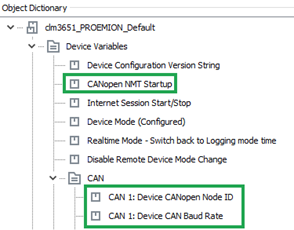
The variables required concern the CAN connection and belong to the object dictionary group DEVICE VARIABLES.
| Variable | Value | Function |
|---|---|---|
| CANOPEN NMT STARTUP | 0 |
Automatically sets the device to CANopen mode "Operational". |
| CAN1/CAN2/CAN3:DEVICE CANOPEN NODE-ID | 1 … 127 |
The CANopen node address (can_be_left_at_the_standard_value). |
| CAN1/CAN2/CAN3:DEVICE CAN BAUD RATE | min. 50 kbit/s; max. 1 Mbit/s (default: 250kBit/s) | The baud rate at which the CAN bus operates. |
Logging Variables
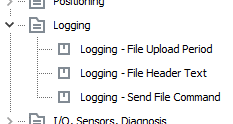
The variables required concern the logfile and belong to the DEVICE VARIABLES > LOGGING object dictionary group.
| Variable | Function |
|---|---|
| LOGGING -- FILE UPLOAD PERIOD | Period in which the logfile is completed and sent to the DataPlatform. value = 0 → data is sent when the size of the logfile reaches 1 kB. |
| LOGGING -- FILE HEADER TEXT | Information text in the header of each logfile. Can contain version information for instance (max. 32characters). |
| LOGGING -- SEND FILE COMMAND | Assign any value to the variable during operation in order to immediately close and transfer the existing logfile. |
Note
The logfile is sent to the DataPlatform when its size reaches 1kb regardless of the period set.