Glossary
AEMP compliant
The AEMP, which is short for Association of Equipment Management Professional, is a Telematics Standard approved and recognised by the International Standards Organization and is subject to ISO 15143-3.
There are 2 AEMP interfaces at Proemion that allow
-
to export information out of our DataPlatform in the AEMP standard way, see also AEMP API.
-
to pull information into our DataPlatform from 3rd party systems, helping our customers to have all their data in one place. Contact your account manager if you want to get more information on or make use of the Mixed Fleet.
Aggregation
Minimum
Returns the smallest value in a Bucket.
Maximum
Returns the largest value in a Bucket.
Average
Returns the mean or the average of all values in a Bucket.
Standard Deviation
Returns the amount of variation of the values in a Bucket.
Sum
The resulting total of the signal values in a Bucket.
Cumulative Sum
Returns the sum of all values within the current Bucket and all previous Bucket sums in the selection. For example, the cumulative sums of the sequence 'a, b, c, ...', are 'a, a + b, a + b + c, ...'.
Serial Difference (Avg.)
Returns the difference of the averaged signal values from a previous Bucket to the next Bucket in a sequence.
Delta
Returns the difference between the last value before the time frame start and the last value before the time frame end. However, the DataPortal will return multiple delta values (one for each bucket):
-
if the time frame is larger than the bucket size
-
if the time frame start and end is on different calendar days
Note
Delta aggregation is only available for continuous counter signals (that are configured as such in the PDC and signals that do not reset at the end of an event.
Communication Unit
The Communication Unit (CU) is the hardware device - in principle the CANlink mobile series - manufactured by Proemion. The CU is installed, brought online, undergoes configuration and interfaces directly with the DataPlatform via the REST API or the DataPortal.
Dashboard
Visualization of machine details like location and other signals on a model/machine level or organization level.
Device
The Device is the physical hardware component of the communication unit. This component can be installed, brought online or taken offline.
Geo Data
Track
: A position history on the Machine is usually visualised as a line as shown.
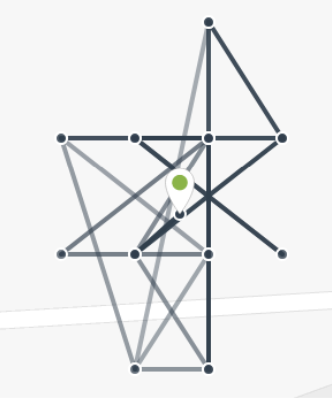
The user can see similar tracks using the Machine Map widget.
Machine
The machine referred to in our documentation is the vehicle where the device is installed.
Model
The collection of features, functionality or characteristic (i.e. small, medium, large) that differentiates a type of machine from another.
Online Mode
The Online mode replaces the previously separate Logging and Realtime modes that are only used in some legacy devices. The Online mode connection type combines the functionality of both Logging and Realtime modes. For further information read the section Connection Types.
Organization Units
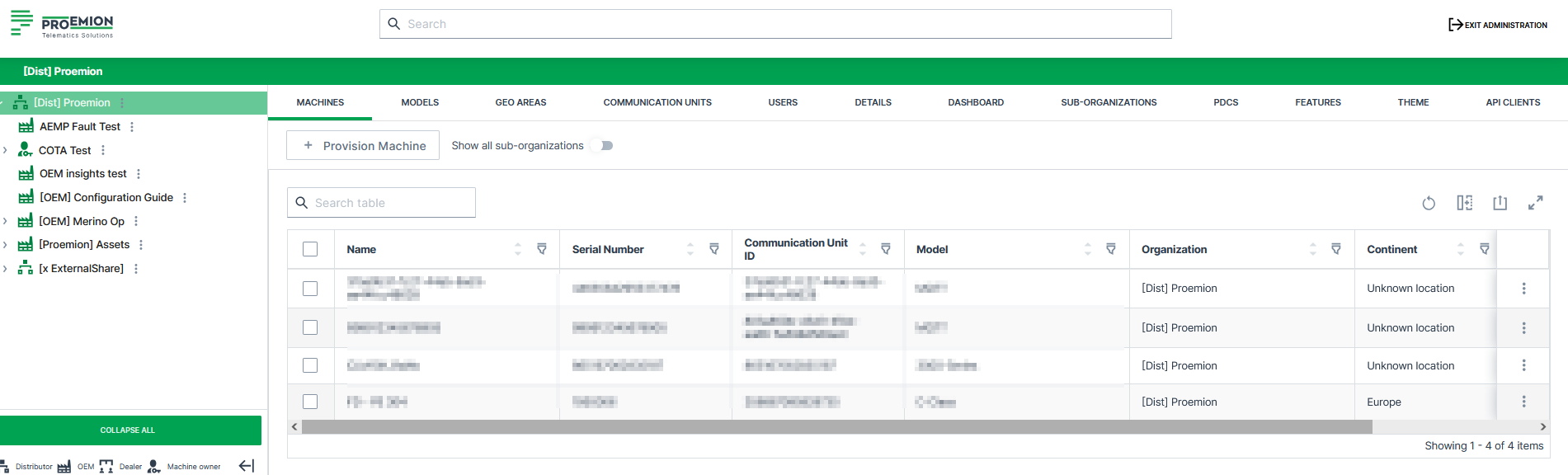
The Organization Unit or OU is an object within the DataPortal that contains its own Users, Machines and other Sub-Organizations. See Organizations.
Tenant
Note
With the Business Units Concept, the first OEM organization in an organization tree automatically becomes its tenant. There is no separate, manually assignable tenant flag.
The tenant is typically the machine manufacturer and thus also the higher-level administrative organizational unit containing most of the organizational assets and configurations. Assets managed at the tenant are Models, PDCs, Signal Catalog, Dashboards, Configuration Bundles, Efficiency Definitions, Machine Share Definitions, Asset Types, VIN/PIN uniqueness, Themes, OEM Name, and Legal Documents.
A tenant organization unit must be of Organization Type OEM and cannot have another tenant above it, i.e. must be a parent organization.
Revoking tenancy is not possible, respectively, revoking tenancy is possible only for newly created organizations.
Time Series Data
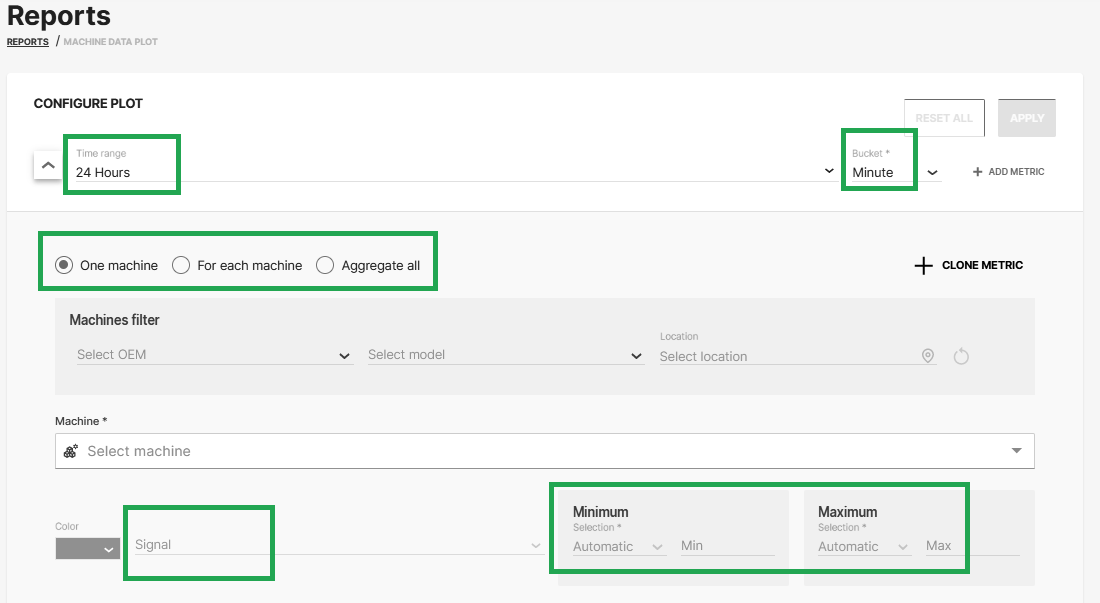
The following options described are used for time series data selection in the Reports.
Signal
A set time series measurements.
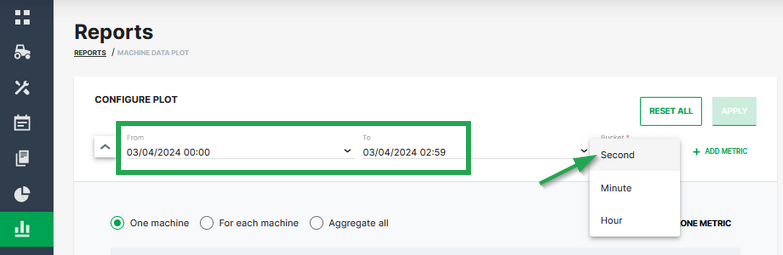
Bucket
The bucket defines the time resolution of the output. All data points for the signal are combined using the defined aggregation type. When configuring Reports, the bucket Second can be selected, if the time range is below 3 hours, i.e. 2h 59 minutes or less, when combined with time range Absolute:
Aggregation
See also Aggregation
A mathematical function applied to all data points of a Bucket. The result of the Aggregation is one value that is provided as the value for the entire Bucket.
Aggregate all
This plotting option aggregates the selected signals of all applicable machines into a single signal. Usually used in combination with a machine Model selection. If a machine Model is selected the operation includes date from all machines of that Model. The selected signal is then aggregated into one single signal covering all machines.
For each machine
This plotting option shows one signal for each applicable machine. Usually used in combination with a machine Model selection. If that case one signal for each machine of the selected Model is provided.
Time series data handling
You can use the CANlink® mobile to send measured data of signal values via CAN messages from the CAN bus to the DataPlatform
Consider that signals with the same timestamp in one CAN message are stored into individual time-series entries and thus lose their "link" they have in the CAN message
The workflow is as follows:
-
The signals, i.e. their values, are logged/sent within 1 second, i.e. they get the same time stamp in the CAN message.
-
The DataPlatform then parses the message by signal first.
-
When the recorded signals get stored in the long-term database, a de-duplication takes place in the database and redundant values with equal time stamps get deleted
In detail, the first appearance of the signal will be stored, and other entries with the same time stamp and value of that signal will be deleted. Entries with the same timestamp and different values will be retained.
In case you need structured data access similar to tables, you could implement the following workarounds:
-
Transferring the tables as a file using the CANopen file transfer function, see also File Transfer
The files then can be retrieved via the REST API. -
Limiting the rate of transmitting the "table row" CAN messages to an interval >1 sec to ensure different timestamps for the rows but consistent timestamps for the measurement values.
-
Implementing a DataPump Service to get all measurement values as they are received
For more information, contact our Service and Support.