Fleet Distribution
Fleet Distribution Overview is a useful option for fleet managers with machines from different OEMs within their DataPortal organization
With this function the so-called mixed fleet owners can see how many machines they have from each OEM.
Requirements
In order to have the Fleet Distribution Overview option available within the DataPortal, the following requirements must be fulfilled:
| Permission Set Name | Level |
|---|---|
| Machines | View |
| Feature Name | Status |
|---|---|
| OEM Name | ON |
Fleet Distribution Overview
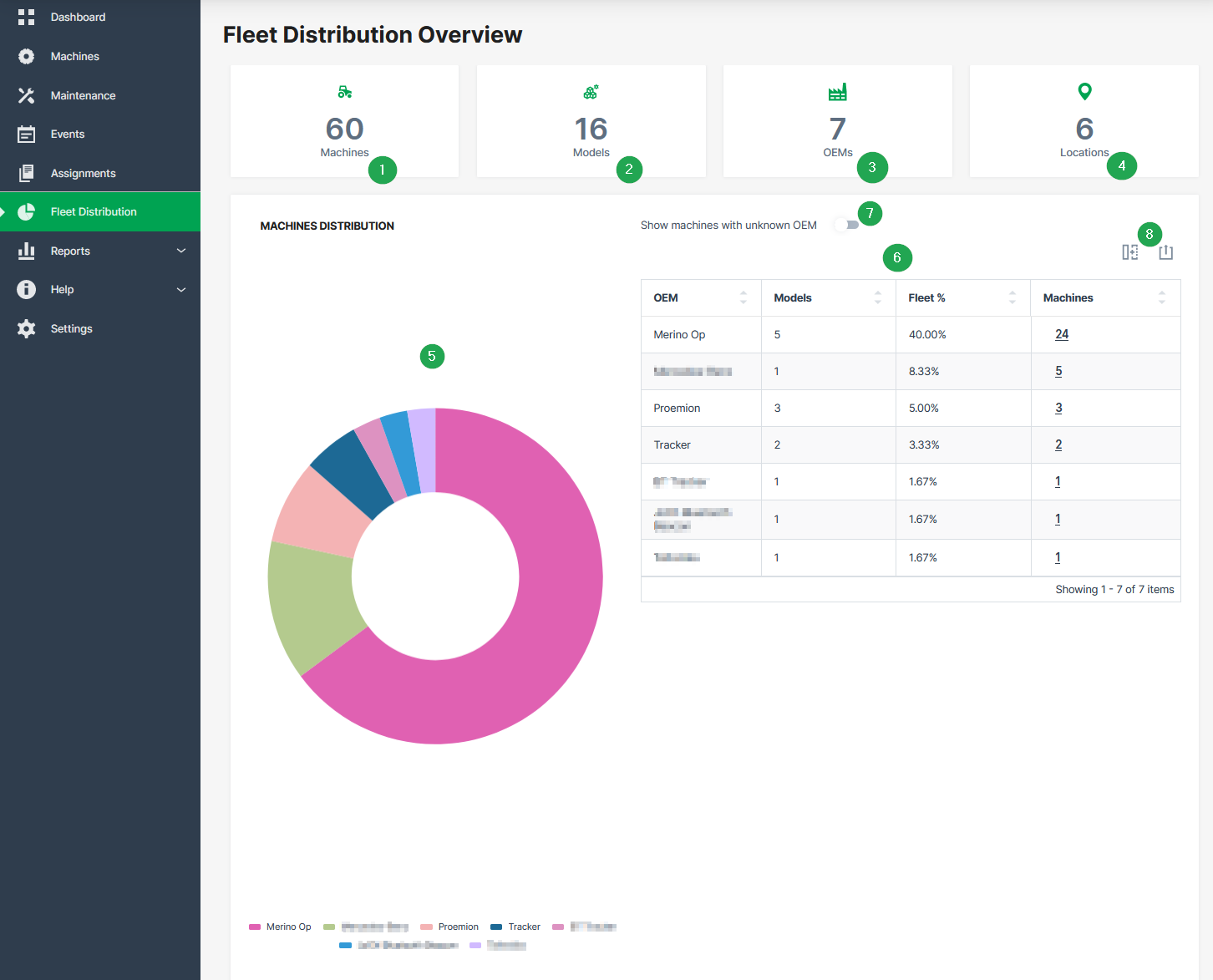
This overview is aimed to display the distribution of machines and their corresponding OEMs for the entire organization tree.
| # | Item | Description |
|---|---|---|
| 1 | Machines | Display of total number of machines. |
| 2 | Models | Display of total number of different models. |
| 3 | OEMs | Display of total number of different OEMs. |
| 4 | Locations | Number of countries where the machines are located. |
| 5 | Pie chart | Statistical graphic of OEMs and the corresponding number of machines. |
| 6 | Table | Tabular overview of OEMs, models and the corresponding number of machines. |
| 7 | Toggle switch | Show machines with unknown OEM. |
| 8 | Export | Options to hide columns and export the table to a CSV or XLSX file. |