Introduction
In the DataPortal there are two different types of dashboards available for customization with an individual widget layout. The organization associated dashboard provides an overview of your machine fleet and data on an organizational level. A model associated dashboard can be configured to display specific signals and states for a certain machine and its corresponding model when opening the machine page. For both types of dashboards, the same set of widgets is available for configuration of a customized widget layout.
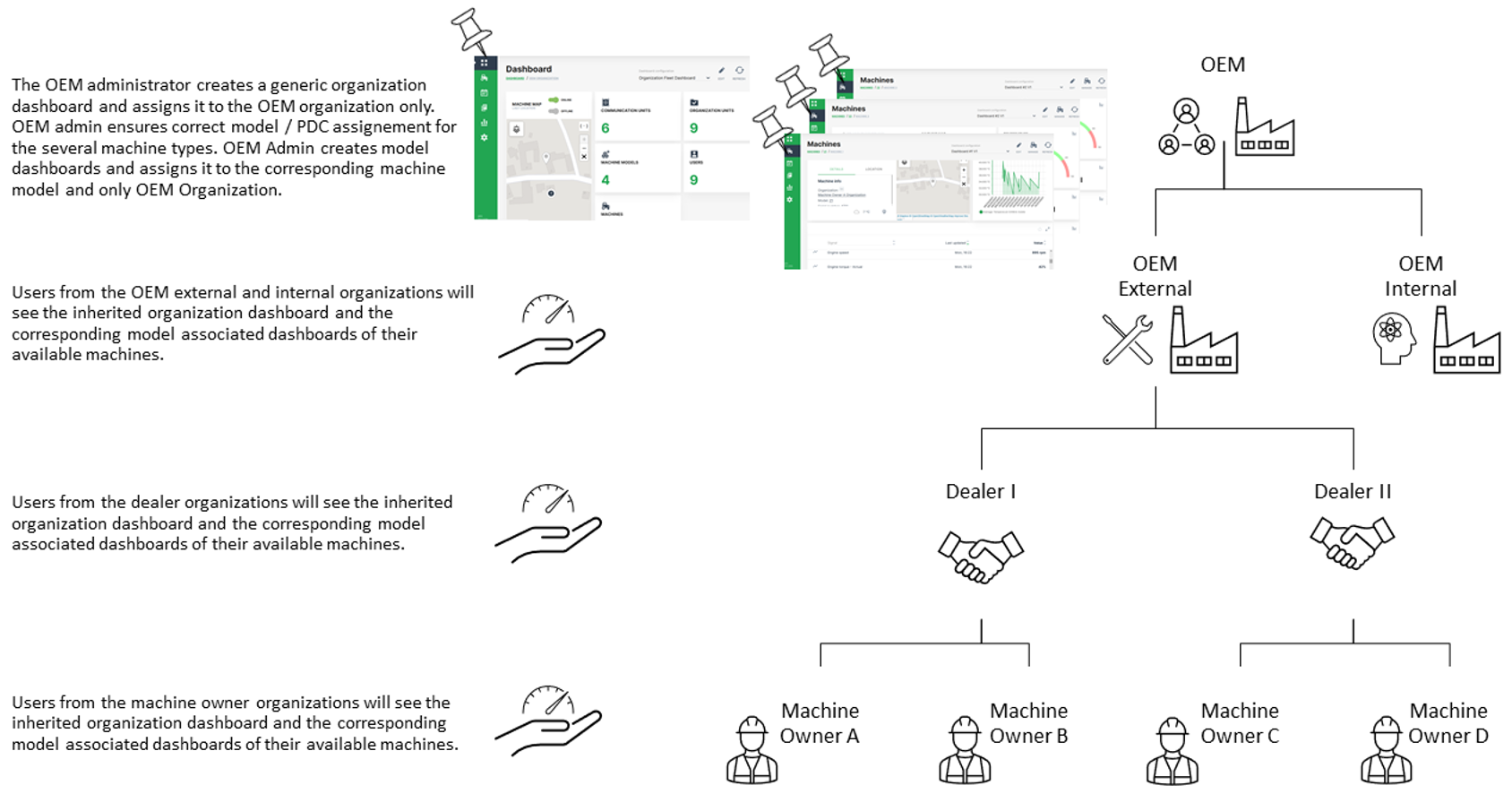
Since there are certain rules for displaying the several dashboards, it is essential to distinguish between organization associated dashboard and model associated dashboard. The basic idea of an organization associated dashboard is to show the most relevant parameters for the entire fleet and organization. The model associated dashboard is aimed to show machine and machine model specific data. Please be aware that the organization associated dashboard is bound to an organization and a model associated dashboard is bound to the organization type.
Especially when having a rather complex organization tree and a fleet with different machine types and models, the assignment of a dashboard to the organization and model has an important role for the visibility down to the machine owner organization through the entire organization tree.
Recommendations for handling of organization associated dashboards:
-
It is highly recommended for organization associated dashboards to just assign it to the top level organization and leave the organization units below unchecked. The lower level organizations will automatically inherit the organization associated dashboard from their parent account then.
-
Since the management of multiple dashboards requires additional administration efforts at the lower level organization units, it is also recommended to keep the organization associated dashboard as generic as possible. So it can be used for all available types of accounts.
Recommendations for handling of model associated dashboards:
- Create a basic dashboard layout for one model and assign it to other models or and duplicate it for configuring different dashboards layouts.
INFORMATION
As of January 2023, model associated dashboards are assigned to the organization type, e.g. OEM or Dealer, and not the organization (unit) itself. Thereby, all organizations (and their organization units) of that organization type inherit the layout of the model associated dashboards.
Note
INFORMATION A video tutorial on how to create and assign a customized dashboard for the lower level organization units can be downloaded at the following link Dashboard Management Part 1. In case that an updated version of the dashboard needs to be pushed to the lower level organization units, please refer to Dashboard Management Part 2.