Machines Overview
The Machines Overview is the central place for managing specific machines on different views.
The machines can be displayed in map that allows to zoom-in and-out and gives a quick description of the machines whn hovering over.
The machines can be also displayed in a table/list view to have a clear structure of the available machines.
By default, the Machines overview offers the 3 views: List view, Map view and Split view on all machines visible to the user. You can disable the possibility to select the Map view via Settings > Portal Appearance > Theme > Behavior Options.
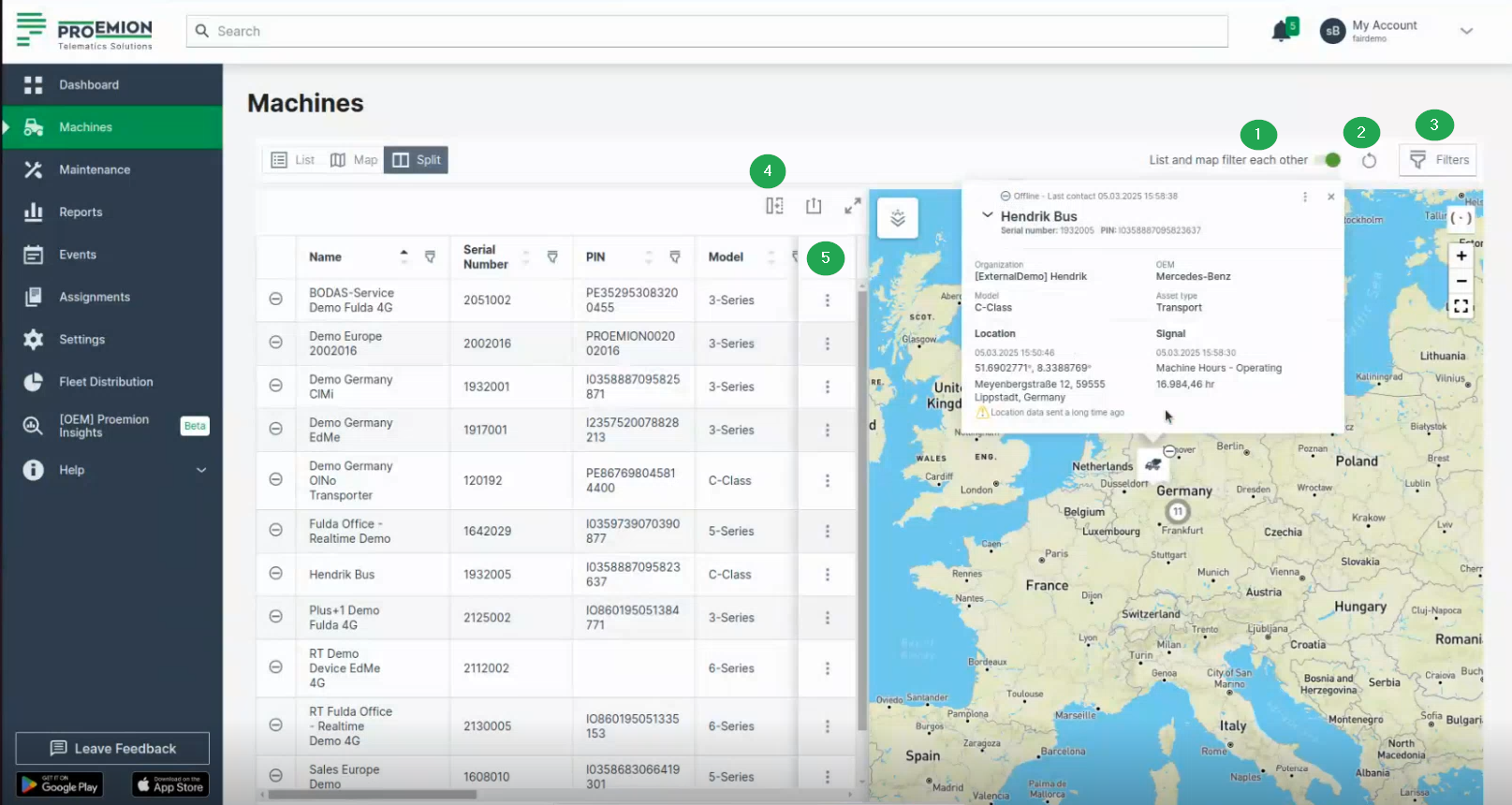
The following filters and options let you narrow down the machines shown to the ones relevant to you (e.g. only machines with upcoming maintenance, or only machines belonging to a specific organization); for details, see Filters and Options:
- List and map filter each other toggle, above the table/map next to the Reset icon and the Filters button
- Reset icon, next to the toggle
- Filters dialog, top right corner
- Table options, above the table next to the search field (available for the list view only)
- 3-dots menu, at the end of each row (available for the list view only)