Business Units Concept
Business Units (BU) are one of the Core Organizational Concepts built on top of the Organization Structure.
Business Units group all organization units of the same type within the organization structure. The root is a special organization unit to identify the start of a BU, reflecting all the organization units that belong to it.
Each BU has one root organization and may include several sub-organizations. When creating a sub-organization, the organization type is automatically inherited from its parent. As a result, sub-organizations share the same type and belong to the same BU. A BU continues until another organization becomes a BU root.
The next root organization reflects a different BU with its own sub-organizations. A sketch of BU's can look as follows:
OEM 1 (BU root/tenant)           > Dealer A (BU root)
          |  |-> Dealer B (sub-org) > Machine Owner a (BU root)
          |  |-> Dealer C (sub-org) > Machine Owner b (BU root)
          |  |-> Dealer D (sub-org) > Machine Owner c (BU root)
          |  |        |-> Machine Owner d (sub-org)
          |  |        |-> Machine Owner e (sub-org)
          |  |-> Dealer E (sub-org) > Machine Owner f (BU root)
          |
          |-> OEM 2 (sub-org) > Dealer F (BU root)   > Machine Owner g (BU root)
          |
          |-> OEM 3 (sub-org)    > Machine Owner h (BU root)
                        |-> Machine Owner i (sub-org)
                        |-> Machine Owner j (sub-org)
BUs and Tenant
When a new OEM is created (e.g., by a Distributor) and this is the first OEM organization unit, it is automatically created as a tenant and becomes the BU root of a new BU.
Requirement: Ensure the first OEM organization is the first organization in the tree that is of type OEM.
Terminology
| Term | Definition |
|---|---|
| Business Unit (BU) | A collection of organization units of the same type within the organization structure. |
| BU Root | An organization that has no parent or whose parent has a different organization type. It defines the start of a BU. |
| BU Sub-Organization | An organization within the organization tree of a BU root that has the same type as the BU root. |
| Organization Type | The classification of an organization (e.g., OEM, Dealer, Machine Owner). |
Convert to <organization type> |
The action of changing an organization's type. This may change the BU assignment of the organization and its child organizations. |
Advantages
BU's give OEMs an overview of the Dealers and Machine Owners/machines belonging together.
This concept also enables users to view and maintain features only for their organization or below. It also enables sharing data with organizations belonging to the same Business Unit, but not outside the Business Unit, for example: dealership locations, assignments, geoareas, geofence alerts.
-
BU's allow OEMs to directly connect with Dealers or Machine Owners.
-
Dealers can only connect with Machine Owners.
-
All users are provided access of the organization assets depending on the organization root and its sub-organizations the users belong to within the Business Unit.
Requirements and Validation
The BU concept is active by default when creating a new account, e.g. when a Distributor creates an account for an OEM.
It requires an accurate grouping and nesting of organizations (even before and during the migration process):
-
Validate the children organizations of the same type.
-
Make sure that organizations which should not share resources are separated. Especially, take care of Dealers that are nested under other Dealers.
-
Review the users associated with each organization.
Organization Type Changes
You can change an organization's type within the DataPortal using the option Convert to <organization type>.
If a type change is not permitted by the system, the option will not be available.
To change the organization type, proceed as follows:
-
Navigate to Settings > Organization Structure
-
Search for the organization in the organization tree.
-
Open the organization menu via the three dots and select Convert to
<organization type>.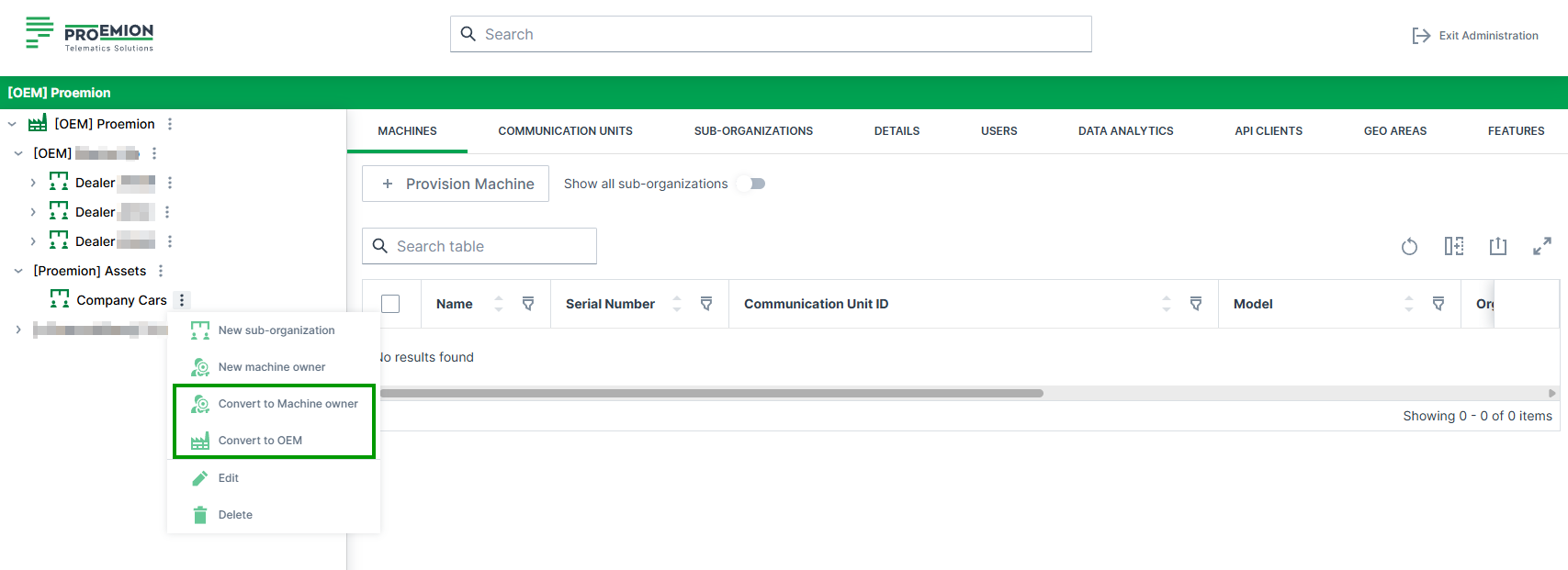
Figure 1: Change Organization Type -
Review the confirmation dialog carefully. Click Convert to confirm the organization type change.
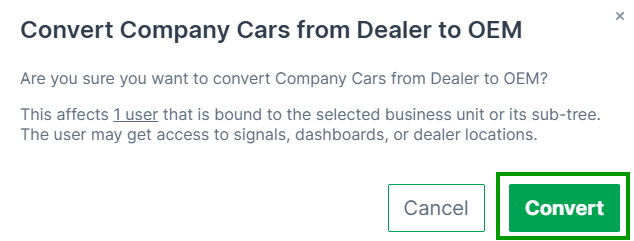
Figure 2: Confirm Organization Type Change
How an organization change affects your organization
When you change an organization type, the system automatically recalculates the BU structure.
Although many structural constellations are possible, the type change results in one of the following structural effects, depending on the organization’s position in the structure:
The organization becomes a new BU root
If the new type differs from the parent's type:
- The organization leaves its current BU.
- It becomes a new BU root and forms its own BU.
- Its sub-organizations remain assigned to it.
The organization joins the parent's BU
If the new type matches the parent organization’s type:
- The organization joins the parent's BU.
- It is no longer a BU root.
- Depending on their type, its direct sub-organizations might become new BU roots.
The BU structure remains unchanged
If the organization is already a BU root and the organization change does not require it to join or leave a BU:
- The organization type is updated.
- The BU assignment remains the same.
- The overall hierarchy structure stays unchanged.
Note
Review the organization structure before making changes. Changing an organization type can affect data visibility and access to shared resources within the BU.