Machine Share Definitions
Machine Share Definitions allow you to categorize the machine shares. In the Machine Share Definitions page you find an overview of the Shares count.
Requirements
The Machine Share Definitions can be configured by a tenant, typically the OEM. For more information, see Tenant.
The required permission set is Organization:Maintain to use the Machine Share Definitions feature, see Organization Subject.
Note
The Machine Share Definitions feature is only available if the feature to share a machine is enabled. To share a machine, read Share Machine functionality.
Configure Machine Share Definitions
To create a Machine Share definition, open Settings > Machine Data Management > Machine Share Definitions and click Create New.
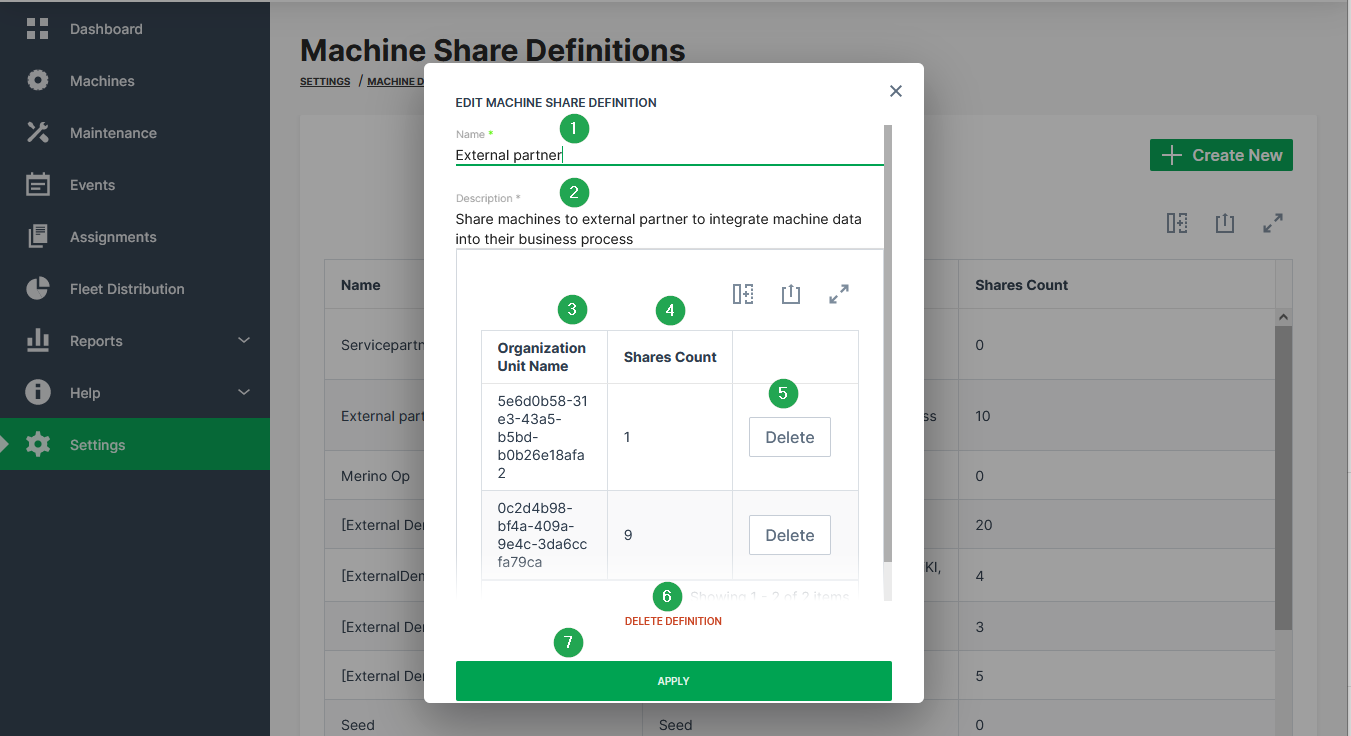
To edit Machine Share Definitions, click in the row of a Machine Share Definition.
| # | Item | Description |
|---|---|---|
| 1 | Name | The label for the share definition. |
| 2 | Description | The description of why the share exists. |
| 3 | Organization Unit Name | These are the organization units where machines with the open share definition are shared to. |
| 4 | Shares Count | The number of shares within the organization unit. That means the number of times the definition has been applied to a machine. |
| 5 | Delete Definition | Remove the definition from the DataPortal and cancel all Machine Shares that use this definition. |
| 6 | Waste Basket | Remove all share permissions for the organization unit at once. |
| 7 | Apply | Save the share definition and add it to the list. |