Hierarchical Geo Data
The DataPortal provides hierarchical geo data for machines in your organization to use as filter criteria in reports and machines lists. Any machine that has position data also has hierarchical geo data. This functionality enables filtering all machines within a continent > country. Herewith you can categorize or aggregate reports and data by location.
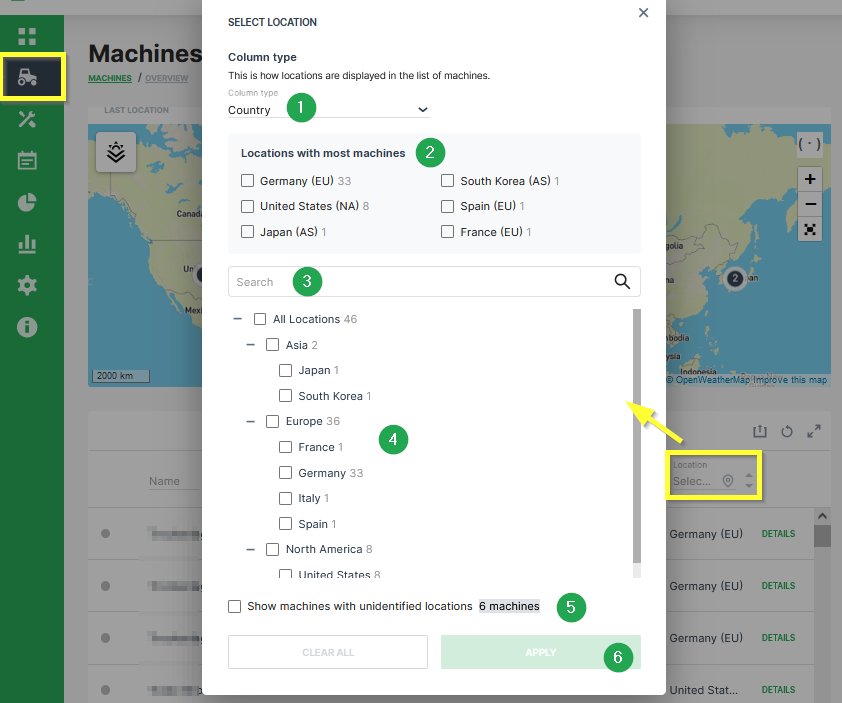
| # | Item | Description |
|---|---|---|
| 1 | Column type | User can filter machines of a specific Country or Continent. |
| 2 | Locations with most machines | List of locations with most machines is displayed here. User can enable a filter for the given countries or continents. |
| 3 | Search | Input field if a user wants to search for a specific location. |
| 4 | All Locations | Tree of all locations and the distribution of the machines is displayed here. Enable the checkbox for the required continent or country. |
| 5 | Machines with unidentified locations | Enable this checkbox to also list machines with Unknown location. |
| 6 | APPLY | Button to APPLY the location filter. If the filter settings needs to be removed, click on CLEAR ALL |
Note
Only users with the Machine: View and Latest location or Location history permission sets have access to this functionality. Location history is necessary to retrieve the data via API.
Note
The Geo Data Location Filter can only be applied to machines where the setting for the Geo permissions in the assigned PDC also allows visibility of the location for the respective organization type. If a machine has a PDC without Geo permission for the user's organization type, the Location of this machine is displayed as Unknown Location. For further information regarding the permission settings, please refer to PDC Manual - Permissions.
The table below shows the availability of the GEO Data Location Filter in the DataPortal.
| Feature/Menu Item | Module/ Column | Filter? Y/N | Navigation |
|---|---|---|---|
| Machines Overview | - | Y | Machines > Machine list > Location column |
| Maintenance | - | Y | Maintenance > Filter > Machine > Machines filter: Location |
| Events | - | Y | Events > Filter > Machine > Machines filter: Location |
| Assignments | - | Y | Assignments > Filter > Machine > Machines filter: Location |
| Reports | |||
| Maps | Y | Reports > Maps > Configure Maps > One machine > Machines filter: Location | |
| Plots | Y | Reports > Plots > Configure Plot > One machine > Machines filter: Location | |
| Scatter Plots | Y | Reports > Scatter Plot > Configure Scatter Plot > One machine > Machines filter: Location | |
| Tables | Y | Reports > Table > Configure Tables > One machine > Machines filter: Location | |
| GeoLeash | N | Reports > Filter GeoLeash Events > Select machine | |
| Machine Efficiency | Y | Reports > Efficiency Snapshot > Select machines | |
| Y | Reports > Efficiency History > Select machines | ||
| Assignments | N | Reports > Assignments > Assignment Report > Configure report | |
| Settings > Administration > Organization Structure | |||
| Machines Management | Y | List of machines | |
| Models | N | New machine model > Machines > Select machine | |
| Communication Units | N | Settings > Administration > Organization Structure > Communication Units tab | |
| Contracts | N | Settings > Administration > Contract > Contracts list |