Platform Contracts
The Platform Contracts Page provides a unified interface where all customer-specific platform contracts are listed. It improves transparency by consolidating plan information, add-on modules (e.g. Mobile App, Datascience, DataPump Service etc.), pricing details and usage limits in one location inside the DataPortal.
To view all contracts of a Business Unit (BU):
- the Contract:Admin Permission Set is required.
- the BU must have a SAP customer number, see REST API.
Overview
Go to Settings > Administration > Platform Contracts to open the Platform Contracts page.
The screen below displays the details of an FDP (Fleet Diagnostics Package) contract within the Platform Contracts Page. It provides an overview of the contract metadata and shows current usage of the included diagnostic limits.
The following contract information is available:
- Contract Name
- Purchase Number
- Start Date
- End Date
- Price
These fields summarize the validity period and identification of the FDP contract.
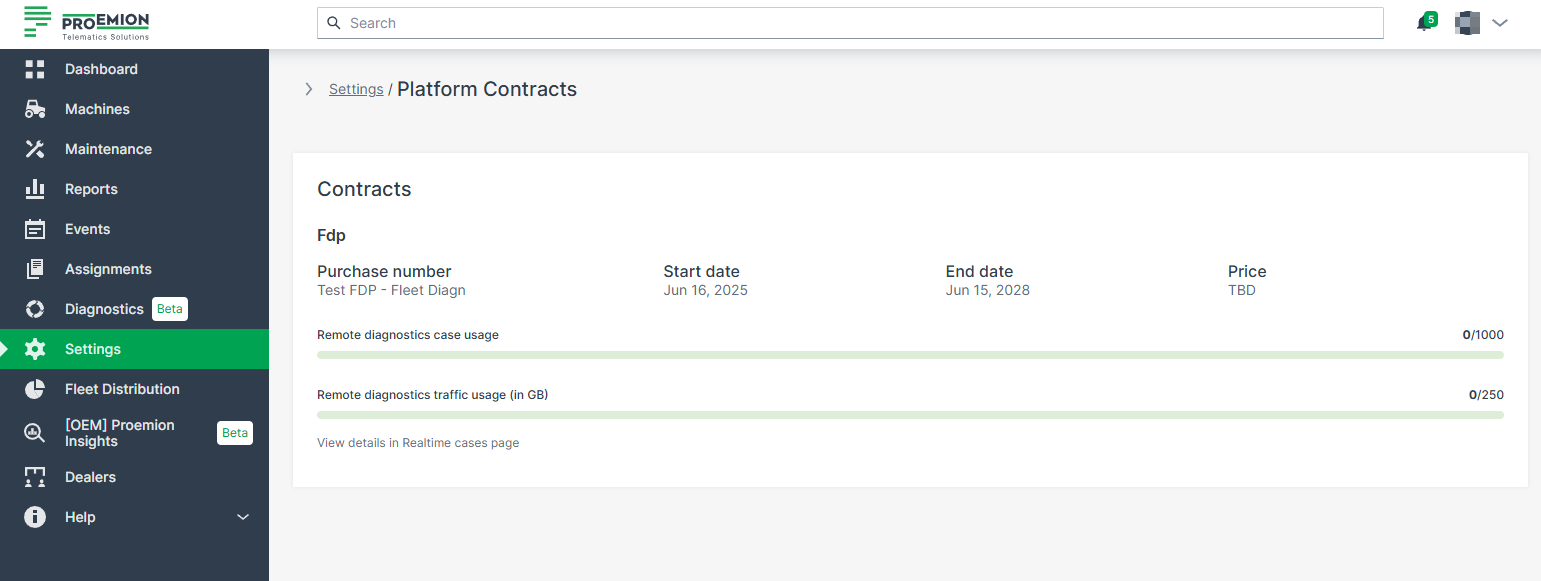
Fleet Diagnostic Package - Usage Information
Two usage bars provide insight into how much of the diagnostic resources have been consumed:
-
Remote diagnostics case usage: Displays how many remote diagnostic cases have been used out of the total available.
-
Remote diagnostics traffic usage (in GB): Shows the data traffic consumption for diagnostic transfers.
The number of available Diagnostic Cases — i.e., the remaining limit value — is updated once per day. However, the number of used Diagnostic Cases is updated immediately when a new case is started. Diagnosis sessions initiated by the Proemion Support team do not count against your contract quota. Only Diagnostic Cases of the last 24 month can be displayed.