GeoLeash
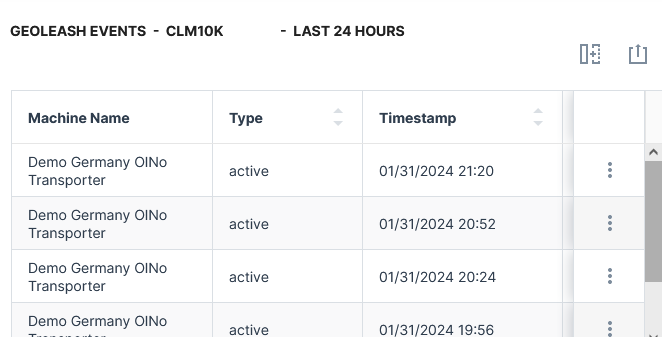
The GeoLeash widget tracks and lists the events of machine relocation (defined as movement from one area to another).
An automatic notification can be enabled via the Manage Machine configuration, see View Breach Events.
Note
GeoLeash functionality (configuring a boundary) can only be implemented for devices where the installed firmware supports this feature. Contact your DataPortal representative for more information.
Note
Location history access must be set by an organization admin and is necessary to use this feature.
Configuration
Configure the widget and put it on the Organization Dashboard and/or the Model Dashboard by following the steps below:
It is highly recommended to adapt a Machine Page (Model Dashboard) centrally via the Machine Page Layout. If you need to configure the Machine Page for the selected machine only, proceed as follows:
-
In the selected Machine Page, select Manage Layout > Add widgets.
-
Select the desired widget. A preview will be shown.
-
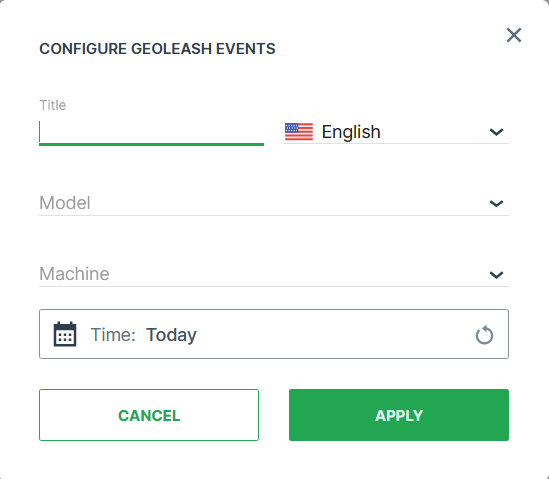
Click Apply. This forwards you to the widget configuration dialog with the options described below.
If you need to adapt the Organization Dashboard, select the desired dashboard configuration and click Edit > Add  to open the widgets catalog, see also Add Widgets to the Organization Dashboard.
| Item | Description |
|---|---|
| Title | The label for the widget (English is the default, additional languages must be configured. See Language below). |
| Language | Select the language for the title of the widget. |
| Model* | The model of the machine you select to display the GeoLeash events. |
| Machine* | The machine that you select to display the GeoLeash events. |
| Time | Select a predefined, relative time range, e.g. Last 24 hours or select a custom one, e.g. This last 5 Days, see Time selection. |
Note
*These config options can only be selected from the Organization Dashboard.
Sample