Contract renewal
Contract Renewal
The contract renewal is available on "active (cancelled)" contracts with an end date in the future that is within the next 12 months. Terminated contracts cannot be renewed, but only re-activated, see Reactivation.
Users can either request the renewal; eligible users can directly renew the contracts on their own, see also the Requirements for the required user permissions.
When renewing the contract, both the contract ID and start date of the contract remain the same.
Note
Contracts that are not canceled will be automatically renewed.
Requirements
Users without permissions (e.g. at least Contract:Maintain permissions) can request the renewal of their expired or soon to expire contracts via the Machine Page.
The receiver of the request - usually the OEM or Dealer - can contact the requester, make an offer and renew the contract as described below in Contract Renewal.
The receiver must have the Contract:Maintain permissions - to renew both active canceled contracts and terminated contracts
Renew Contract
To manually renew a contract, proceed as follows:
- In the Contracts menu, select the option Renew Contract via the 3-dots icon by the end of the row
 :
:
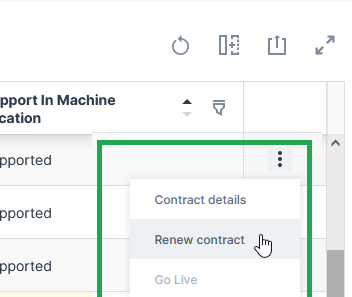
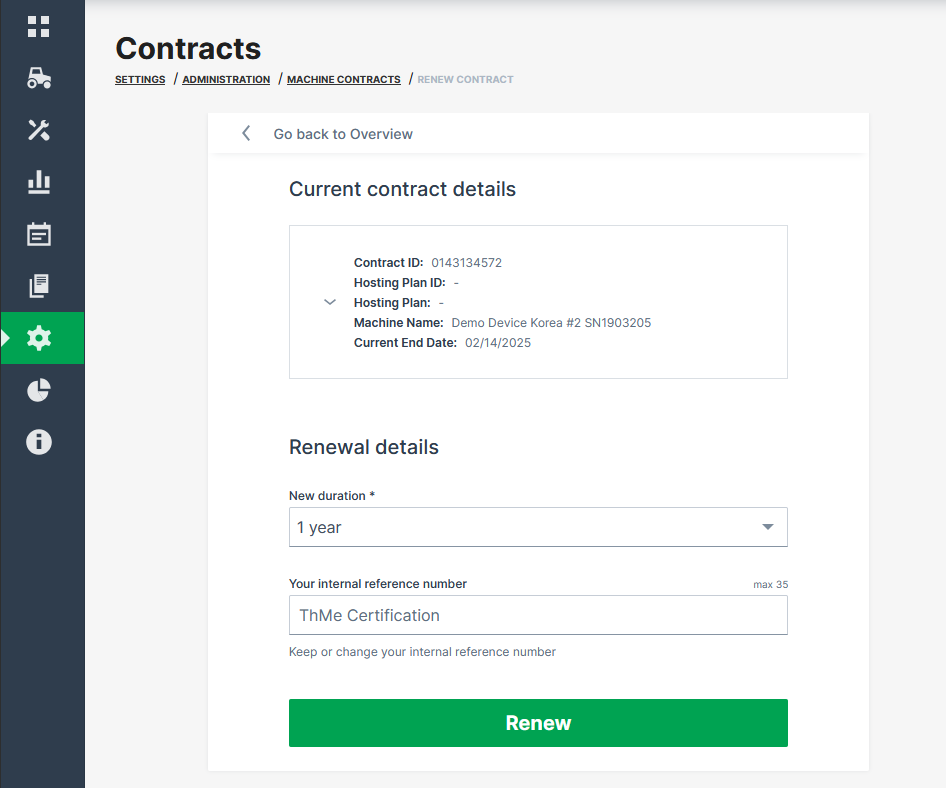
✓ The Renewal details page opens.
-
Select the New duration: 1 Year, 2 Years, 3 Years, 4 Years or 5 Years.
-
Enter a new Your internal reference number (maximum length of 35 characters) or just keep the existing one for later reference (this number can be assigned during Go Live). It is recommended to have a recurring reference number for easier reference of your machine/contract in your system, see Provision Machine Dialog.
-
Click Renew.
✓ The request for contract renewal is transmitted. ✓ You will receive an updated contract confirmation via email.
Note
With the contract renewal, the complete duration will be billed at once.