Migration from CANlink® wireless 3000
The CANlink® wireless 3000 was the predecessor of the CANlink® wireless 4000.
It offered many of the features of the CLW4000, but has been updated and improved in its successor.
CANlink® wireless 3000 and CANlink® wireless 4000 comparison:
| Feature | CLW3000 | CLW4000 |
|---|---|---|
| CAN buses | 1 | 2 |
| BLE interface | ❌ | ✔️ |
| Bluetooth PAN | ✔️ | ❌ |
| Bluetooth MultiPoint | ✔️ | ❌ |
| UDP/IP | ✔️ | ❌ |
| Wi-Fi AP needs password | ❌ | ✔️ |
| Simultaneous BT SPP and Wi-Fi connections | ✔️ | ❌ |
| wireless Configurator support | ✔️ | ❌ |
| Proemion Configurator support | ❌ | ✔️ |
| Protection Class | IP6k5 (3002) IP6K7 (3001) |
IP6K7 |
| Supply Voltage range | 8 - 32V | 6 - 36V |
Note
Changes between models
The CANlink® wireless 4000 is not a drop-in-replacement with respect to mounting and electrical connection, so the customer must adapt the existing installation according to their application.
There is a cable available 136200001 that allows the trivial electrical replacement of a CANlink® wireless 3000 by a CANlink® wireless 4000.
All accessories are listed in the Accessories chapter.
It is possible that some application configuration changes may be required.
Physical Differences
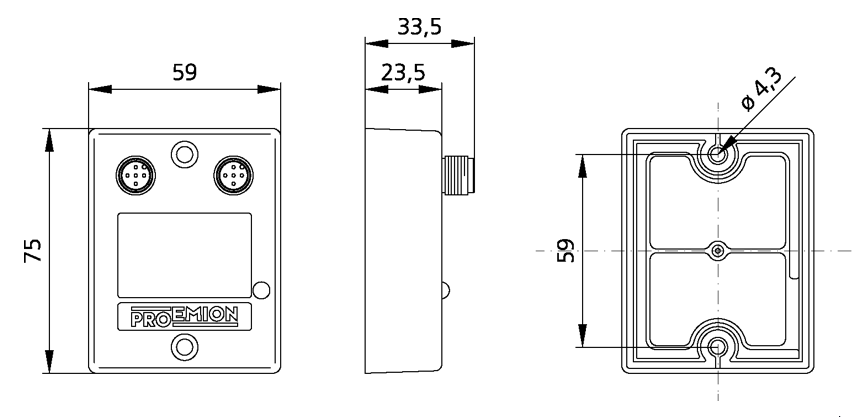
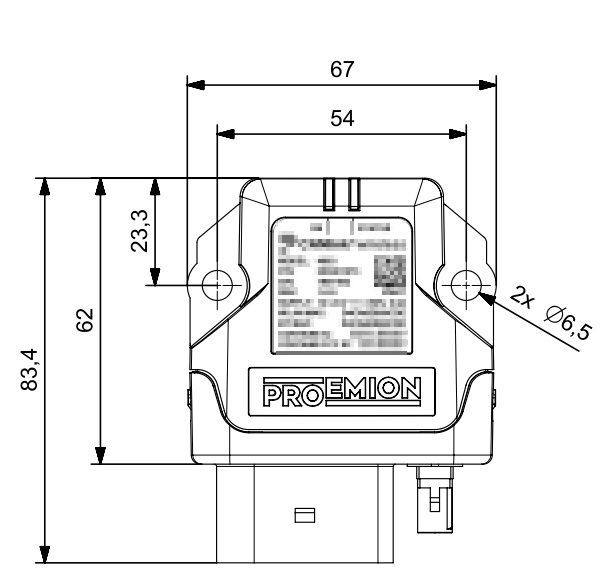
The CANlink® wireless 4000 housing has been upgraded to a superior IP class, and in order to contain the improved electronics. Therefore the mounting points and cabling has changed.
You can download the CAD files from our Download Center under: 01_Proemion_Devices > 08_CANlink wireless 4000 > 05_3D CAD Files
Housing
CANlink® wireless 3000 and CANlink® wireless 4000 dimensions:
| CANlink® wireless 3000 | CANlink® wireless 4000 |
|---|---|
 |
 |
Cabling
Since the CANlink® wireless 4000 supports two CAN buses, the cable has been upgraded.
Please check the CLW3000 information in the CANlink® wireless 3000 Device Manual Cable section.
The CANlink® wireless 4000 cable information is in the Cables section of this document.
Network Protocols
UDP
The CLW3000 supported UDP over IP, whereas the CANlink® wireless 4000 does not support this unreliable transport protocol.
The application can be easily modified to use TCP over IP.
The CANopen Object Dictionary objects 0x3010:0x16 and 0x3008:0x09 determine the network protocol in use.
The three options are:
-
Wi-Fi (TCP)
-
Bluetooth (SPP)
-
BLE
For information about setting the wireless interface, see Interface Configuration.
Bluetooth PAN connection
A Bluetooth Personal Area Network (PAN) is an ad-hoc wireless connection that allows the devices to communicate directly with each other.
The devices are tethered together over a Bluetooth Classic connection.
The CANlink® wireless 4000 does not support this legacy connection technology.
BLE is the recommended method of ad-hoc connections for low bandwidth applications (see BLE).
See Bluetooth, or Wi-Fi for higher bandwidth requirements.
Simultaneous interface protocols
In the CANlink® wireless 4000, only one protocol may be enabled at one time.
Single Wi-Fi band
In the CANlink® wireless 4000, it is recommended to only enable one Wi-Fi band at a time.
This only applies to the Client, as the Server determines the band.
If the Server is on channels 1 through 11, then that is the 2.4GHz band.
If the Server is on channels 36 through 48, then that is the 5GHz band.
To correctly configure a Wi-Fi Client device band, please observe the following table "Client Wi-Fi band".
| Band | Settings |
|---|---|
| 2.4GHz | Set 0x3000:0x10 [Enable 2.4GHz WiFi Band / Infrastructure only] to 1Set 0x3000:0x11 [Enable 5GHz WiFi Band / Infrastructure only] to 0 |
| 5GHz | Set 0x3000:0x10 [Enable 2.4GHz WiFi Band / Infrastructure only] to 0Set 0x3000:0x11 [Enable 5GHz WiFi Band / Infrastructure only] to 1 |
Object Dictionary
Due to the differences in the hardware and software of the CANlink® wireless 4000 compared to the CANlink® wireless 3000, the CANopen Object Dictionary (OD) has been modified as appropriate to work with the new device.
This has led to objects moving or changing values between the two ODs.
We have reduced the changes as much as possible, and summarize them here.
In order to reduce the amount of changes required for legacy applications using the CANlink® wireless 3000, we have implemented a software switch that reduces the footprint of the changes.
We call this 'Legacy Mode'.
Legacy Mode
This is an object in the OD that selectively enables and disables various features so that they more closely follow the schema employed in the CANlink® wireless 3000.
The Object Dictionary object 0x4000:0x30 [CLW3000 Legacy Mode BitField] is a 32bit bitfield.
Each bit represents one OD entry, and when set, configures that entry to more closely behave as it did in the CANlink® wireless 3000.
By default, these bits are all reset (disabled).
Tip
If changes to access objects in the CANlink® wireless 4000 Object Dictionary is prohibited, you can request additional fields to this object.
For more information, please fill out the support form at Support.
Entries
Bit0 - 0x0001
This enables legacy mode for object 0x3001:0x0B [Wireless connection state].
| Bit | Object affected | Behaviour Reset 0 |
Behaviour Set 1 |
|---|---|---|---|
0x0001 |
0x3001:0x0B |
0: Connection not established 1: Connection active |
1: Initialization 2: Status Ready 4: Connected 255: Error |
Example: Wireless Connection State
Using bit0 of the 0x4000:0x30 [CLW3000 Legacy Mode BitField] object:
When that object is set to 0x0001, when a wireless connection has been made, the value available at 0x3001:0x0B [Wireless connection state] will be 4, instead of 1 if that bit was not set.
This is the same value that was read after a successful connection in the CANlink® wireless 3000.