Reset device (repair mode)
The repair mode resets the device to the firmware default settings.
This is also referred to as a "Factory Reset".
Note
Loss of custom configuration
The repair mode reset wipes the configuration in the device.
No roll-back is possible if the configuration is not read from the device and saved to a file with the Proemion Configurator.
Read and store the configuration prior to a repair mode reset.
These three methods reset the device in exactly the same way.
After a reset has been performed - the device is configured, and behaves exactly as it arrived from the factory.
Reset Device to Factory Settings via Starter Cable / Main Plug Connector
-
Connect the device to the power supply grid with the cable CLW4K Starter Cable, 6 open, 2 dsub, 1 pw, 2 m and the power supply unit from the launch kit, see Starter Cable / Main Plug Connector.
-
Slide the switch on the D-Sub connector (CAN1) towards the SUB-D connection
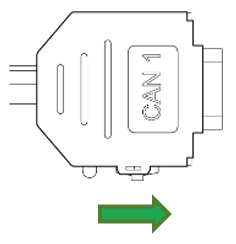 ✅ The LED on the D-Sub connector (CAN1) lights up red.
 -
Wait until both LEDs on the device light up orange.
✅ The device is now in the "Repair mode ready" status.
Note
To abort the device reset , disconnect the power supply while the LEDs are still orange and Slide the switch on the D-Sub connector (CAN1) toward the LED while the device is powered off.
-
Slide the switch on the D-Sub connector (CAN1) toward the LED.
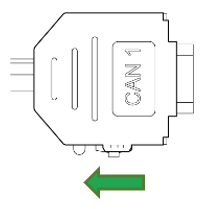
Figure 1: Switch to exit Reset Mode ✅ Both LEDs light up green for a second and change to LED ON = steady green and STATUS = green blinking.
Note
✅ After the reset to factory settings, all wireless interfaces are disabled.
✅ The CAN bit rate is 250 kbit/s.
Note
For further information on the LED status signals, see chapter Indicator Element (LED).
Factory Reset Device via Object Dictionary
Another method of performing a factory reset is by using the Object Dictionary.
If the value 0x64616F6C is written to object 0x1011:0x01 [Restore all default parameters], the device immediately performs a factory reset.
While the factory reset functionality is available to customers, it should be used cautiously and preferably by trained personnel who understand the implications.
As noted, any configurations will be lost unless previously saved with the Proemion Configurator.
It's advisable for customers to consult with Proemion support or refer to device-specific documentation before performing a factory reset.
Factory Reset Device via Proemion Configurator
The device can be simply reset to the Factory default settings using the Proemion Configurator.
- Connect to the device
- Select Tools > Reset device to factory settings...
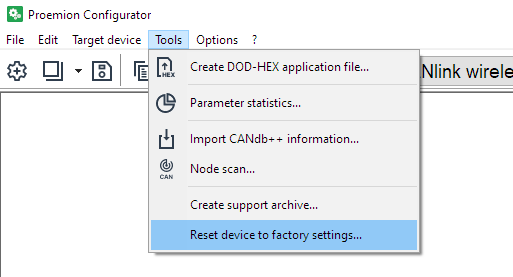
There is no feedback.
The device will simply be initialized to how it was delivered from the factory.