BLE Interface
Some devices are equipped with a Bluetooth Low Energy (BLE) interface.
Such devices support two modes of operation:
-
Gateway mode: The device operates as a BLE peripheral and provides access to CAN data to any connecting BLE central device such as a PC, smartphone, or tablet.
-
CAN‑CAN‑BLE bridge mode: Two Proemion devices connect via BLE to wirelessly forward CAN traffic between their CAN networks. One device operates as BLE peripheral, the other as BLE central.
While both modes are supported, BLE’s limited bandwidth makes the gateway mode ideal for diagnostic or monitoring use cases, whereas BLE bridges are recommended only for low‑traffic scenarios. For higher CAN loads, Wi‑Fi or Bluetooth Classic bridges provide better performance.
Note
BLE prioritizes low power consumption over data throughput and does not guarantee data delivery. BLE is not suitable for high-bandwidth CAN traffic. For high CAN bus loads, use a Wi-Fi-based or Bluetooth Classic–based CAN bridge.
The following table lists device families and the minimum firmware version required for BLE support.
| Device family | Minimum firmware version with BLE support |
|---|---|
| CANlink® wireless 4000 | v2.0 |
| CANlink® mobile 3600 | v4.1.1 |
Terminology
This table defines terminology used in this documentation.
| Term | Description |
|---|---|
| BLE | Bluetooth Low Energy. A wireless technology optimized for short range and low power consumption. |
| central | A BLE role that initiates connections (for example, a smartphone or PC). Also referred to as client in configuration objects. |
| peripheral | A BLE role that advertises services and accepts connections (for example, a Proemion device). Also referred to as server in configuration objects. |
| service | A collection of BLE characteristics exposed by a peripheral. |
| characteristic | A data endpoint within a BLE service used to read, write, or notify data. |
| PHY mode | BLE physical layer configuration that affects speed, range and transmission reliability. |
| CAN-CAN-BLE bridge mode | Operating mode in which two Proemion devices connect via BLE to wirelessly forward CAN traffic between their CAN networks. |
| Gateway mode | Operating mode in which the device acts as a BLE peripheral and provides CAN data to any connecting BLE central device such as a PC, smartphone, or tablet. |
BLE PHY Configuration
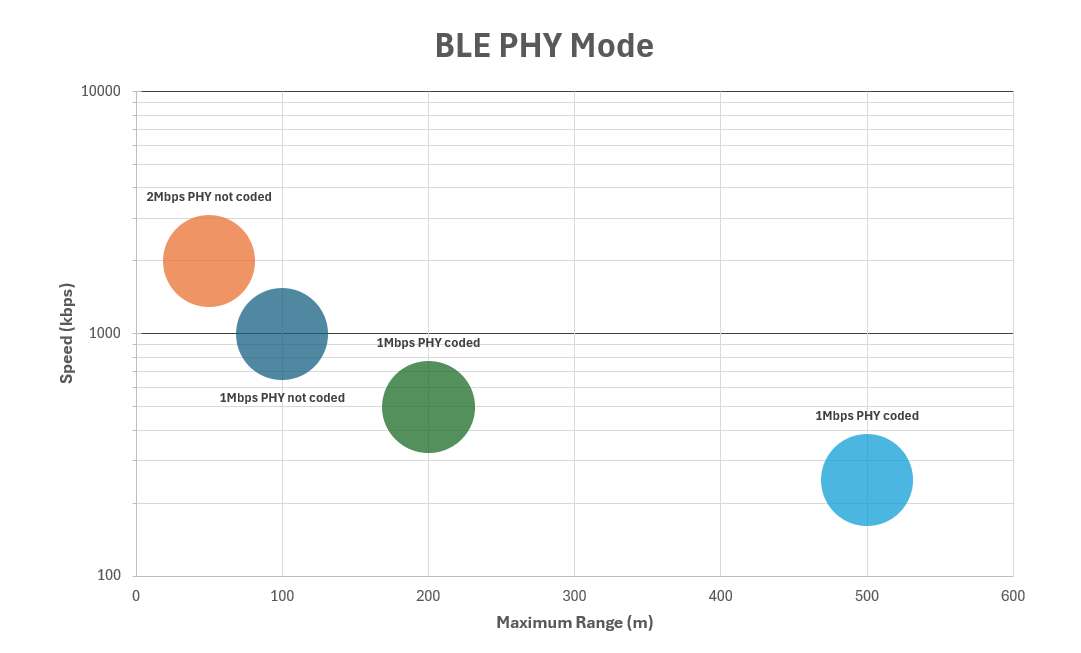
This section covers the Physical Layer (PHY) mode, which defines the BLE radio’s physical transmission characteristics and has a major impact on speed and range.
The PHY mode can be configured using the 0x3009:0x0A [BLE PHY Mode] object.
The default setting is 0 ( 1 Mbps, not coded).
Note
The PHY mode is configured by the BLE central device.
For Proemion devices, this setting must be applied on the client.
0x3009:0x0A setting |
PHY mode | Speed | Range (approx.) | Typical use |
|---|---|---|---|---|
0 default |
1 Mbps, not coded | 1 Mbps | ~100m | Balanced default |
1 |
2 Mbps, not coded | 2 Mbps | ~50m | High data throughput |
2 |
1 Mbps, coded | 500 kbps | ~200m | Long range, robust connection |
3 |
1 Mbps, coded | 125 kbps | ~500m | Long Range, low bandwidth |
The coded PHY modes trade data throughput for increased range and robustness. They provide longer range and improved reliability in noisy environments compared to the non-coded PHY modes. The coded PHY modes significantly limit available throughput but at the same time it increases transmission reliability.
A PHY mode change is initiated by the BLE central device and must be supported by both the central and the peripheral.
BLE buffer size
The 0x3333:0x2D [BLE maximum buffer age ms] object defines the maximum time, in milliseconds, that the CANlink® wireless 4000 buffers CAN data before transmitting it over BLE.
This setting balances transmission latency and data throughput. Lower values result in lower latency but higher transmission frequency. Higher values increase latency but allow more data to be sent per transmission.
The effective behavior also depends on the amount of CAN traffic generated on the bus.
In typical configurations with a CAN baud rate of 500 kbit/s and a bus load of approximately 50%, a buffer age of 5 ms provides a balanced compromise.
BLE whitelist
The BLE whitelist restricts incoming BLE connections to devices explicitly listed in a predefined allow list. It provides a simple access control mechanism for BLE connections.
The whitelist is evaluated only when BLE is enabled (0x3008:0x09 [BLE Enable]).
Enable the whitelist
The whitelist is enabled by default.
By default, 0x3009:0x0B [BLE Whitelist - Enable] is set to 1, which enables whitelist enforcement.
When enabled, the device accepts BLE connection requests only from devices listed in the whitelist.
Up to eight whitelist entries are available.
Each whitelist entry defines a DeviceName for which incoming connection requests are accepted.
The DeviceName must be between 4 and 25 bytes long.
On CANlink® wireless 4000 and CANlink® mobile 3600 devices, the DeviceName corresponds to the value of 0x3009:0x05 [BLE Devicename] on the connecting device.
DeviceName for whitelist comparison are limited to 15 characters and must match exactly, or use the device's MAC address.
Info
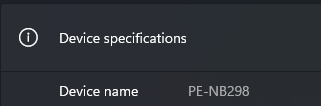
For non-Proemion devices, the DeviceName typically corresponds to the device name reported by the operating system.
On Windows systems, the DeviceName typically matches the computer name.
You can find this value under Settings > System > About.
Important
When the whitelist is enabled, only devices listed in the whitelist can establish a BLE connection.
DeviceName for whitelist comparison are limited to 15 characters and must match exactly, or use the device's MAC address.
The following objects define the available whitelist entries:
| Object Index | Object Name |
|---|---|
0x3009:0x0C |
BLE Whitelist - Entry 1 |
0x3009:0x0D |
BLE Whitelist - Entry 2 |
0x3009:0x0E |
BLE Whitelist - Entry 3 |
0x3009:0x0F |
BLE Whitelist - Entry 4 |
0x3009:0x10 |
BLE Whitelist - Entry 5 |
0x3009:0x11 |
BLE Whitelist - Entry 6 |
0x3009:0x12 |
BLE Whitelist - Entry 7 |
0x3009:0x13 |
BLE Whitelist - Entry 8 |
Warning
All whitelist entries are empty by default. Because the whitelist is enabled by default, this configuration rejects all incoming BLE connection requests. This behavior is intentional and provides a secure default configuration.
Since the whitelist has 8 entries, up to 8 distinct devices can be authorized. By default, no BLE connection requests are accepted because the whitelist is enabled and contains no entries.
Tip
Remember that only Wi-Fi supports more than one simultaneous connection- so only one of the items on this list will be connected at one time.
Disable the whitelist
With 0x3009:0x0B [BLE Whitelist - Enable] set to 0, whitelist enforcement is disabled.
In this state, any BLE device requesting a connection is accepted.
Warning
Disabling the BLE whitelist removes access control for incoming BLE connections.
When the whitelist is disabled using 0x3009:0x0B [BLE Whitelist - Enable], any BLE central device can establish a connection.
Disable the whitelist only if other measures ensure that unauthorized devices cannot reach the BLE connection range.
This may be acceptable in environments with physical access restrictions, such as controlled or enclosed areas.
BLE peripheral
When operating as a BLE peripheral, the device advertises services that expose data endpoints, referred to as characteristics. A BLE central device scans and connects to the peripheral to exchange the data.
Proemion bridge service
The Proemion bridge service is the BLE service used to exchange CAN data. A BLE central device scans for this service, connects to it, and uses it for data transfer.
The service UUID is:
CAEC2DB0-0000-426D-B4FB-61B67CE2054C
The service exposes two characteristics.
| Characteristic UUID | Name | BLE properties | Description |
|---|---|---|---|
CAEC2DB0-0001-426D-B4FB-61B67CE2054C |
ReceiveData | WriteWithoutResponse | Receives data sent from the central device to the peripheral. |
CAEC2DB0-0002-426D-B4FB-61B67CE2054C |
TransmitData | Notify | Sends data from the peripheral to the central device using notifications. |
After connecting to the service, the central device can:
- Subscribe to notifications on the
TransmitDatacharacteristic. - Write data to the
ReceiveDatacharacteristic.
Data sent by the device is delivered to the central as BLE notifications.
Data sent by the central device is written to the ReceiveData characteristic.
Note
All data is transferred using the Proemion Byte Command Protocol.
For more information, see Byte Command Manual.
Configure device as a BLE peripheral
To operate the device as a BLE peripheral, configure the CANopen objects listed below. This configuration enables gateway operation between the CAN network and a BLE central device.
After applying the configuration, restart the device to activate BLE advertising.
| Object | Name | Value | Notes |
|---|---|---|---|
0x3008:0x02 |
WiFi Enable | 0 |
Disabled |
0x3008:0x03 |
Bluetooth Enable | 0 |
Disabled |
0x3008:0x09 |
BLE Enable | 1 |
Enabled |
0x3011:0x15 |
Connection Direction Configuration/Server or Client 2 | 2 |
Server enabled |
0x3011:0x16 |
Connect Type 2 | 3 |
BLE |
0x3009:0x05 |
BLE Devicename | ProemionBLE |
Set to appropriate name |
Ensure that the device is configured with a valid and unique CANopen Node ID for the CAN network. After the next restart, the device advertises the Proemion bridge service and is ready to accept BLE connections.
CAN-CAN-BLE bridge
A CAN-CAN-BLE bridge provides a wireless connection between two CAN networks using BLE. This configuration can be used as a substitute for CAN cabling in low-traffic scenarios, such as drag chains or remote control units.
Due to limited bandwidth, a BLE-based CAN-to-CAN bridge is not suitable for high CAN bus loads.
Configure a CAN-CAN-BLE bridge
To configure a CAN-CAN-BLE bridge, one device operates as a BLE central and the other as a BLE peripheral. Configure the CANopen objects as shown below.
| Object | Name | BLE central | BLE peripheral | Notes |
|---|---|---|---|---|
0x3008:0x02 |
WiFi Enable | 0 Disabled |
0 Disabled |
|
0x3008:0x03 |
Bluetooth Enable | 0 Disabled |
0 Disabled |
|
0x3008:0x09 |
BLE Enable | 1 Enabled |
1 Enabled |
|
0x3011:0x16 |
Connect Type 2 | 3 BLE |
3 BLE |
|
0x3011:0x15 |
Connection Direction Configuration/Server or Client | 3 Client Enabled |
2 Server Enabled |
|
0x3009:0x0B |
BLE Whitelist - Enable | - | 0 Disabled |
Allow connection from the central device |
0x3009:0x05 |
BLE Devicename | - | ProemionBLE |
Set as required |
0x3011:0x1A |
BLE MAC Address or device name | ProemionBLE |
- | Must match the peripheral device name |
The above configuration is already sufficient for a connectivity test. Optionally, you can apply a whitelist entry using the following example configuration:
| Object | Name | BLE central | BLE peripheral | Notes |
|---|---|---|---|---|
0x3009:0x0B |
BLE Whitelist - Enable | - | 1 Enabled |
Enable whitelist enforcement |
0x3009:0x05 |
BLE Devicename | ProemionCentral |
(as above) | Set a unique name for the central device |
0x3009:0x0C |
BLE Whitelist - Entry 1 | - | ProemionCentral |
Allow the central device to connect |
After configuration and reboot, the BLE central device scans for and connects to the BLE peripheral specified in 0x3011:0x1A.