Bluetooth groupname
GroupName and Roaming
GroupName is what Proemion calls the ability to name more than one Bluetooth Server in such a way that a Client device can automatically connect to one of the group with the strongest RSSI (the closest).
Roaming maintains a list of nearby Bluetooth Servers so that if the connected signal strength drops below a certain threshold, another connection can automatically be made to the Server with highest signal strength.
These two features are typically used together.
In fact, Roaming is only useful when the GroupName feature is enabled, because without GroupName enabled, there is only one target to connect to (MAC Address or DeviceName), so there is no other device to roam to.
Objects for Configuration
| Object | Device | Details |
|---|---|---|
0x3002:0x05 [BT Classic Devicename] |
Server | This is where the Devicename (and therefore GroupName) is set in the Server. The GroupName is the portion of the DeviceName before the underscore. For example: GroupName_IndividualName. In the example below with a DeviceName of TRAILER_TR06 — the GroupName is TRAILER. |
0x3010:0x1B [Bluetooth GroupName Enable] |
Client | Enables the GroupName functionality. Set to 1 to enable.Requires setting 0x3010:0x1C [Bluetooth Remote Server GroupName]. |
0x3010:0x1C [Bluetooth Remote Server GroupName] |
Client | This is the part of the Server object 0x3002:0x05 [BT Classic Devicename] before the underscore.For example, if 0x3002:0x05 [BT Classic Devicename] is set to TRAILER_TR06 in the Server, the GroupName to be written here should be TRAILER. |
0x3010:0x1D [Bluetooth GroupName Roaming] |
Client | Set to 1 to enable. |
0x3010:0x1E [Bluetooth Roaming Low Threshold] |
Client | The Client device scans for valid alternative Servers while the current connection RSSI is below this level. Refer to Roaming Thresholds |
0x3010:0x1F [Bluetooth Roaming High Threshold] |
Client | During scanning, the Client will attempt a connection to a Server with an RSSI level above this value Refer to Roaming Thresholds |
0x3010:0x20 [Bluetooth Roaming Scan Interval] |
Client | While the current connection has an RSSI below 0x3010:0x1E [Bluetooth Roaming Low Threshold], background scans to maintain a list of nearby Bluetooth Servers are done with this period (in seconds). |
A simple example will clarify these features.
Example
We demonstrate configuring the Bluetooth GroupName in the BT Client, and in several BT Servers.
Roaming is enabled.
In this example, a weighbridge encapsulates a CANlink® wireless 4000 Bluetooth Client, and must automatically connect to vehicles in close proximity in order to share CAN data with that vehicle.
No manual effort is required to dynamically connect to the closest vehicle when using the GroupName and Roaming functionality.
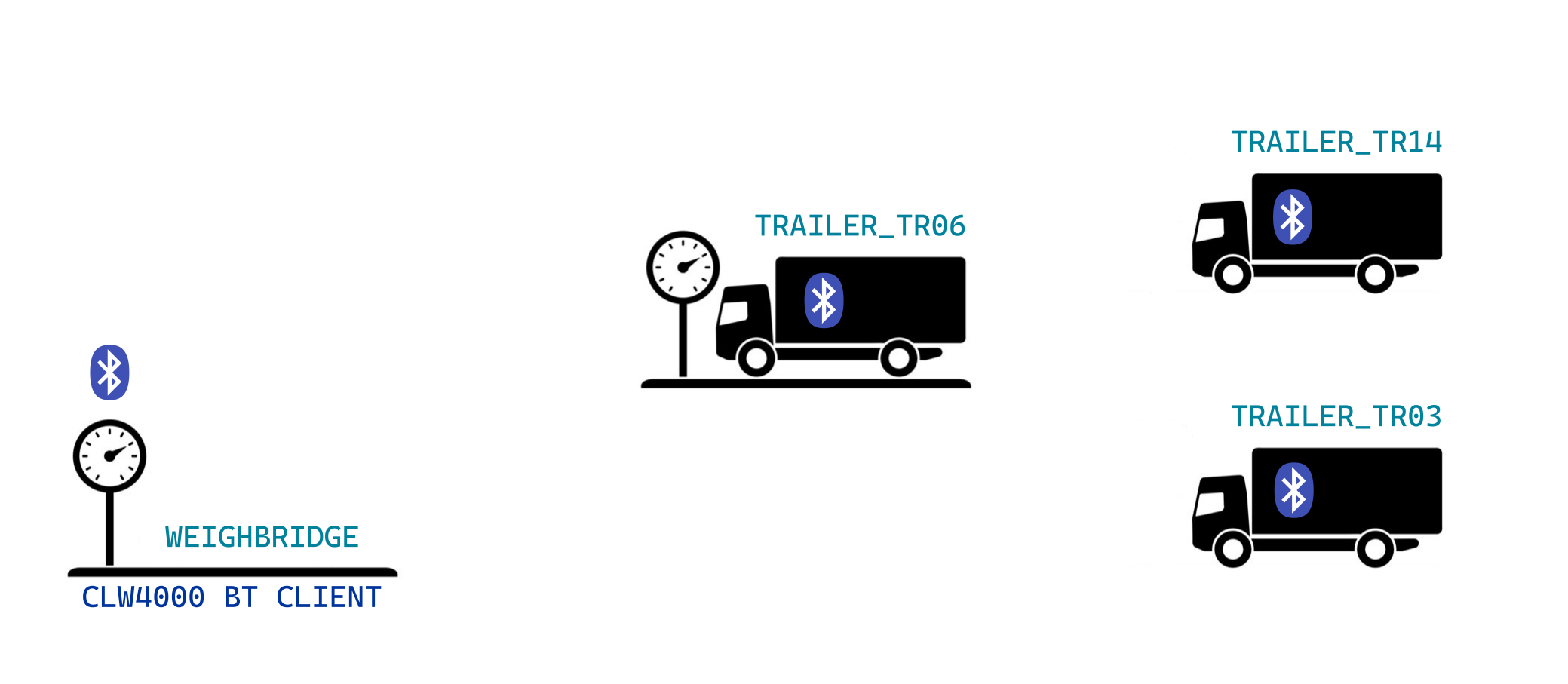
TRAILER_TR06 is currently connected, because it is closest and has the strongest signal strength.
When that vehicle moves away and another vehicle approaches, the Weighbridge (Client) will request connection to that new vehicle.
In this way, the connection is always maintained to the vehicle that is closest (has the strongest highest signal).
In this scenario:
- the WEIGHBRIDGE is the Bluetooth Client device:
0x3010:0x1B [Bluetooth GroupName Enable]is set to1(Enable).0x3010:0x1C Bluetooth Remote Server GroupName]is set toTRAILER.0x3010:0x1D [Bluetooth GroupName Roaming]is set to1(Enable).- the other objects are left with their default settings.
- the vehicles each have an on-board Bluetooth Server device.
Their0x3002:0x05 [BT Classic Devicename]is set toTRAILER_(with a unique suffix per trailer).
(In this example,TRAILER_TR06is currently on the weighbridge).
Configuration
The setup of the Client and Server devices in the visual example are explored in this section.
Firstly, decide on a GroupName.
In this example: TRAILER (case-sensitive).
Client
To configure Bluetooth GroupName and Roaming together (with reference to the visual example):
-
Configure as a conventional Bluetooth Client.
The steps are detailed in the Bluetooth Bridge section. -
Enable the GroupName feature.
Set0x3010:0x1B [Bluetooth GroupName Enable]to1(Enable). -
Set the GroupName that should be searched for and connected to.
Set0x3010:0x1C Bluetooth Remote Server GroupName]toTRAILER. -
Enable Bluetooth Roaming.
Set0x3010:0x1D [Bluetooth GroupName Roaming]to1(Enable).
Server
No special configuration is required for the Server to participate in GroupName or Roaming network.
The standard configuration explored in the Bluetooth Bridge section will suffice.
-
Configure as a conventional Bluetooth Server.
The steps are detailed in the Bluetooth Bridge section. -
Set the DeviceName according to the GroupName chosen.
Set0x3002:0x05 [BT Classic Devicename]to:TRAILER_03TRAILER_14- etc...
Note
The GroupName is defined as the part of the 0x3002:0x05 [BT Classic Devicename] before the underscore character.
-
With
0x3010:0x1C [Bluetooth Remote Server GroupName]in the Client set toTrailer, the Bluetooth Client will connect to the strongest signal of Bluetooth Server devices that have a0x3002:0x05 [BT Classic Devicename]beginning with "Trailer_". -
The GroupName is case-sensitive.
The prefix in the Client must match the case of the value set in the Server.
Roaming Thresholds
There are two objects that may be configured to tune the reconnection behaviour:
0x3010:0x1E [Bluetooth Roaming Low Threshold]0x3010:0x1F [Bluetooth Roaming High Threshold]
Both are used only when configuring the Client.
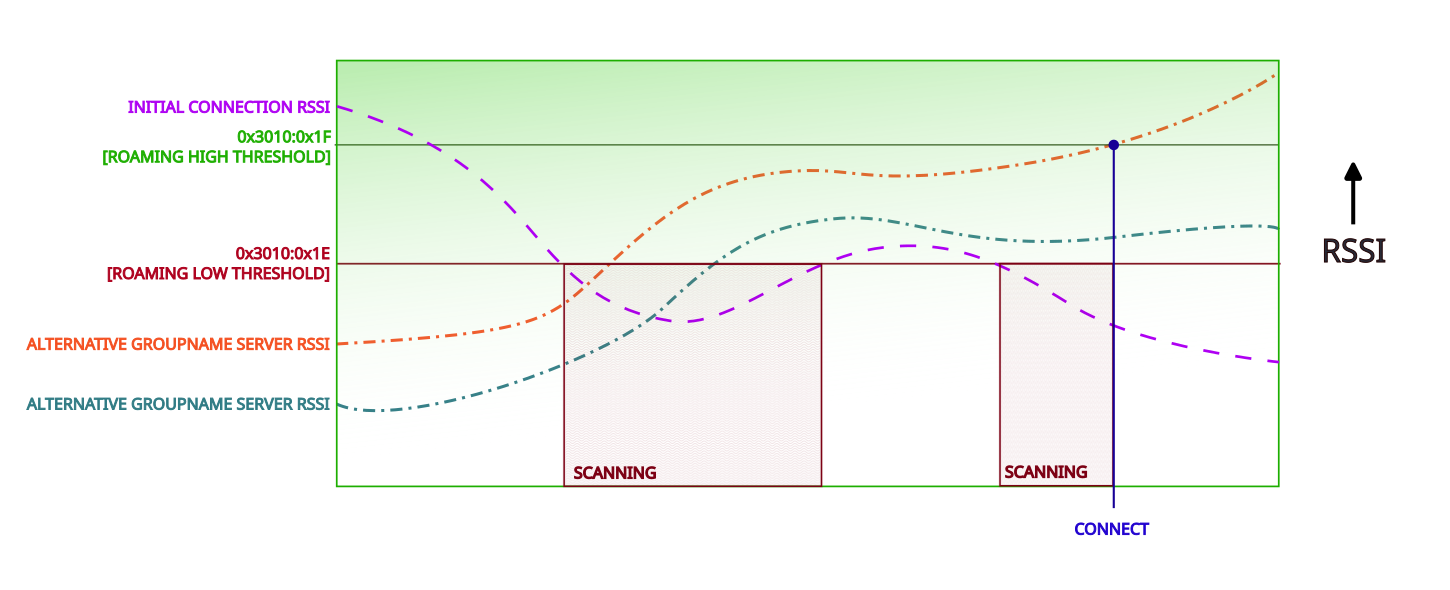
Points to note about Roaming:
- Scanning is maintained while the current connection signal strength is below the
0x3010:0x1E [Bluetooth Roaming Low Threshold] - Scanning is paused while the current connection signal strength is above
0x3010:0x1E [Bluetooth Roaming Low Threshold] - During the scanning phase, the Client will attempt connection to:
- the Server with the highest signal strength, and
- with a signal strength above
0x3010:0x1F [Bluetooth Roaming High Threshold], and - with the appropriate GroupName
The connection persists until the current connection signal strength drops below the 0x3010:0x1E [Bluetooth Roaming Low Threshold], at which point scanning is resumed.