Send CAN Message
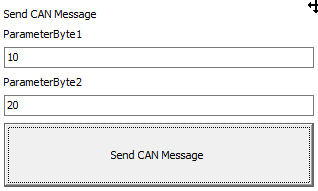
The Send CAN message Dashboard element creates and configures a button that transmits a configurable CAN message to the remote CAN network.
General Tab
The General tab is the same for every Dashboard element, see General Tab.
Message Tab
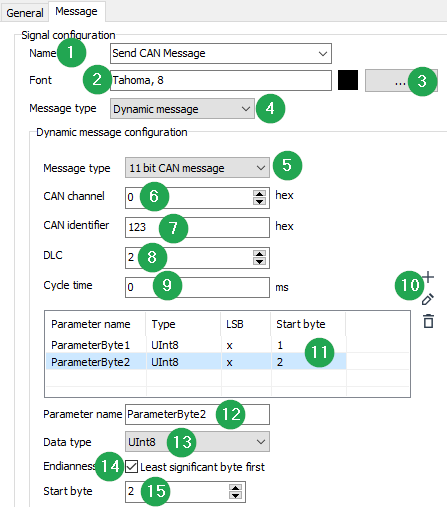
In the Message tab, configure the CAN message to send.
Warning
Transmitting defective CAN messages can cause unwanted system reactions on the target device, and can lead to malfunctions or damage. Make sure the CAN messages to be transmitted contain correct commands.
Note
In the example shown, a dynamic message is configured that sends when you press a button. Optionally, define a fixed and/or cyclical send message.
| # | Item | Description |
|---|---|---|
| 1 | Name | Define the button text by entering it or selecting it from a list of already available texts. |
| 2 | Font | Shows the current font and font size for the Name button text. |
| 3 | […] | Opens the Font dialog. |
| 4 | Message type | Select Dynamic or Fixed message. Selecting Dynamic message automatically enables a value check. |
| 5 | Message type | Select an 11-bit CAN message or a 29-bit CAN message. |
| 6 | CAN channel | Select the CAN interface of the gateway device (Ch0=CAN1, Ch1=CAN2, Ch2=CAN3). |
| 7 | CAN identifier | Enter the hexadecimal value of the CAN identifier of the CAN message to send. |
| 8 | DLC | Select the number of data bytes (0-8) in the data field of the CAN message to send. |
| 9 | Cycle time | Enter the cycle time for transmission of the CAN message. Clicking the configured button transmits the message cyclically when the cycle time is greater than zero; if the cycle time is zero, Remote Service Tool transmits the message exactly once. |
| 10 | Add, edit & delete icon | Use these buttons to add, edit, or remove a dynamic message. |
| 11 | Dynamic message overview | List of defined messages. |
| 12 | Parameter name | Defined name for the message. |
| 13 | Data type | Selected data type. |
| 14 | Endianness | Enable this checkbox for LSB first. Leave the checkbox disabled for MSB. |
| 15 | Start byte | Define the start byte for the data. |