Filter Data in the Communication Gateway
Remote Service Tool supports various communication gateways for reading CAN bus information from the target device. Not every communication gateway has a transmission bandwidth that lets it transmit 100% of the CAN bus information to the software. Remote Service Tool writes the CAN filters of the application to the volatile memory (RAM) when it establishes the connection to the gateway device. These settings stay active until new filters overwrite them, or the device reboots.
Note
Not every CAN bus information affects the diagnosis application. You can create and save a DBS file with filter settings appropriate for the diagnosis application to the communication gateway used. Alternatively, you can manually configure the filter settings, for example if you use a different communication gateway.
Tip
For normal operation, enable Auto filter (global) as the optimal setting for the CAN receive filters. In rare cases, it may be necessary to configure a manual CAN receive filter instead, see the table below.
- Click the filter settings icon
 .
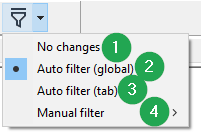
The filter settings have the following meanings:
| # | Option | Description |
|---|---|---|
| 1 | No changes | If you enable this filter setting, Remote Service Tool doesn't load any filter settings to the communication gateway at the start of a realtime data session. If available, Remote Service Tool uses the filter settings last used or configured in the communication gateway; if none are available, it reads off the data without filters. |
| 2 | Auto filter (global) | Enable this filter setting to optimize the filters for all tabs of the opened DBS file. The greater the number of tabs, the more CAN bus information Remote Service Tool reads in. If too much CAN bus information is transmitted, the bandwidth on the selected communication path may be exceeded. |
| 3 | Auto filter (per tab) | Enable this filter setting to optimize the filters for the currently selected tab of the open DBS file. If you switch to another tab, Remote Service Tool again optimizes the filters and transmits them to the communication gateway. The more elements under the active tab, the longer switching between tab elements takes. |
| 4 | Manual filter | Enable this filter setting to configure the filter manually using Options > Settings > Filter settings, see Configure a Manual CAN Receive Filter. |