Digital Value
The Digital value Dashboard element shows a digital value received through a CAN message.
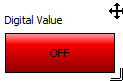
General Tab
The General tab is the same for every Dashboard element, see General Tab.
Source Tab
The Source tab configuration is the same as for other Dashboard elements, see Source Tab.
Note
Not all parameters are available; some are disabled because this is bit information. The settings for Multiplier, Offset, and Decimals aren't available.
| Parameter | Value | Description |
|---|---|---|
| Data type | Bit | The data type of the value to display within the CAN data is fixed. |
| Byte order | MSB first, LSB first | This selection is disabled because this is bit information. |
| Bit | 0 to 7 | Position of the binary value to evaluate within the byte specified in First byte. |
LED Tab
In the LED tab, configure the LED depiction of the digital value to display.
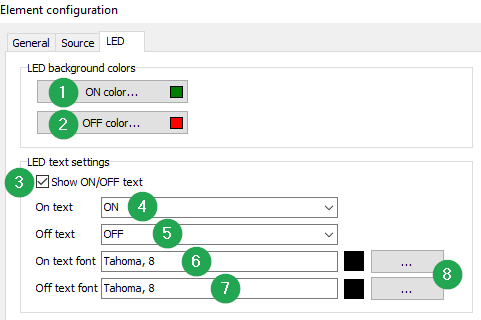
| # | Item | Description |
|---|---|---|
| 1 | On color… | Determine the color the digital LED shows when it receives bit value 1. |
| 2 | Off color… | Determine the color the digital LED shows when it receives bit value 0. |
| 3 | Show on/off text | Tick the box to show an additional text on the LED. |
| 4 | On text | Define the text to display when Remote Service Tool receives bit value 1, by entering the text or selecting it from a list of already available texts. |
| 5 | Off text | Define the text to display when Remote Service Tool receives bit value 0, by entering the text or selecting it from a list of already available texts. |
| 6 | On text font | Shows the current font and font size for the On text. |
| 7 | Off text font | Shows the current font and font size for the Off text. |
| 8 | […] | Opens the Font dialog. |