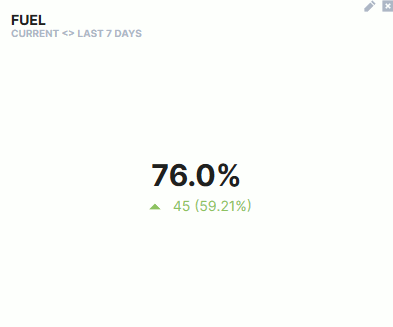
Comparison
The Comparison widget allows you to compare values within a time period and display the increase or decrease (value and percentage) in comparison to the actual value.
Configuration
Configure the widget and put it on the Organization Dashboard and/or the Model Dashboard by following the steps below:
It is highly recommended to adapt a Machine Page (Model Dashboard) centrally via the Machine Page Layout. If you need to configure the Machine Page for the selected machine only, proceed as follows:
-
In the selected Machine Page, select Manage Layout > Add widgets.
-
Select the desired widget. A preview will be shown.
-
Click Apply. This forwards you to the widget configuration dialog with the options described below.
If you need to adapt the Organization Dashboard, select the desired dashboard configuration and click Edit > Add  to open the widgets catalog, see also Add Widgets to the Organization Dashboard.
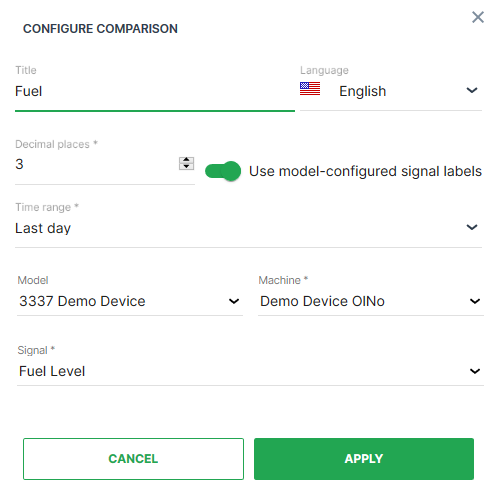
| Item | Description |
|---|---|
| Title | The label for the widget (English is the default, additional languages must be configured. See Language below). |
| Language | Select the language for the title of the widget. |
| Decimal Places | Select the number of decimal places for the value. |
| Use model-configured signal labels | Use signal labels in place of signal numeric values. |
| Time | Select a predefined, relative time range, e.g. Last 24 hours or select a custom one, e.g. This last 5 Days, see Time selection. Consider how the widget calculates the comparison[^1]. |
| Model | Select the model of the machine. |
| Machine | Select the machine for the comparison. |
| Signal | Select the signal to be compared. |
[^1] Calculation of the comparison
The Comparison widget checks if there was an increase or decrease using the "signal's latest datapoint within the selected time range" and subtracting the "latest datapoint before the time range" from it. Consider that the widget doesn't use aggregated values.
Machine-operating-hours example:
-
Selected time range: 15th of May until 31st of May.
-
Measured value on the 31st of May: 21.8 hours.
-
Measured value on the 14th of May: 10 hours.
-
Comparison widget calculates as follows:
21.8 - 10 = 10.8 hours
No-data example: When choosing "Last month", but the machine has sent data only for the past 3 weeks, the widget won't do a comparison.
Sample
Suggested Usage: Applicable to all signals.