Machine Actions
The Machine Actions functionality enables the user to transfer information entered into the DataPortal interface to the machine. Information can be sent to the machine as one of the following:
| Data Type | Description | Sample Use Case |
|---|---|---|
| Numeric Value | Data sent to the machine that acts as a trigger or target value. | Change a machine control parameter such as maximum engine speed (numeric increase/decrease). |
| Set State | Data sent to the machine that allows the setting of a discrete (or distinct) state. | Change the machine mode from Power to_Eco* mode. |
| String Value | Data sent to the machine so the communication unit can execute some action. | A string could be sent from the DataPortal to the machine display. |
Machine Actions functionality including user permission level and organizational unit access are configured in the PDC file.
Note
The transfer of data to the machine may be delayed depending on whether the communication unit is online or offline.
Numeric Value Example: Time Fence – Start Time
In the Manage Machine dialog, the user can select an action from the list, such as Time Fence: Start time.
This action allows setting the time from which the machine is permitted to operate – a typical example of a numeric value sent to the machine.
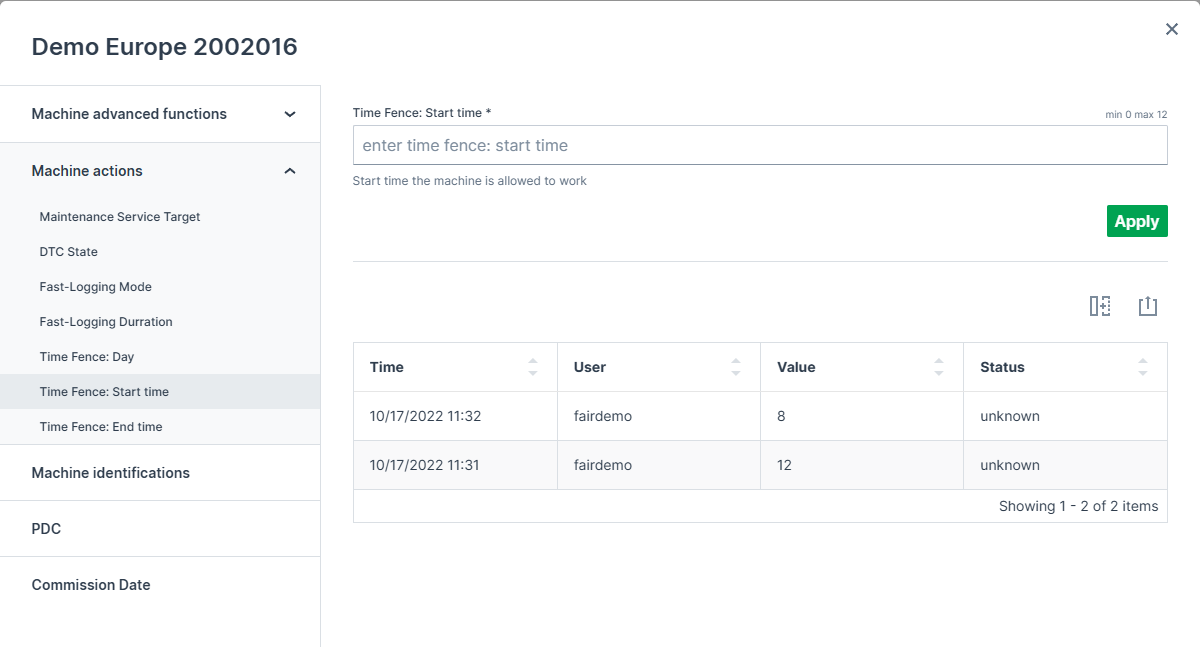
| # | Item | Sample | Description | PDC Item |
|---|---|---|---|---|
| 1 | Action Title | Time Fence: Start time | Label for the action | Action title |
| 2 | Action Input | Enter time value | Numeric value used as a trigger or target time | Action valueLabel |
| 3 | Defined Signal Value | Control Value | Time from which the machine is allowed to work | valueDefinition |
After entering the new value and clicking Apply, the value is sent to the machine and taken into account accordingly.
Set State Example: DTC State
In the Manage Machine dialog, the user can select an action such as DTC State.
This action allows selecting one discrete state from multiple options via a dropdown menu, for example choosing between No Active Errors, Active Error, or Multiple Active Errors.
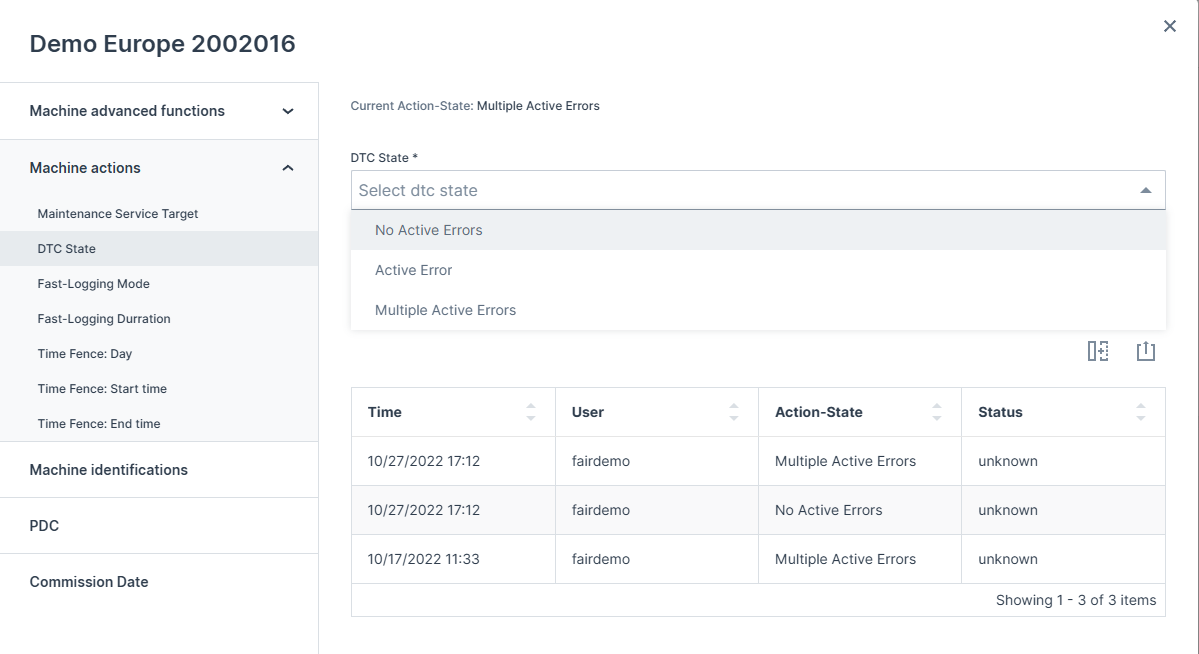
| # | Item | Sample | Description | PDC Item |
|---|---|---|---|---|
| 1 | Action Title | DTC State | Label for the action | Action title |
| 2 | State Selector | Dropdown with multiple states | Select one state from options | Discrete Value valueLabel |
| 3 | Current State | No Active Errors / Active Error / Multiple Active Errors | Current trigger state | valueDefinition |
After selecting the desired state from the dropdown and clicking Apply, the new state is sent to the machine and applied accordingly.
Machine Actions Configuration
The Actions configuration (the labels for the DataPortal and the object descriptions on the communication unit) is described in the PDC Manual (PDC Manual). Contact your Proemion representative for further information.