Reset Device
The Reset Device feature is only available for CANlink® mobile devices.
To reset the device, the Machine:Admin Permission Set is required.
Proceed as follows:
On the Machine Page, select the machine you want to manage and click the Manage Machine vehicle button in the top-right corner.
This opens the Manage Machine window.
-
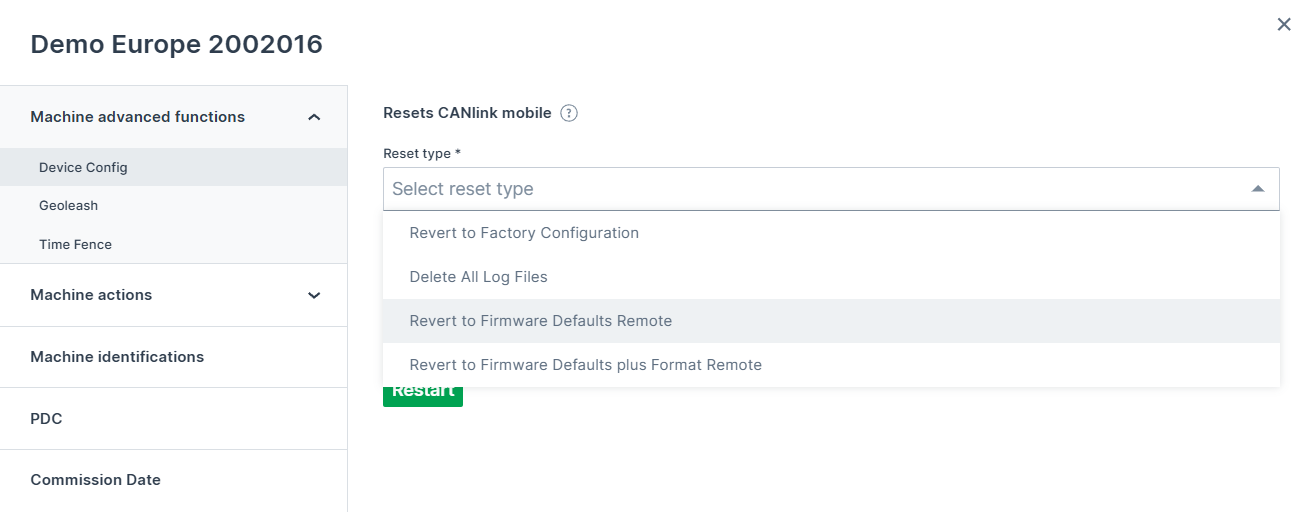
In the Manage Machine window, open the Machine advanced functions and select Device Config.
-
Select a Reset type from the drop-down menu and click Apply. The device will be restarted.
The following reset options are available:
-
Revert to Factory Configuration
-
Delete All Log Files
-
Revert to Firmware Defaults Remote
-
Revert to Firmware Defaults plus Format Remote
-
For more details about the different type of resets, refer to following information from the chapter Device Reset CANlink mobile 3600 of the CANlink mobile Device Manual showing the according objects and their sub-indexes for triggering the various reset options available via the CAN interface:
| Function | Index | Subindex | Description |
|---|---|---|---|
| Revert to Factory Configuration1 | 0x1011 |
0x01 |
The factory configuration is restored. All logged data is deleted. |
| Delete All Log Files | 0x1011 |
0x62 |
All logged data stored on the device is deleted. |
| Revert to Firmware Defaults Remote | 0x1011 |
0x63 |
The standard configuration1 of the current firmware is restored. All logged data is deleted. CAN, Wi-Fi®, Bluetooth and mobile radio parameters as well as the factory configuration are retained. |
| Revert to Firmware Defaults plus Format Remote | 0x1011 |
0x64 |
The standard configuration of the current firmware is restored. All logged data and the factory configuration are deleted. CAN, Wi-Fi®, Bluetooth and mobile radio parameters are retained. |
| Revert to Firmware Defaults Local | 0x1011 |
0x65 |
The standard configuration of the current firmware is restored. All logged data and parameters are deleted. The factory configuration is retained. |
Consider that when a Device Reset is being performed, the ON LED flashes in a magenta color and the Status LED orange, see Device Reset CANlink mobile 3600.
-
Difference between Factory configuration and Standard configuration:
Factory configuration
With the end-of-line tests (EOL test), Proemion loads a standard configuration (
DOD.binfile) into the file system of the device.
This configuration is called Factory configuration.
The content of this file is activated in the device by using the object0x1011, subindex0x01. The factory configuration can be easily overwritten by the customer via the object0x3333, subindex0xF0.
This makes it easy for customers to define and install their own configuration as the "factory configuration".
If there is no file in the file system, the device configuration will not be changed, but the logged data will always be deleted.Standard configuration
Each firmware version has its own default values in the code for non-volatile configuration parameters. These default values are loaded automatically for fresh devices, for example.
The default values of the firmware are loaded via the object0x1011, subindex0x63.
In contrast to the factory configuration, the standard values cannot be changed by customers.
These are fixed values in the code memory. ↩↩