API Client Management
API Clients can be used for connecting DataPlatform to other systems or 3rd parties via REST API and AEMP API.
Info
API Clients are intended for machine-to-machine integrations without an individual end user, such as scripts or ERP integrations. If you need to give your own application user-level access on behalf of a signed-in DataPortal user, read DataPlatform as Identity Provider instead.
Organization Admins with Organization:Admin Permission Set can create and delete clients while users with Organization:Maintain Permission Set can view client information (i.e. URL and available Permission Sets).
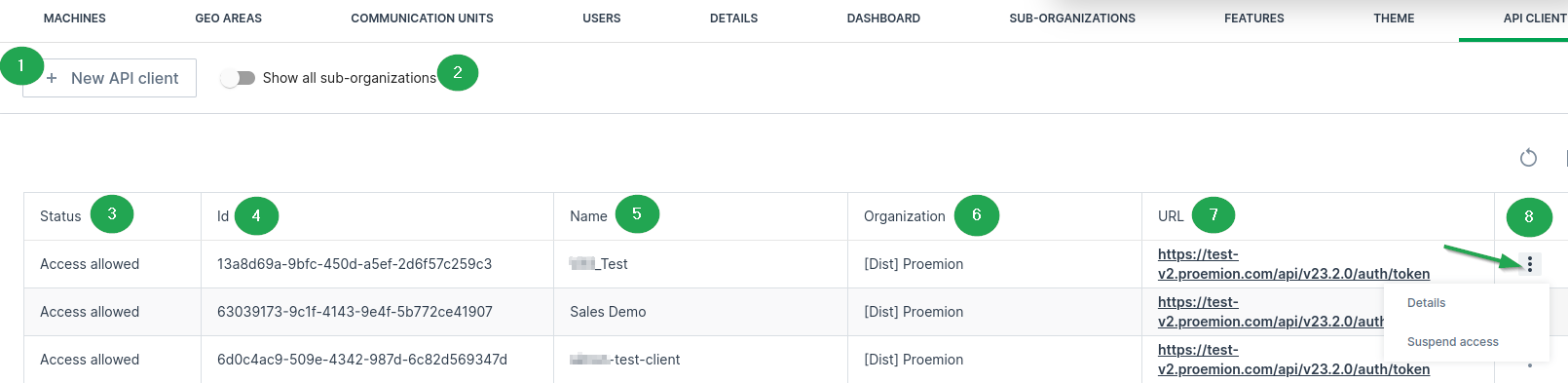
In the DataPortal navigate to Administration > Organization Structure and open the API Clients tab.
| # | Item | Description |
|---|---|---|
| 1 | New API Client | Open the create new client dialog. |
| 2 | Show All sub-organizations | Show or hide Clients for the sub-organizations. |
| 3 | Status | Shows the access status of the API Client. |
| 4 | ID | Automatically generated client ID. |
| 5 | Name | Name provided by the client admin. |
| 6 | Organization | The DataPortal organization the client can access. |
| 7 | URL | URL of the client. |
| 8 | Details | View or edit client details. Configure the access, see Ban API Clients. |
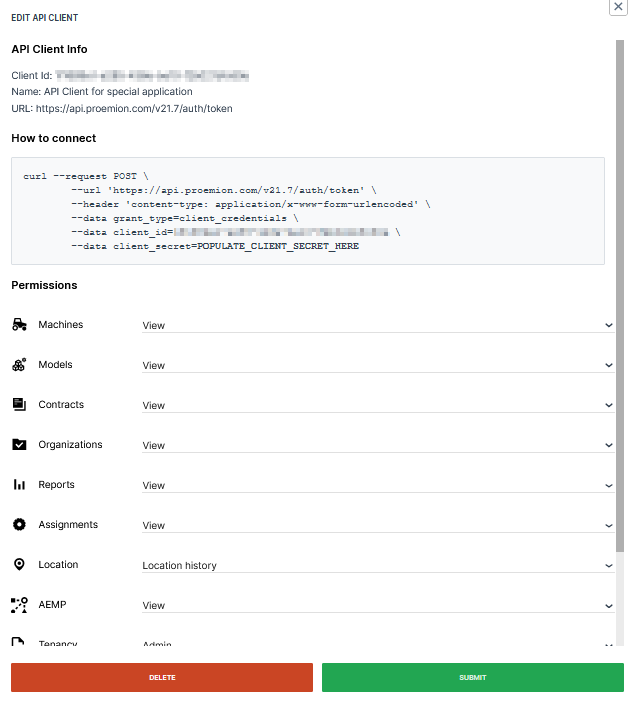
To view information about an existing client select Details to the right of an item in the list. Here you can also edit the permission set.
Note
Users with the Organization:Maintain Permission Set cannot edit clients.
Managing API Clients
This section covers how to create a new API Client and suspend or restore its access.
Create a New Client
To create a new API client:
-
Select Settings > Administration > Organization Structure from the left-hand menu to open the Administration Dashboard.
-
Select the organization unit from the org tree on the right side where you want to create a new API client.
-
Select the API Clients tab.
- Optionally toggle the Show all sub-organizations to display all API clients.
-
Select the New API Client button
 .
. -
In the panel that opens enter a name and select the permissions for the client.
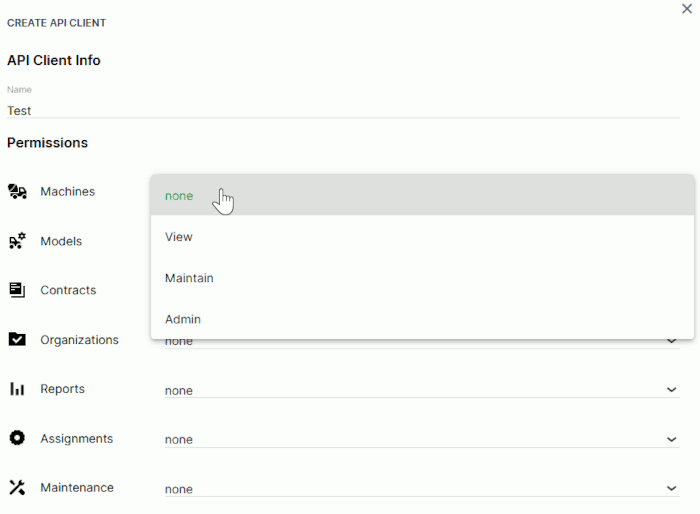
Figure 3: New Client Configuration -
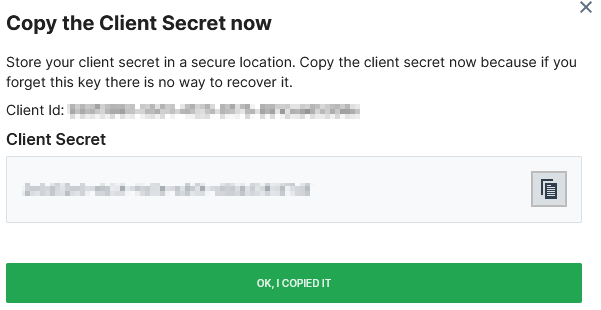
Select Submit to view and Copy the Client Secret Now.
Danger
Store your client secret in a safe location.
-
Confirm the creation of the new API Client.
The new API client is now visible in the list of clients for this organization.
Ban API Clients
You may ban API Clients in order to disable them to obtain an authentication token or request other endpoints with previously obtained (not yet expired) token.
To ban API Clients, i.e. suspend the access, the Organization:Admin Permission Set is required.
In the API Client Management administration table, the Status column shows the current access status of the client.
To change the status, at the end of the table row of each API Client, select the 3-dots icon  > Suspend access.
Select Allow access to revoke the ban.
EU Data Act
In order to share data with 3rd parties according to EU Data Act, use the Operational:View Permission Set which can only be assigned to REST API Clients. This Permission Set grants the necessary read-only access to Product Data and selected Related Service Data, without granting administrative or configuration privileges.
For further information on EU Data Act, please contact Service and Support or contact your Proemion representative.
Access AEMP Service
The following chapter targets OEMs and describes which requirements to fulfill in order for consumers, e.g. Machine Owners' third party fleet management systems, to retrieve data via the Proemion ISO 15143-3 (AEMP) API with their account and machines
For more information on the API, read AEMP API.
The machine data that should be retrieved via the ISO 15143-3 API are defined in the PDC using standard metric keys
Refer to AEMP API and Proemion Standard Metrics
Machine data include any history of a machine.
Make sure to meet the following criteria to make machine data accessible via the AEMP API:
-
The machines must be identifiable using the following identifiers (read also about the identifiers in the section General properties > Identifiers / Request parameters in the AEMP API):
-
VIN or PIN identifiers: recommended for consumers to use as the parameters for VIN or PIN are not likely to change over the machine's lifetime.
-
MakeModelSerial identifier (combination of the parameters for OEM name (Make), Model and Serial number): optional to use; both the OEM name and Model are more likely to change than PIN/VIN
In case of a change of a parameter, in the AEMP API the machine must be accessed by a new identifier
Moreover, the OEM name is to be set for each machine individually.
-
Note
Both identifiers are configured by the OEM. It is highly recommended for the OEM to maintain all the parameters for these identifiers to ensure compatibility with any request type a consumer may use.
-
In order to access the AEMP interface, the AEMP - View permission set must be assigned to the requesting Rest Client, see AEMP Subject.
-
The AEMP API should be accessed with a REST client only.