Reset Device
You may reset the device manually via the hardware button which is placed under the main plug connector, see Device Elements.
A manual reset of the device is used to disconnect it completely from any power supply, in order to reset to the standard configuration of the respective firmware variant. This might be useful, for example, when the access to the device got lost due to a misconfiguration of the Configuration Web User Interface during testing.
Note that remote resets or via the Configuration Web User Interface are not enabled.
Note
Make sure that the device was connected to a power supply for ~30 min before removing the main plug.
Note
Note that the device functions will be severely restricted due to device reset and, therefore, only trained personnel should carry out a device reset. Consider to back up your data before a device reset as all logged data is deleted from the device memory.
To reset the device, proceed as follows
Press the Reset button on the main plug connector, see following image, using a suitable tool (1 mm diameter) with the reset duration for the different modes described in the table below:
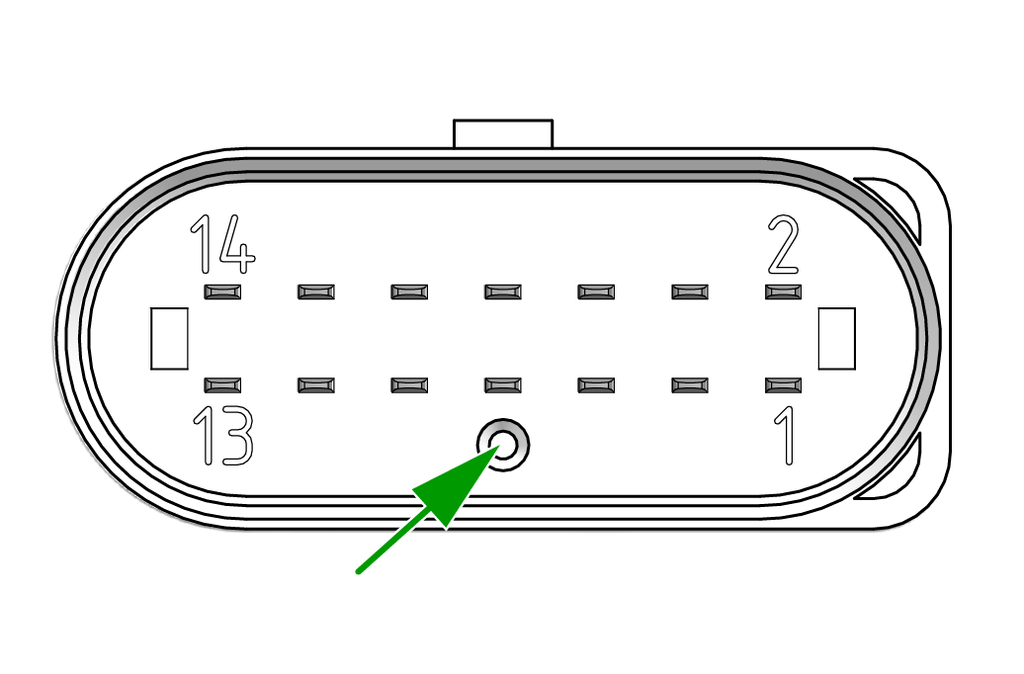
Switching to a new reset mode is indicated by the ON LED. The STATUS LED is partially illuminated and therefore imitates the ON LED in a slightly darker tone.
| Press Duration | Reset Mode | LED indicator |
|---|---|---|
| t < 5s | Power Reset (disconnect internal battery) | LEDs blink red in a 95/5 period. |
| 5s < t < 10s | Reset the Bridge (only for models with Wi-Fi module) or Ethernet network settings to factory configuration | LEDs start blinking in a 50/50 period. Once 10 seconds are reached the LEDs go off. |
| 30s < t < 40s | Reset to factory settings/configuration | LEDs start blinking in a 25/75 period. Once 40 seconds are reached the LEDs go off. |
| t > 45s | Start Recovery Mode Recovery mode is currently only relevant for Proemion. It allows the CANlink® mobile 10000 to receive a completely fresh firmware installation even if the device refuses to boot. A power reset (t < 5s) allows the CANlink® mobile 10000 to boot normally (and exit recovery mode). |
LEDs start blinking in a 5/95 period when holding the button for more than 45 seconds. Once 100 seconds are reached the LEDs go off. |
You can cancel the reset in the periods between resets. If the reset button is released during this time, the button press is ignored and the device remains in its starting state.