Standard Metrics Manual
Introduction
Metrics which show the same value for different machines and machine types should have the same signal key for the purpose of a unified data analysis. Especially the data transferring and analysis according to the AEMP and ISO 15143-3 standard need standardized metrics to work properly and without an unnecessary complexity. These metrics are required for an automatic transforming of the values according to the ISO 15143-3 standard so that third-party client software is able to operate with these data sets. Which AEMP signals are currently implemented is described in the AEMP API documentation.
Syntax definition
alphanumeric = "0" | "1" | ... | "9" | "a" | "b" | ... | "z" | "A" | "B" | ... | "Z" ;
dot = "." ;
string = alphanumeric { alphanumeric } ;
custom_string = string  { dot string } ;
network = custom_string ; (*Remark: "network" is optional, in our case only used by automatically generated signal keys for J1939 metrics in case of reception from two physical CAN interfaces*)

component_name = custom_string ;
signal_group = custom_string ;
signal_name = custom_string ;
unit_name = custom_string ;

oem_name = "common" | "custom" | custom_string; ("common" is reserved for Proemion predefined signals)

(*signal key syntax:*)
signal_key = "value" dot oem_name [ dot "network" ] dot component_name dot [ signal_group dot ] signal_name ;

(*signal name syntax:*)
signal_name =  /^value.custom\.[a-zA-Z0-9_-]+(\.[a-zA-Z0-9_-]+)*$/;

(*unit key syntax:*)
unit_key = "unit" dot oem_name dot unit_name ;

(*label key syntax:*)
label_key = "label" dot signal_key | "label" dot unit_key;
Standard Metrics
Standard Metrics
The subsequent subchapters provide lists of Proemion Standard Metrics.
The chapter Standard Metrics Explanation below describes the specific keys.
The standard metrics should be used dependent on the use cases.
Consider that there are more metrics dedicated to different components of the machine, see the following subchapters.
Note
If there are standard signals missing that might be useful for other customers, too, you may request them via the Service and Support to make them available.
-
Standard System Metrics are signals written by the system, but customers may declare those signals in the PDC within
<ValueDefinition>in order to read and display them. The Standard System Metrics are reserved for being updated by Proemion services and are not available for parsing machine data, i.e. writing new values to the signals. Therefore, you must not reference the signals within<ParsingDefinition>as the values would be wrongly updated twice - by the system and through the CLF → PDC. -
Use System-Used Signals, if you want to use additional features e.g. the DataScience feature Fuel Guard (DataScience). Here, you must both declare and parse the necessary metrics in the PDC in order for the machines to provide the signals.
-
For defining your own signal keys, adhere to Custom Metrics.
-
All the signal keys, whether they are standard or custom metrics, should use the predefined units, see Units.
Standard Metrics Explanation
ISO 15143-3 and AEMP Metrics
The following chapter describes the keys used for the ISO 15143-3 and AEMP Metrics. For more information, see REST API and AEMP API.
Header Information
Header Information can contain the following parts:
-
Installation date of the telematics unit
-
Name of the OEM
-
Name of the model
-
Equipment ID
-
Serial Number
-
PIN or VIN
Signal Keys are not necessary for this information. Use the Proemion DataPortal to maintain the machine data.
Last known Location
The information for the Last known Location is part of the GPS dataset. Therefore, latitude, longitude and altitude are received from the device per default configuration. To provide the standardized Unit for these values the received data is pre-processed if it is needed. Date and Time are delivered via a timestamp.
Operating Hours
To provide the operating hours of your vehicle use the following key:
value.common.machine.hours.operation.total
Date and time are delivered via a timestamp. Use the predefined unit (see the columns "Standard Unit" described for the Standard Metrics) for time duration for the value of operating hours.
Cumulative Fuel Used
To provide the cumulative used fuel of your vehicle use the following key:
value.common.engine.fuel.used.total
Date and time are delivered via a timestamp. Use the predefined unit (see the columns "Standard Unit" described for the Standard Metrics) for volume for the value of cumulative fuel used.
Fuel Used in the Preceding 24 Hours
To provide the fuel used in the preceding 24 hours of your vehicle use the following key:
value.common.engine.fuel.used.last.24hrs
Date and time are delivered via a timestamp. Use the predefined unit (see the columns "Standard Unit" described for the Standard Metrics) for volume for the value of fuel used in the preceding 24 hours.
Note
Our AEMP exporter currently does not support this metric. Contact Support in case your application needs it.
Cumulative Distance Travelled
To provide the cumulative travelled distance of your vehicle use the following key:
value.common.machine.distance.total
Date and time are delivered via a timestamp. Use the predefined unit (see the columns "Standard Unit" described for the Standard Metrics) for length for the value of cumulative distance travelled.
Caution Codes
CautionMessages contains a list of CautionDescription items, populated by signals with PDC valueDefinition category StateSignal and attribute machineError=true. Details see PDC Manual → ValueDefinition → StateSignal
Each CautionDescription represents the number of a code that occurred at a specific date and time. Identifier and Description are taken from the aempCautionCode section in the PDC. If <aempCautionCode> is absent, then the <state>.value and <state>.description are used.
Date and time are delivered via a timestamp.
Cumulative Idle Hours
To provide the cumulative idle hours of your vehicle use the following key:
value.common.machine.hours.oem.specific.total
Date and time are delivered via a timestamp. Use the predefined unit (see the columns "Standard Unit" described for the Standard Metrics) for time duration for the value of cumulative idle operating hours.
Fuel Remaining Ratio
To provide the fuel remaining ratio of your vehicle use the following key:
value.common.engine.fuel.level
Date and time are delivered via a timestamp. Use the predefined unit (see the columns "Standard Unit" described for the Standard Metrics) for percent for the value of fuel remaining ratio.
DEF Remaining Ratio
To provide the DEF remaining ratio of your vehicle use the following key:
value.common.engine.def.level
Date and time are delivered via a timestamp. Use the predefined unit (see the columns "Standard Unit" described for the Standard Metrics) for percent for the value of def remaining ratio.
Engine Condition
To provide the engine condition of a specific engine of your vehicle use the following keys:
-
value.common.engine.identification.serialnumber -
value.common.engine.state
Date and time are delivered via a timestamp.
Digital Input State
To provide the digital inputs state use the corresponding key:
value.common.machine.inputs.digital.[number]([number]has to be replaced by the input number (0 … 4294967295)
Date and time are delivered via a timestamp.
Cumulative Power Take Off Hours
To provide the cumulative power take off hours of your vehicle use the following key:
value.common.machine.hours.pto.total
Date and time are delivered via a timestamp. Use the predefined unit (see the columns "Standard Unit" described for the Standard Metrics) for time duration for the value of cumulative power take off hours.
Average Daily Engine Load Factor
To provide the average daily engine load factor of your vehicle use the following key:
value.common.engine.loadfactor.current
We can calculate the average daily engine load factor with the data provided by the current engine loadfactor. Date and time are delivered via a timestamp. Use the predefined unit (see the columns "Standard Unit" described for the Standard Metrics) for percent for the value of average daily engine load factor.
Note
Our AEMP exporter currently does not support this metric. Contact Support in case your application needs it.
Peak Daily Speed
To provide the peak daily speed of your vehicle use the following key:
value.common.machine.speed
We can filter for the maximum speed per day with the data provided by the machine speed. Date and time are delivered via a timestamp. Use the predefined unit (see the columns "Standard Unit" described for the Standard Metrics) for velocity for the value of peak daily speed.
Cumulative Load Count
To provide the cumulative load count of your vehicle use the following key:
value.common.machine.load.count.total
Date and time are delivered via a timestamp.
Cumulative Payload Totals
To provide the cumulative total payloads of your vehicle use the following key:
value.common.machine.load.total
Date and time are delivered via a timestamp. Use the predefined unit (see the columns "Standard Unit" described for the Standard Metrics) for mass for the value of cumulative payload totals.
Cumulative Nonproductive Regeneration Hours
To provide the cumulative nonproductive regeneration hours of your vehicle use the following key:
value.common.engine.hours.regeneration.total
Date and time are delivered via a timestamp. Use the predefined unit (see the columns "Standard Unit" described for the Standard Metrics) for time duration for the value of cumulative nonproductive regeneration hours.
Cumulative Idle Nonoperating Hours
To provide the cumulative nonoperating idle hours of your vehicle use the following key:
value.common.machine.hours.idle.total
Date and time are delivered via a timestamp. Use the predefined unit (see the columns "Standard Unit" described for the Standard Metrics) for time duration for the value of cumulative idle nonoperating hours.
Diagnostic Trouble Codes
To provide specific diagnostic trouble codes of your vehicle use the following keys:
-
value.common.machine.diagnostic.trouble.code -
value.common.machine.ambient.temperature
Date and time are delivered via a timestamp. Use the predefined unit (see the columns "Standard Unit" described for the Standard Metrics) for temperature for the value of ambient temperature. Diagnostic trouble codes are based on your specific definitions. If it is defined, we need to know the severity, description and the code source of each code. Therefore, we need to set up our database in an OEM specific project to meet your demands.
AEMP Signals Overview
The following section gives an overview on which and how of the Proemion standard metrics are aligned with the AEMP elements. That means, by simply implementing those Proemion standard metrics you get, without additional effort, full AEMP support on the Proemion AEMP API.
In Standard Machine Metrics you can already view which of our signals keys are aligned with the AEMP signals. The following table summarizes all the signals by the AEMP elements together with the Proemion standard signal they use as a source. In other words, what elements of the AEMP API response are fed with which standard signals.
Note
Consider that there is a list of the supported AEMP signals in AEMP API, too (see "Supported Metrics") with descriptions provided by Proemion.
| AEMP signal key/element name in the response | Proemion signal key/standard metric | Description (ISO/TS 15143-3) |
|---|---|---|
AverageDailyEngineLoadFactors |
value.common.engine.loadfactor.current, see Average Daily Engine Load Factor |
The preferred definition of average daily load factor is a percentage calculated as the actual fuel consumed over the previous 24 h period divided by the fuel that would have been consumed during that period if the machine had been continually operated at the engine's rated output. |
CumulativeOperatingHours (Operating Hours) |
value.common.machine.hours.operation.total |
The current total lifetime operating hours of the machine is expressed as the cumulative quantity of time during which the machine's engine has been running. This is generally the value of the hourmeter on the machine. |
CumulativePowerTakeOffHours (Cumulative Power Take-Off Hours) |
value.common.machine.hours.pto.total, see Operating Hours |
The current lifetime total power take-off hours of the machine. |
CumulativeActiveRegenerationHours (Cumulative Non-Productive Regeneration Hours) |
value.common.engine.hours.regeneration.total, see Cumulative Nonproductive Regeneration Hours |
The current lifetime total non-productive regeneration hours of the machine. |
CumulativeIdleHours (Cumulative Idle Operating Hours) |
value.common.machine.hours.oem.specific.total, see Cumulative Idle Hours |
The current lifetime total cumulative idle operating hours of the machine- |
CumulativeNonProductiveIdleHours (Cumulative Idle Non-Operating Hours) |
value.common.machine.hours.idle.total, Cumulative Idle Nonoperating Hours |
Cumulative idle non-operating hours are the total hours when the engine is running, but the machine is not moving and the machine controls are not operated (e.g. lever or pedal not operated. |
Distance (Cumulative Distance Travelled) |
value.common.machine.distance.total, see Cumulative Distance Travelled |
The distance the machine has travelled (regardless of direction) while operating. Cumulative distance travelled is the total distance travelled by the machine, under its own power, since its manufacture. |
EngineStatus (Engine Condition) |
For EngineNumber value.common.engine.identification.serialnumber, see Engine Condition For EngineRunning value.common.engine.state, see Engine Condition |
This value is an indicator of the current status of the machine's engine running state. |
| - both underlying metrics have to be configured and present | ||
| - the Running value drives the datetime | ||
FuelRemaining |
value.common.engine.fuel.level, see Fuel Remaining Ratio |
The percentage of fuel remaining in the fuel tank of the machine |
CumulativeFuelUsed (Cumulative Fuel Used) |
value.common.engine.fuel.used.total, see Cumulative Fuel Used |
The total amount of fuel consumed by the machine is expressed by three separate fields. This data element represents the cumulative amount of fuel used by the machine since its manufacture |
CumulativeLoadCount (Cumulative Load Count) |
value.common.machine.load.count.total, see Cumulative Load Count |
- |
CumulativePayloadTotals (Cumulative Payload Total) |
value.common.machine.load.total, see Cumulative Payload Totals |
Cumulative total payload moved by the machine. |
Locations (Last Known Location) |
See Last known Location | The last known equipment location is expressed by the following fields: |
| - Latitude - from Geo dataset | ||
| - Longitude - from Geo dataset | ||
| - Altitude - from Geo dataset | ||
PeakDailySpeed (Peak Daily Speed) |
value.common.machine.speed, see Peak Daily Speed |
This field indicates the highest achieved travel speed by the machine during a 24 h period as of the specified date and time. |
DEFRemaining (DEF Remaining Ratio) |
value.common.engine.def.level, see DEF Remaining Ratio |
The percentage of DEF remaining in the DEF tank of the machine. |
DiagnosticTroubleCode (DiagnosticTroubleCode/FaultCodes) |
See Diagnostic Trouble Codes | Diagnostic codes that alert the owner to the need for non-scheduled machine supports. |
CautionMessages (CautionCode) |
See Caution Codes | Caution codes arising from machine operation. |
SwitchStatus (Digital Input State) |
value.common.machine.inputs.digital.[number], see Digital Input State |
This value is the current status of any digital input on the machine available manufacturer's telematics device. A digital input on a telematics device is a gate or proximity switch. Other forms of switches and logic outputs may be used. |
Units
Predefined units are the recommended way on using units for standard metrics. Custom units should only be used when no matching predefined unit is available, since they are not supported by Signal Catalog and prevent PDC migration. See Units in the PDC Manual for their syntax.
Predefined Units
The predefined units enable automated conversion between metric and imperial units of values on the DataPortal. The declaration of the include for the predefined units must be located above the "Unit" definition.
Warning
Note that the following snippet must be added to the Parsing Definition Configuration, see PDC Manual. A PDC template with the necessary elements can be downloaded here: PDC Template.
<xsi:include href="https://xml.proemion.com/ProemionDataConfiguration/predefinedUnits.xml" parse="xml" xpointer="element(/1)"/>
The following units are predefined and should always be used if possible.
| Predefined Unit Keys | Units |
|---|---|
predefined.unit.acceleration.G |
g |
predefined.unit.acceleration.METERS_PER_SECOND_SQUARED |
m/s² |
predefined.unit.angle.DEGREE |
° |
predefined.unit.area.SQUARE_METER |
m² |
predefined.unit.BITFIELD |
integer without unit symbol |
predefined.unit.capacity.AMPERE_HOUR |
Ah |
predefined.unit.current.AMPERE |
A |
predefined.unit.current.MILLIAMPERE |
mA |
predefined.unit.datavolume.BYTE |
byte |
predefined.unit.datetime.DATE |
date without additional time. Value should be provided in seconds, but hours, minutes and seconds will be ignored. |
predefined.unit.datetime.DATETIME |
date with additional seconds of day. Indicates to tooling that values should be formatted, contrary to predefined.unit.datetime.TIMESTAMP |
predefined.unit.datetime.TIMESTAMP |
sec |
predefined.unit.density.GRAM_PER_MILLILITER |
g/ml |
predefined.unit.density.KILOGRAM_PER_CUBICMETER |
kg/m3 |
predefined.unit.energy.consumption.KILOVAR_HOUR |
kvarh |
predefined.unit.energy.consumption.KILOVOLT_AMPERE_HOUR |
kVAh |
predefined.unit.energy.consumption.KILOWATT_HOUR_PER_KILOMETER |
kWh/km |
predefined.unit.energy.KILOWATT_HOUR |
kWh |
predefined.unit.flow.CUBIC_METER_PER_HOUR |
m3/h |
predefined.unit.flow.GALLON_LIQUID_US_PER_HOUR |
gal/h |
predefined.unit.flow.GALLON_LIQUID_US_PER_MINUTE |
gal/min |
predefined.unit.flow.LITER_PER_HOUR |
l/h |
predefined.unit.flow.LITER_PER_MINUTE |
l/min |
predefined.unit.force.KILONEWTON |
kN |
predefined.unit.force.NEWTON |
N |
predefined.unit.force.POUND_FORCE |
lbf |
predefined.unit.fraction.PARTS_PER_MILLION |
ppm |
predefined.unit.frequency.HERTZ |
Hz |
predefined.unit.frequency.per.HOUR |
1/h |
predefined.unit.frequency.per.MINUTE |
1/min |
predefined.unit.fueleconomy.KILOMETER_PER_LITER |
km/l |
predefined.unit.geoposition.DECIMAL_DEGREE |
° |
predefined.unit.length.CENTIMETER |
cm |
predefined.unit.length.FOOT |
ft |
predefined.unit.length.INCH |
in |
predefined.unit.length.KILOMETER |
km |
predefined.unit.length.METER |
m |
predefined.unit.length.MILE |
mi |
predefined.unit.length.MILLIMETER |
mm |
predefined.unit.mass.GRAM |
g |
predefined.unit.mass.KILOGRAM |
kg |
predefined.unit.mass.METRIC_TON |
t |
predefined.unit.mass.POUND |
lb |
predefined.unit.mass.SHORT_TON |
tn |
predefined.unit.NUMBER |
number without unit symbol |
predefined.unit.PERCENT |
\% |
predefined.unit.power.KILOVOLT_AMPERE |
kVA |
predefined.unit.power.KILOVOLT_AMPERE_REACTIVE |
kvar |
predefined.unit.power.KILOWATT |
kW |
predefined.unit.power.VOLT_AMPERE |
VA |
predefined.unit.power.VOLT_AMPERE_REACTIVE |
var |
predefined.unit.power.WATT |
W |
predefined.unit.powerlevel.DECIBEL-MILLIWATTS |
dBm |
predefined.unit.pressure.BAR |
bar |
predefined.unit.pressure.HECTOPASCAL |
hPa |
predefined.unit.pressure.KILOPASCAL |
kPa |
predefined.unit.pressure.MEGAPASCAL |
MPa |
predefined.unit.pressure.MILLIBAR |
mbar |
predefined.unit.pressure.opt.PSI |
psi |
predefined.unit.pressure.PSI |
psi |
predefined.unit.ratio.PROMILLE |
‰ |
predefined.unit.resistance.KILO_OHM |
kΩ |
predefined.unit.resistance.OHM |
Ω |
predefined.unit.rotation.DEGREES_PER_SECOND |
°/sec |
predefined.unit.rotation.RPM |
rpm |
predefined.unit.roughness.iri.m |
m/km |
predefined.unit.speed.FOOT_PER_SECOND |
ft/s |
predefined.unit.speed.KILOMETERS_PER_HOUR |
km/h |
predefined.unit.speed.METERS_PER_SECOND |
m/s |
predefined.unit.speed.MILES_PER_HOUR |
mi/h |
predefined.unit.stiffness.MEGANEWTON_PER_METER |
MN/m |
predefined.unit.surface_density.GRAM_PER_SQUARE_CENTIMETER |
g/cm² |
predefined.unit.surface_density.GRAM_PER_SQUARE_METER |
g/m² |
predefined.unit.temperature.CELSIUS |
°C |
predefined.unit.temperature.FAHRENHEIT |
°F |
predefined.unit.temperature.KELVIN |
K |
predefined.unit.TEXT |
text without unit symbol |
predefined.unit.time.HOUR |
hr |
predefined.unit.time.MILLISECOND |
ms |
predefined.unit.time.MINUTE |
min |
predefined.unit.time.SECOND |
sec |
predefined.unit.torque.NEWTON_METER |
Nm |
predefined.unit.velocity.FOOT_PER_MINUTE |
ft/min |
predefined.unit.velocity.FOOT_PER_SECOND |
ft/s |
predefined.unit.velocity.INCH_PER_SECOND |
inch/s |
predefined.unit.velocity.METERS_PER_MINUTE |
m/min |
predefined.unit.velocity.METERS_PER_SECOND |
m/s |
predefined.unit.velocity.MILLIMETERS_PER_SECOND |
mm/s |
predefined.unit.voltage.MILLIVOLT |
mV |
predefined.unit.voltage.VOLT |
V |
predefined.unit.volume.CUBIC_METER |
m³ |
predefined.unit.volume.CUBIC_YARD |
yd³ |
predefined.unit.volume.GALLON_LIQUID_US |
gal |
predefined.unit.volume.LITER |
l |
predefined.unit.volume.OUNCE |
fl oz |
Note
TIMESTAMP, DATE and DATETIME must be provided in UTC time.
Note
In case that there is no format defined in the value definition, the predefined.unit.time.HOUR, predefined.unit.time.MINUTE and predefined.unit.time.SECOND are displayed as HH:MM:SS format.
Note
If there are predefined units missing, you may request them via the Service and Support.
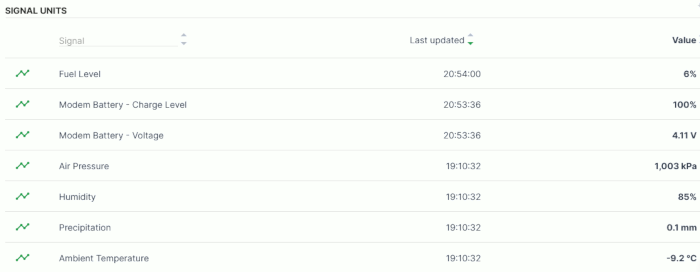
Standard System Metrics
Metrics which are used for standard Proemion services.
CAUTION
PDCs with System Metrics in Parsing Definition will not be accepted for upload.
The standard keys listed here are exclusively used by the DataPlatform for parsing Proemion standard data and must not be used in any <ParsingDefinition>. For more explanations on the Parsing Definitions please refer to the PDC Manual).
Note
When creating a new PDC manually, it is highly recommended to use the following PDC template containing the necessary elements: PDC Template. For a reference of the metrics to be used, go to the Download Center under: 02_DataPlatform Documentation > 03_Data Transfer and Interpretation > Proemion_DemoConfig.pdc. For more information, see Migration Guide for the Signal Catalog.
Note
It is recommended to define the label key as the signal key prefixed with label (label.[Key]).
The reception of new metrics usually updates the machine's timestamps LastContact and LastDatapoint which can be also viewed in the DataPortal, see DataPortal User Manual → "Machines Overview". But the signal keys with the following namespaces don't have an influence on these timestamps as they are not produced by the device:
value.common.system.*
value.common.external.*
value.common.cu.*       // except value.common.cu.sensors.*
| Key | Standard Unit (Prefix: predefined.unit.) |
|---|---|
value.common.cu.sim.traffic.month |
datavolume.BYTE |
value.common.cu.celloperator |
TEXT |
value.common.cu.config.date |
TEXT |
value.common.cu.config.version |
TEXT |
value.common.cu.hours.operation |
HOUR |
value.common.cu.mode |
NUMBER |
value.common.cu.signal.quality |
powerlevel.DECIBEL-MILLIWATTS |
value.common.cu.sim.id |
TEXT |
value.common.cu.version.hw |
TEXT |
value.common.cu.version.sw |
TEXT |
value.common.machine.geo.altitude |
length.METER |
value.common.machine.geo.heading |
geoposition.DECIMAL_DEGREE |
value.common.machine.geo.latitude |
geoposition.DECIMAL_DEGREE |
value.common.machine.geo.longitude |
geoposition.DECIMAL_DEGREE |
value.common.machine.geo.speed |
speed.KILOMETERS_PER_HOUR |
value.common.system.external.machine.weather.airpressure |
pressure.HECTOPASCAL |
value.common.system.external.machine.weather.humidity |
PERCENT |
value.common.system.external.machine.weather.precipitationrate |
length.MILLIMETER |
value.common.system.external.machine.weather.temperature |
temperature.CELSIUS |
value.common.system.external.machine.weather.uv.index |
NUMBER |
value.common.system.external.machine.weather.windspeed |
speed.METERS_PER_SECOND |
value.common.system.machine.platform.ft.traffic.delta |
datavolume.BYTE |
value.common.system.machine.platform.numberof.measurements.delta |
datavolume.BYTE |
value.common.system.machine.platform.rt.traffic.delta |
datavolume.BYTE |
value.common.system.machine.platform.traffic.delta |
datavolume.BYTE |
value.common.system.machine.platform.clf.traffic 1 |
datavolume.BYTE |
Note
1 The signal key value.common.system.machine.platform.clf.traffic must be added in the PDC, if you need to display it in the DataPortal. Otherwise, calling /timeseries is sufficient and an adaption of the PDC isn't required. Consider that in the API, the values will only show up in /timeseries reports where a time period is shown, i.e. upon timeseries queries, not on any measurements query where only the latest value is queried. Thus, it won't show up in the DataPortal where only the last value is shown.
Standard Modem Metrics
Metrics provided or measured by the communication unit (e.g. GSM signal strength, modem operating hours, acceleration sensor values) use the component_name = "cu".
Note
It is recommended to define the label key as the signal key prefixed with label (label.[Key]).
| Key | Standard Unit (Prefix: predefined.unit.) |
|---|---|
value.common.cu.battery.cyclecount |
NUMBER |
value.common.cu.battery.low.state |
NUMBER (0 = false; 1 = true) |
value.common.cu.battery.stateofcharge |
PERCENT |
value.common.cu.battery.stateofhealth |
PERCENT |
value.common.cu.battery.timetoempty |
time.MINUTE |
value.common.cu.battery.voltage |
voltage.VOLT |
value.common.cu.beacon.signal.strength |
powerlevel.DECIBEL-MILLIWATTS |
value.common.cu.beacon.transmitter.power |
powerlevel.DECIBEL-MILLIWATTS |
value.common.cu.inputs.analog.1 |
NUMBER |
value.common.cu.inputs.analog.2 |
NUMBER |
value.common.cu.inputs.digital.1 |
NUMBER (0 = off; 1 = on) |
value.common.cu.inputs.digital.2 |
NUMBER (0 = off; 1 = on) |
value.common.cu.outputs.digital.1 |
NUMBER (0 = off; 1 = on) |
value.common.cu.sensors.acc.x |
G |
value.common.cu.sensors.acc.y |
G |
value.common.cu.sensors.acc.z |
G |
value.common.cu.sensors.angle.pitch |
angle.DEGREE |
value.common.cu.sensors.angle.roll |
angle.DEGREE |
value.common.cu.sensors.gyro.x |
DEGREES_PER_SECOND |
value.common.cu.sensors.gyro.y |
DEGREES_PER_SECOND |
value.common.cu.sensors.gyro.z |
DEGREES_PER_SECOND |
value.common.cu.sensors.humidity |
PERCENT |
value.common.cu.sensors.ignition.state |
NUMBER (0 = off; 1 = on) |
value.common.cu.sensors.ignition.voltage |
voltage.VOLT |
value.common.cu.sensors.movement.count |
NUMBER |
value.common.cu.sensors.magnet.state |
NUMBER (0 = no magnetic field detected; 1 = magnetic field detected) |
value.common.cu.sensors.movement.state |
NUMBER (0 = no movement detected; 1 = movement detected) |
value.common.cu.sensors.supply.voltage |
voltage.VOLT |
value.common.cu.sensors.temperature |
temperature.CELSIUS |
value.common.cu.unplug.detected |
NUMBER (0 = no unplug event detected; 1 = unplug event detected) |
Standard Machine Metrics
If metrics are on machine scope and not dedicated to one particular component of the machine use the component_name = "machine".
Note
It is recommended to define the label key as the signal key prefixed with label (label.[Key]).
| Key | Standard Unit (Prefix: predefined.unit.) |
J1939 SPN | ISO 15143-3 (incl. AEMP) |
|---|---|---|---|
value.common.machine.ambient.humidity |
PERCENT |
354 | |
value.common.machine.ambient.temperature |
temperature.CELSIUS |
171 | Diagnostic Trouble Codes |
value.common.machine.angle.pitch |
angle.DEGREE |
3318, 4976 | |
value.common.machine.angle.roll |
angle.DEGREE |
3319, 4977, (5582) | |
value.common.machine.battery.potential |
voltage.VOLT |
168 | |
value.common.machine.diagnostic.trouble.code |
NUMBER |
Diagnostic Trouble Codes | |
value.common.machine.distance.total |
length.KILOMETER |
245 | Cumulative Distance Travelled |
value.common.machine.distance.trip |
length.KILOMETER |
244 | |
value.common.machine.geo.distance |
length.KILOMETER |
||
value.common.machine.geo.precision |
length.METER |
||
value.common.machine.geo.speed.max.trip |
speed.KILOMETERS_PER_HOUR |
1018 | |
value.common.machine.hours.work.total |
time.HOUR |
||
value.common.machine.hours.ecomode |
time.HOUR |
||
value.common.machine.hours.fullload |
time.HOUR |
||
value.common.machine.hours.idle.total |
time.HOUR |
(235) | Cumulative Idle Nonoperating Hours |
value.common.machine.hours.ignition.total |
time.HOUR |
||
value.common.machine.hours.oem.specific.total |
time.HOUR |
Cumulative Idle Hours | |
value.common.machine.hours.operation.total *(read the remark below) |
time.HOUR |
246 | Operating Hours |
value.common.machine.hours.operation.resetting *(read the remark below) |
time.HOUR |
||
value.common.machine.hours.pto.total |
time.HOUR |
248 | Cumulative Power Take Off Hours |
value.common.machine.hours.total |
time.HOUR |
||
value.common.machine.hydraulic.oil.temperature |
temperature.CELSIUS |
5536 | |
value.common.machine.ignitionswitch.state |
NUMBER (0 = off; 1 = on) |
||
value.common.machine.ignitionswitch.voltage |
voltage.VOLT |
158 | |
value.common.machine.inputs.digital.[number] |
NUMBER (0 = off; 1 = on) |
Digital Input State | |
value.common.machine.lockdownstatus |
NUMBER (0 = Machine Operation Allowed, 1 = Lockdown Active) |
||
value.common.machine.load.count.total |
NUMBER |
7699 | Cumulative Load Count |
value.common.machine.load.total |
mass.KILOGRAM |
Cumulative Payload Totals | |
value.common.machine.mode.eco |
NUMBER ( 0 = inactive; 1 = active) |
||
value.common.machine.mode.fullload |
NUMBER ( 0 = inactive; 1 = active) |
||
value.common.machine.mode.idle |
NUMBER ( 0 = inactive; 1 = active) |
||
value.common.machine.service.count |
NUMBER |
||
value.common.machine.service.due |
NUMBER (0 = false; 1 = true) |
||
value.common.machine.service.hourssincelastservice |
time.HOUR |
||
value.common.machine.service.hourstonextservice |
time.HOUR |
916 | |
value.common.machine.speed |
speed.KILOMETERS_PER_HOUR |
84 or 517 | Peak Daily Speed |
value.common.machine.state.bitcoded |
BITFIELD (OEM defined) |
||
value.common.machine.state.numeric |
NUMBER (OEM defined) |
||
value.common.machine.towing.detected |
NUMBER (0 = no towing detected; 1 = towing detected) |
Note
^*^Remark about resetting and total signal keys: The value.common.machine.hours.operation.resetting signal key must be used if the operating hours sent by the CU to the DataPlatform may be reset to 0, e.g. due to configuration or ECU updates on the machine. However, the value.common.machine.hours.operation.total signal key should be a monotonously increasing number. Proemion can calculate the value.common.machine.hours.operation.total from the value.common.machine.hours.operation.resetting signal in a way that the resulting total signal is a monotonously increasing number. To set this up, contact your DataPlatform representative for more information.
Standard Combustion Engine Metrics
Metrics which are related to the vehicle's engine use the component_name = "engine".
Note
It is recommended to define the label key as the signal key prefixed with label (label.[Key]).
| Key | Standard Unit (Prefix: predefined.unit.) |
J1939 SPN | ISO 15143-3 (incl. AEMP) |
|---|---|---|---|
value.common.engine.coolant.level |
PERCENT |
111 | |
value.common.engine.coolant.pressure [^1] |
pressure.BAR |
109 | |
value.common.engine.coolant.pressure.kpa |
pressure.kpa |
109 | |
value.common.engine.coolant.temperature |
temperature.CELSIUS |
110 | |
value.common.engine.def.level |
PERCENT |
1761 | DEF Remaining Ratio |
value.common.engine.fuel.efficiency.current |
flow.LITER_PER_HOUR |
183 | |
value.common.engine.fuel.efficiency.total |
flow.LITER_PER_HOUR |
||
value.common.engine.fuel.efficiency.trip |
flow.LITER_PER_HOUR |
1029 | |
value.common.engine.fuel.level |
PERCENT |
96 | Fuel Remaining Ratio |
value.common.engine.co2.total |
mass.KILOGRAM |
||
value.common.engine.fuel.pressure [^1] |
pressure.BAR |
||
value.common.engine.fuel.pressure.kpa |
pressure.kpa |
||
value.common.engine.fuel.used.work.total |
volume.LITER |
||
value.common.engine.fuel.used.total |
volume.LITER |
250 | Cumulative Fuel Used |
value.common.engine.fuel.used.last.24hrs |
volume.LITER |
Fuel Used in the Preceding 24 Hours | |
value.common.engine.fuel.used.trip |
volume.LITER |
182 or 5053 | |
value.common.engine.fuel.idle.total |
volume.LITER |
236 | |
value.common.engine.hours.idle |
time.HOUR |
235 | |
value.common.engine.hours.load |
time.HOUR |
||
value.common.engine.hours.regeneration.total |
time.HOUR |
3527 | Cumulative Nonproductive Regeneration Hours |
value.common.engine.hours.total |
time.HOUR |
247 | |
value.common.engine.identification.make |
TEXT |
586 | |
value.common.engine.identification.model |
TEXT |
587 | |
value.common.engine.identification.serialnumber |
TEXT |
588 | Engine Condition |
value.common.engine.identification.unitnumber |
TEXT |
233 | |
value.common.engine.load.percent |
PERCENT |
92 | |
value.common.engine.loadfactor.current |
PERCENT |
Average Daily Engine Load Factor | |
value.common.engine.loadfactor.total |
PERCENT |
1016 | |
value.common.engine.loadfactor.trip |
PERCENT |
1015 | |
value.common.engine.oil.level |
PERCENT |
98 | |
value.common.engine.oil.pressure [^1] |
pressure.BAR |
100 | |
value.common.engine.oil.pressure.kpa |
pressure.kpa |
100 | |
value.common.engine.oil.temperature |
temperature.CELSIUS |
175 | |
value.common.engine.speed |
rotation.RPM |
190 | |
value.common.engine.speed.max.trip |
rotation.RPM |
1013 | |
value.common.engine.state |
NUMBER |
3543 | Engine Condition |
value.common.engine.torque.actual |
PERCENT |
513 |
[^1] These signals are deprecated. Please migrate manually to the new signals value.common.engine.oil.pressure.kpa, value.common.engine.fuel.pressure.kpa, value.common.engine.coolant.pressure.kpa.
Standard Electric Drive Metrics
Note
It is recommended to define the label key as the signal key prefixed with label (label.[Key]).
| Key | Standard Unit (Prefix: predefined.unit.) |
J1939 SPN | ISO 15143-3 (incl. AEMP) |
|---|---|---|---|
value.common.machine.battery.stateofcharge |
PERCENT |
5464 | |
value.common.machine.battery.timetoempty |
time.MINUTE |
||
value.common.engine.energy.total (exception in component name) |
energy.KILOWATT_HOUR |
System-Used Signals
The following chapter describes a set of predefined signal keys for standardized functions on the DataPortal. It is recommended to use these unified keys.
Note
If possible and available on the machine, these metrics should be transferred to the DataPlatform and parsed by the PDC.
Note
Some of these functions must be enabled for your account as special features.
Counter Guard Signals
Counter Guard detects counter violation events in machine counters. A counter violation is a period in the time series in which the signal behaved suspicious. This is done by checking the monotonicity of the time series.
For more information on the usage, see DataScience Manual → "Counter Guard".
Note
All signals that represent a monotonous counter (e.g. operating hours, total fuel consumption) should be defined as category xsi:type="Counter" including naming the counting direction, in the PDC Value Definition.
Fuel Guard Events
The Fuel Guard feature detects four different types of fuel events. They are Fuel Refill (Refuel), DEF/AdBlue Refill, Fuel Loss, and DEF Loss events. For more information on the usage, see DataScience Manual → "Fuel Guard".
Mobile App
To use the complete Machine Companion App function set, the following keys should be used in the PDC for the signals shown in the table below.
You can also use a fully customized signal list based on OEM configuration, i.e. custom signals instead Proemion standard signals.
You can also use aliased signals over Proemion standard signals, if defined. For more information, read the Machine Companion App Manual or contact your Sales representative at Proemion.
| Signal | Key |
|---|---|
| AdBlue Level | value.common.engine.def.level |
| Energy Consumption | value.common.engine.energy.total |
| Fuel Efficiency | value.common.engine.fuel.efficiency.current |
| Fuel Level | value.common.engine.fuel.level |
| Hours/Time To Next Service | value.common.machine.service.hourstonextservice |
| Machine State | value.common.machine.state.numeric |
| Remaining Battery Capacity | value.common.machine.battery.stateofcharge |
| Remaining Battery Time to Empty | value.common.machine.battery.timetoempty |
| Starter Battery Voltage | value.common.machine.battery.voltage |
| Telematics Control Unit Battery Voltage | value.common.cu.battery.voltage |
| Total Distance Traveled | value.common.machine.distance.total |
| Total Idle Fuel Consumption | value.common.engine.fuel.idle.total |
| Total Idle Operating Hours | value.common.machine.hours.idle.total |
| Total Fuel Used/Consumption | value.common.engine.fuel.used.total |
| Total Operating Hours | value.common.machine.hours.operation.total |
Machine Efficiency
The machine efficiency can be calculated of any work signal that is defined as Counter, e.g. machine operating hours, and idle signal, e.g. fuel consumption, over time ("total"). For more information on defining Counter type signals see Counter Guard Signals above.
Custom Metrics
If there is the necessity to define your own keys, you have to use value.custom.[key_name] instead of value.common.[key_name].
For example: value.custom.ueberlader.drives.rpm
Service and Support
The latest versions of the drivers, software, firmware, and documentation are available at Document Library.
Do you need help or want to report a bug?
Visit Proemion for more information, or raise a ticket via Support.
Firmware Updates and Support
To ensure the best performance and security of your devices, we strongly recommend always installing the latest firmware provided by Proemion.
Please note:
We do not provide technical support for issues caused by outdated firmware.
Errors resulting from outdated firmware are considered non-qualified errors and are not covered by warranty or support.
Regular firmware updates are essential to maintaining the functionality of your devices.
If you need assistance with the update process, please contact our Service and Support.
For more information on the Firmware Update, check the device manual of your device at the Document Library.