How Proemion collaborates
How Proemion collaborates
This manual explains how Proemion collaborates with its customers using Jira and Confluence. It covers everything from getting started with the Jira ticket system to the processes and tools used in ongoing project collaboration.
Getting started
This section is relevant for all Proemion customers.
It covers why Proemion uses Jira and Confluence for customer communication, how to register and submit your first support request, how to select the right space for your work items, how issue priorities work, and the best practices for working effectively in Jira.
Collaboration Space
This section is relevant for customers with a Professional Service Agreement (PSA) who have access to a dedicated Customer Collaboration Space.
It covers the Collaboration Dashboards and your day-to-day workflow, how collaboration goals are structured, the different issue and epic types used in the project, file sharing via Confluence, and the importance of requirements engineering for your project.
We recommend reading the pages in this section in order, as each builds on the previous one.
Getting started
Why we use Jira/Confluence for collaboration with our customers?
To ensure effective and efficient collaboration with our customers Proemion uses Jira and Confluence for collaboration.
Jira is used to manage all collaboration-related issues and epics accordingly.
Confluence is the workspace where all collaboration-related information is managed. Jira and Confluence are well integrated so that issue management and information exchange can go hand in hand.
Collaborating through Jira/Confluence has the following advantages for you:
-
Efficient tracking of issues: Since each issue is reflected in a separate Jira task it is very easy for you to track the status of your issues.
-
Issues are being resolved faster: Proemion has set up various automations and processes to handle Jira issues efficiently.
As an example, way more efficiently involve other Proemion teams in the work on an issue as we can do on an e-mail as they immediately have access to the full context of an issue. -
Prioritize your issues: You have the chance to set an issue priority to ensure that important topics are handled with higher priority.
-
Stand-in-arrangements: If you assign an issue to a Proemion employee who can not respond within the agreed reaction time the issue will automatically reassigned to a deputy.
-
You save time: Through the means of Jira/Confluence, complex topics can be handled efficiently. As an example related issues can be linked and it is possible to refer to the Confluence knowledge base in a Jira task.
-
You have transparency: If you have booked any of the Proemion professional services you have transparency about the efforts being taken for your arrangement.
So, due to the above reasons, we ask you to collaborate with us through Jira/Confluence and avoid using other written communication like e-mail.
Issue Priorities
To ensure efficient handling and resolution of customer issues, it is essential that priorities are set in accordance with the descriptions outlined in the Issue Priorities table.
This alignment helps us allocate resources effectively and address your concerns in a timely manner, based on their impact and urgency.
When submitting an issue, please select the priority level that best matches the situation based on the defined criteria.
It is important to consider the impact on the overall project rather than personal circumstances.
This not only streamlines our internal processes but also ensures that we understand your expectations from the outset.
It is important to note that, as part of our commitment to providing the best possible support, Proemion reserves the right to adjust the issue priority after an initial evaluation. This adjustment will always be communicated and discussed with you to ensure alignment between your needs and our approach.
By collaborating on the prioritization process, we can work together to achieve efficient issue resolution and maintain the reliability of your systems.
Issue Priority Levels
Emergency

Emergency - This priority level is reserved for the most critical issues that require immediate attention.
Issues assigned to this priority level typically have a severe impact on system performance and/or project success and require urgent resolution.
-
A high number of end users (over 50%) is affected or not able to fulfill their tasks.
-
The Proemion customer is affected in the operation of their business
-
Damage to Proemion customer’s reputation is likely
- Examples of issues that may be assigned to this priority level include system crashes, data loss, or security vulnerabilities which impact a high number of service consumers.
Note
Proemion ensures to react within 3 hours during working hours1.
High

High - This priority level is used for issues that are important and require attention but are not as critical as those assigned to the highest priority level.
Issues assigned to this priority level may have a significant impact on system performance and/or project success, but not to the extent that they require immediate resolution.
-
A moderate number of End users (over 20%) is affected or not able to fulfill their tasks
-
The Proemion customer is affected in the operation of their business.
Examples of issues that may be assigned to this priority level include functional bugs or performance issues so that a certain service is not functional for service consumers.
Proemion ensures to react within 1 working day.
Medium

Medium - This priority level is used for issues that are important but do not require immediate attention.
Issues assigned to this priority level may have a moderate impact on the project's success but are not critical to its overall success.
Examples of issues that may be assigned to this priority level include bug or feature requests.
Proemion ensures to react within 3 working days.
Low

Low - This priority level is used for issues that are important but can be addressed at a later time.
Issues assigned to this priority level may have a minimal impact on the project's success and can be resolved without affecting the overall project timeline.
Examples of issues that may be assigned to this priority level include minor enhancements, documentation updates, cosmetic issues or low-priority bugs.
Proemion ensures to react within 5 working days.
Lowest

Lowest - This priority level is used for issues that are the least critical and can be addressed when time allows. Issues assigned to this priority level may have no impact on the project's success and can be resolved without affecting the overall project timeline. Examples of issues that may be assigned to this priority level include minor UI changes or spelling errors.
Proemion ensures to react within 10 working days.
-
working hours are from Monday-Friday 08:00 - 16:00 except for German holidays and the period between December, 24th and January, 1st. ↩
The golden rules of collaborating with Confluence and Jira
Below, you find some golden rules you should follow when collaborating via Jira.
An issue needs a clear description of what needs to be done
The description needs to be of a quality that any project member can understand what needs to be done to resolve the issue.
Results from oral conversations about the issues (e.g. during a call) have to be documented in the issue.
One project task per Jira issue
One Jira issue must contain exactly one project task to be resolved.
It is quite normal that - when working on an issue - new issues are being identified.
In such cases, one or several new issue(s) shall be created.
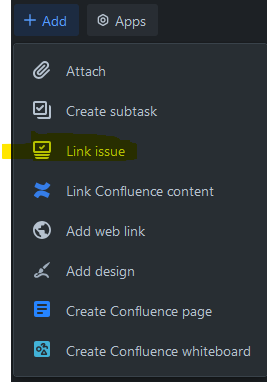
The relation to the originating issue shall be reflected by - depending on the relation type - by linking the issues or creating (SUB-)TASKs.
Maintain relations between issues
Commonly, issues have relations between each other or to other content.
Making them transparent significantly increases execution effectiveness on a project.
So related issues should be linked, or their hierarchy represented by child issues. Also, issues can be linked in other content or other content linked in issues (e.g. a requirements specification).
Progress on a work item is properly documented
The progress on a work item shall be documented by suitable means and updated regularly, especially after meaningful changes or findings. This ensures transparency, traceability, and allows others to follow the current state of work at any time.
This can be for example:
- Sharing intermediate results which had been achieved (e.g. results from an analysis) as comments
- Linking a Git branch which allows to monitor progress on the branch
- Linking new work items which had been spawned as result of the work on a work item
- Linking other artifacts which have been generated during the work on the work item (e.g. a Confluence page)
The assignee is the one who has the next to do
No matter who that is, the one who has to do something next is the assignee.
Warning
To ensure project progress, always keep the assignee up to date.
Note
If it feels that several people should be assigned, this is a clear indicator that several tasks were included in one issue (see above).
If somebody is waiting for someone who is not a member of the Jira project, the issue can remain assigned to the one who has given the task to a non-project member but should be set to the state WAITING.
The next "to do" is apparent
Either via the issue description or via a comment, it is clear what the next step is to resolve the issue.
If this has been identified in an oral conversation (e.g. in a call) the issue is updated with that information.
The source of the issue is apparent
The reporter is representing the originator of the issue.
Note
One can set somebody else as the originator.
So when for instance in a call somebody creates an issue on behalf of someone else this person should be set as a reporter.
Actionability
Information is actionable when its recipient can undertake further actions or make decisions based on it.
When communicating, we should make sure that we provide actionable information to our counterpart(s).
Let’s see a few examples that show how to provide practical value:
- If you cannot achieve what you are asked for, let your counterpart know so that the other person(s) can plan accordingly, avoiding possible misunderstandings and needless waiting.
- If in an issue there is something wrong with the approach: let’s explain why (or offer to) and provide an alternate approach, rather than just veto the change.
That way we are twice useful:
-
both parties are offered a chance to learn
-
we can still achieve the goal, even if by different means
If you don’t know the answer, one should always offer to find it out or help the requester finding it.
Registration
In order to use our Jira ticket system, you need to complete a free registration for Atlassian.
-
Visit our support page and click Sign up.
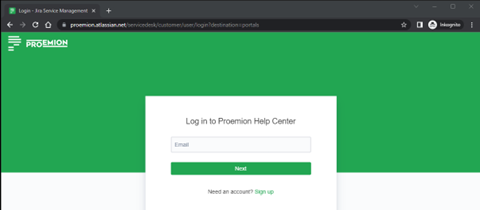
Figure 1: Jira Sign up -
Enter your email address and click Send link.
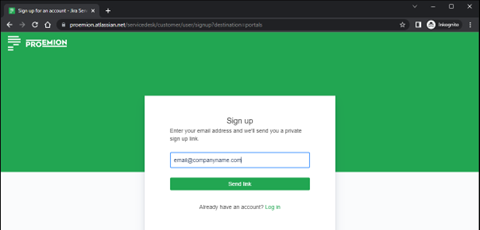
Figure 2: Jira Send Link -
An email for the verification will be sent to your email address.
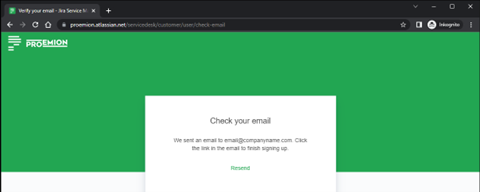
Figure 3: Jira Check Mail -
Check your email inbox. If you haven't received an email, please check your spam inbox.
Click Sign up and verify your email address.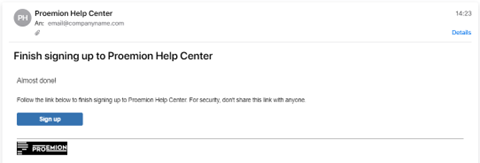
Figure 4: Mail: Sign Up in Jira -
In the support page, you can now create a support request by clicking Support Request.
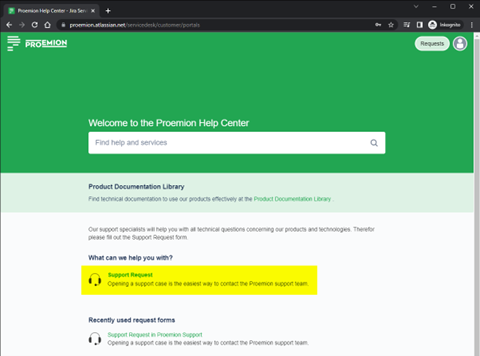
Figure 5: Jira Support Request -
Fill out the form with all the necessary information and click Send.
To ensure a fast and efficient support process and to keep the number of queries as low as possible.
You should provide a description of the error that is as precise as possible and all relevant information.Note
The input mask changes according to the selected topic.
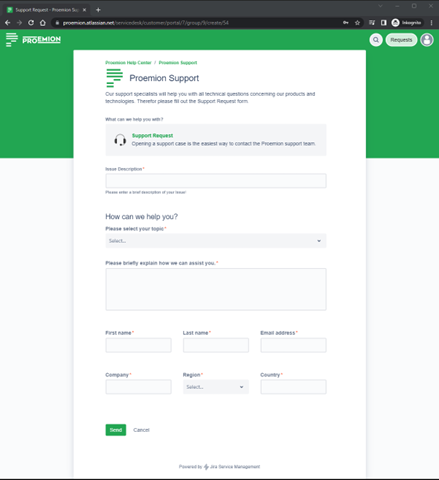
Figure 6: Jira Send Request -
Your ticket is now created.
In the main window, you will find all the information.
On the right pane, you will find the current status of the ticket and some action items.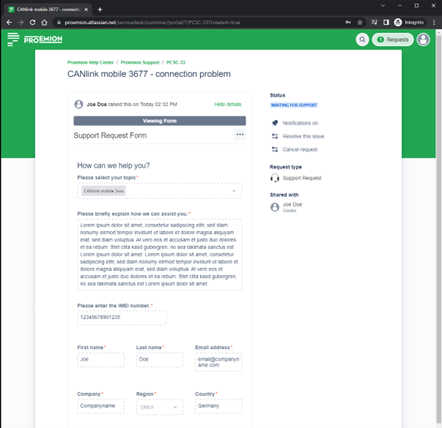
Figure 7: Jira Created Request -
At the bottom of the ticket, you find the Activity area.
There, you can send us more details, upload files, images or add more information about the observed behavior.
Our answers are also displayed here.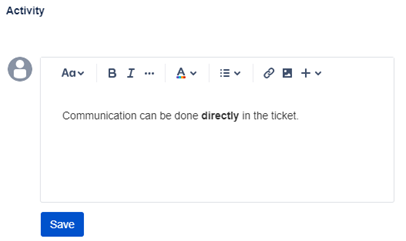
Figure 8: Jira Activity
Collaboration Space
Collaboration Space
If you have a Professional Service Agreement (PSA) with Proemion, you have access to a dedicated Customer Collaboration Space in Jira. This is your shared project environment for managing goals, tracking work items, and coordinating directly with your Proemion team.
This section explains everything you need to know to work effectively in your Collaboration Space:
- Space Types: an overview of the different Jira spaces available and when to use each one
- Collaboration Goals: how goals are defined and used to drive all collaboration activities
- Collaboration Dashboards: how to use the dashboards to manage your open to-dos and prepare for meetings
- Issues & Issue Types: the different types of work items used in your Collaboration Space and their states
- File Sharing: how to share and manage files via Confluence
- Requirements Engineering: why investing in requirements documentation benefits your project
Space Types
To provide the best possible service, we use different Jira space types for customer interaction. Each space type is optimized for the type of service delivered within it. When raising new work items, please select the appropriate space type according to the definitions below.
Note
If a work item is submitted to the wrong space type, Proemion will move it to the correct one before starting work.
Topics per Space Type
| Space Type | Space Name / Naming Pattern | General Scope | Topics |
|---|---|---|---|
| Proemion Customer Support Center | Proemion Customer Support Center (PCSC) | Unexpected behaviors, standard workflows | - DataPlatform topics (unexpected behaviors, permissions, functions, features, questions etc.) - Device topics (connectivity, service contracts, hosting, questions etc.) - Documentation topics (updates, clarifications, enhancements, missing details etc.) - Software topics (unexpected behaviors, functionality, usage questions etc.) - Hosting / Billing issues - Items received through the DataPortal “leave feedback” function |
| Customer Collaboration Space | C-PRJ-{Company name} | Collaboration, space management | - Collaboration goals - Deals of paid services for billing - Feature deployment spaces (e.g., maintenance feature, SSO, app) - Business initiatives - Concept work / consulting initiatives - Data analytics activities - Feature requests |
| Customer Application Development Space 1 | CA-PRJ-{Company name} | Application development | - Requirements for customer-specific applications - Bugs on customer-specific applications - Any work items related to customer-specific applications |
-
The Customer Application Development Space is optional. It is only created if the customer and Proemion have agreed on an individual development collaboration (e.g., through a Professional Service Agreement). Customers without such agreements typically use only their Customer Collaboration Space. ↩
Goals as driver for our collaboration
For an effective collaboration it is essential to have common goals.
A good overview about the importance of goals and recommendations about setting and managing goals can be found here.
Because of that we have the following rule.
Note
Any activity in the collaboration between the customers and Proemion has to contribute to a documented goal.
In Jira this has to be reflected by a issue-epic-goal relation.
Before working on them, goals have to be agreed and confirmed by the decision makers from the customers and Proemion. This is also reflected in the states of the goals.
These collaboration goals should contribute to global company goals at the customer and/or Proemion.
These global goals should be mentioned in the "driver" field for goals.
Collaboration Dashboards
To help you stay organized and efficiently manage your ongoing collaboration with Proemion, we provide two dashboards. Please keep them visible and use them as your central point for collaboration-related activities. For information about which space to use when raising work items, refer to the Space Types section.
Work overview customer user
The Work overview customer user gives you a clear overview of your open to-dos in collaboration with Proemion.
The dashboard is organized into sections based on the Next Call field of the underlying work items. Work items are grouped by labels such as Tech Cloud, Tech Embedded, and Business, among others, allowing you to use each section as the agenda for your respective meetings.
Each work item in the overview displays:
- Summary
- Reporter
- Assignee
- Priority
- Status
You can click a work item in the overview to navigate directly to it. Work items with the status Done are automatically excluded from the dashboard to keep the overview focused on active work.
This dashboard also provides quick links to:
- your collaboration space
- your open issues
- creating a new work item
- other relevant collaboration resources
Meeting preparation
To flag an issue for discussion in an upcoming meeting, set its Next Call field to the appropriate label. Stakeholders from each team can use this to compile the agenda for their respective calls, ensuring relevant topics are ready for discussion before the meeting starts.
Suggested day-to-day workflow
To make the most of this dashboard in your daily work, we recommend the following routine:
- Check the dashboard regularly, ideally once a day, to stay up to date on your open collaboration to-dos.
- Review the sections relevant to your team (such as Tech Cloud, Tech Embedded, or Business). Each section reflects the Next Call field of the underlying work items and helps you prepare for upcoming meetings on that topic.
- Act on issues assigned to you. The assignee is always the person who has the next step to take - if an item is assigned to you, it is waiting on your input or decision.
- Use the quick links to jump directly to your collaboration space, your open issues, or to create a new work item.
- Before a scheduled call, check the corresponding Next Call section, or use the Customer Meeting Dashboard, to confirm which topics are ready for discussion.
Customer Meeting Dashboard
While the Work overview customer user shows your individual open to-dos, the Customer Meeting Dashboard gives you a broader overview across your organization — useful when preparing for a meeting or reviewing the overall collaboration status.
After selecting your organization, the dashboard shows:
- Spaces: an overview of the collaboration and application development spaces available to your organization
- Support Requests: a list of your open support requests, including Key, Summary, Reporter, Assignee, Priority, and Status
Adding a new user to a collaboration space
To add a new user to your collaboration space, create a work item of type Task in your collaboration space, requesting the addition and providing the new user's name and email address. Assign the task to your Field Application Engineer (FAE).
Proemion will process the request. The new user will then receive an invitation from Atlassian if they don't already have an account.
Viewing your time report
If you have a Customer Collaboration Space or Customer Application Development Space, you can view a report of the time Proemion has spent on your project via the Clockwork Pro tab in your space navigation. This gives you transparency about the effort your FAEs have invested on your behalf.
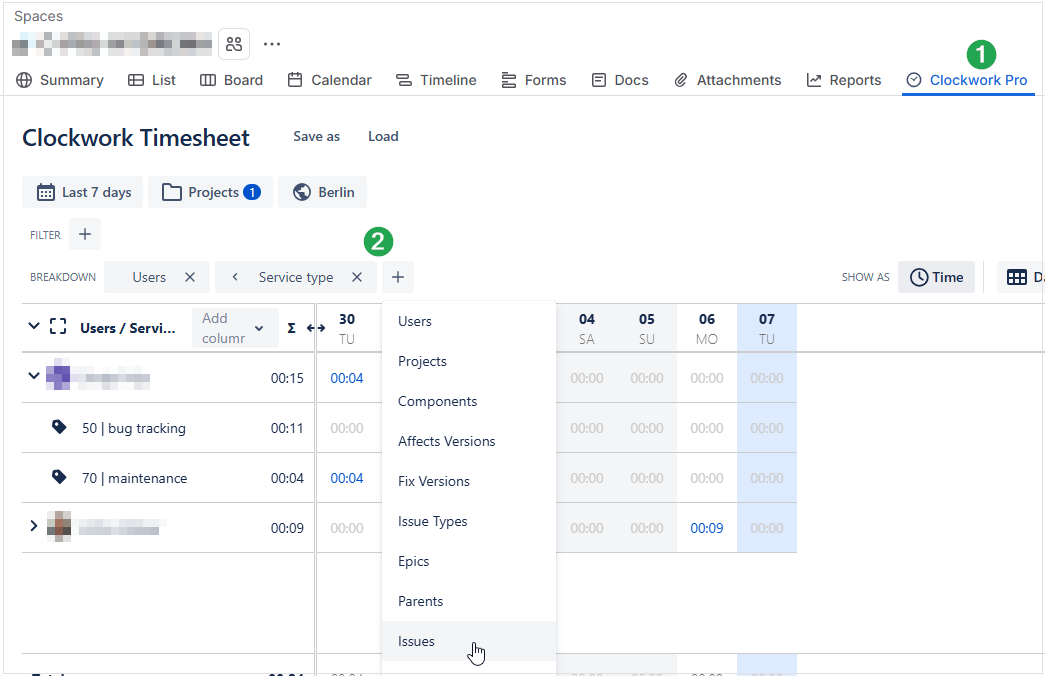
- Open your collaboration space and click the Clockwork Pro tab in the space menu bar (①).
- In the Breakdown bar, click + to add a grouping dimension (②) — for example Service type or Issues.
The timesheet then shows the logged time broken down by the selected criteria.
Services with a Service Type ID below 50 are paid services; services with an ID of 50 or above are free of charge.
For further reporting options, refer to the Clockwork Pro documentation.
All about issues
Issue types
GOAL

A goal represents a mutual objective agreed upon by the customer and Proemion, aiming to achieve a specific outcome together.
These goals must be confirmed by both the customer and the Proemion decision-makers.
Only after receiving this official confirmation can a goal be moved into the "CONFIRMED" state.
While a goal is not technically an issue, we use a custom Jira issue type to represent it.
Each goal must have a target date and be supported by epics and issues that contribute to achieving the goal.
Note
All the collaboration activities are driven by the common goals.
So all epics should be driven by goals.
To reflect this, all epics should be linked to goals using the Jira is caused by issue relation.
EPIC

An epic is a collection of tasks that contribute to a specific goal.
To represent this relation any Epic should be linked to a goal with an is caused by relation.
We have generic EPICs like BUGS epics where the goal is to have a bug-free service.
On the other hand, specific initiatives should have their specific epic.
Examples of specific epics can be "Roll out telematics for model XYZ" or "Launch OEM specific machine companion app".
An epic should be related to one or several goals of the collaboration.
Warning
Each issue must be below a parent EPIC or issue.
There must not be any orphan issues!
Note
An EPIC should not contain specific to-dos.
The specific to-dos should be described in the child’s tasks.
TASK

A TASK represents something that needs to be done to contribute to the accomplishment of the parent epic.
Relations between different tasks can be represented by sub-tasks (see below) or linking tasks.
SUB-TASK

Sometimes when - while working on a TASK - some additional tasks are identified that are required to fulfill a task.
To represent these, issues of type SUB-TASK can be used.
BUG

A BUG is describing a bug that needs to be resolved.
NEW FEATURE

Since we are developing a standard solution, feature requests are undergoing a standardized feature request workflow.
Feature requests for our standardized but configurable solution should be raised with this issue type.
DEAL

DEALs are Proemion services whose provision has been agreed upon between Proemion and the customer.
A deal does not represent any task, but is information for all project members about an agreement and its delivery state.
Paid deals reference the corresponding purchase order numbers.
Issue states
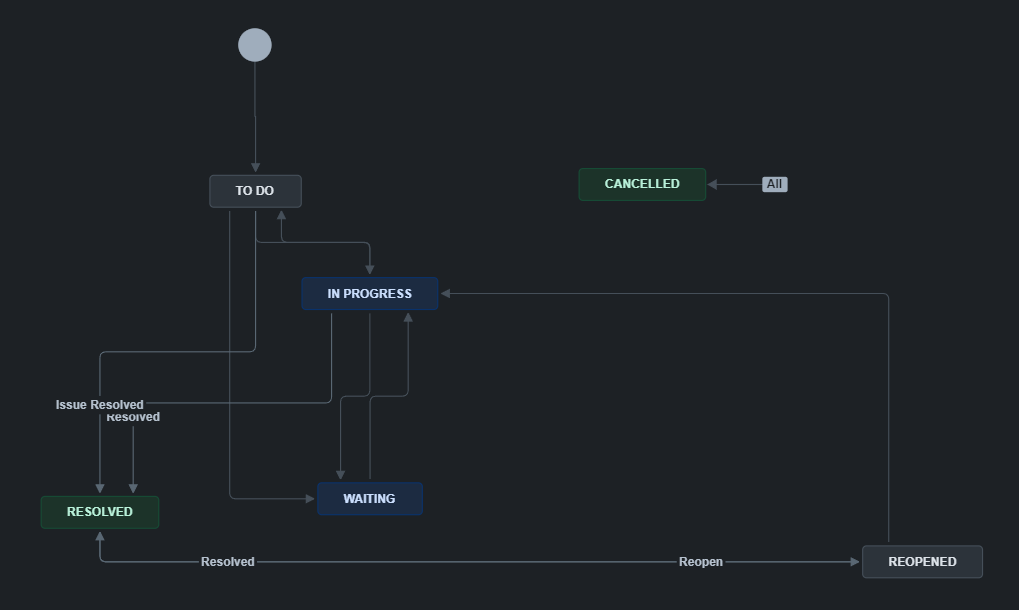
We have a custom state machine for collaboration issues.
Please see a description of the states below.
| Issue state | Description |
|---|---|
TO DO |
The issue is there but currently, nobody is actively working on it. |
IN PROGRESS |
A project member is currently working on the issue. |
WAITING |
The issue is waiting for a delivery from outside the project. |
RESOLVED |
The issue has been resolved. |
CANCELLED |
It was decided to not resolve the issue. |
Goal states
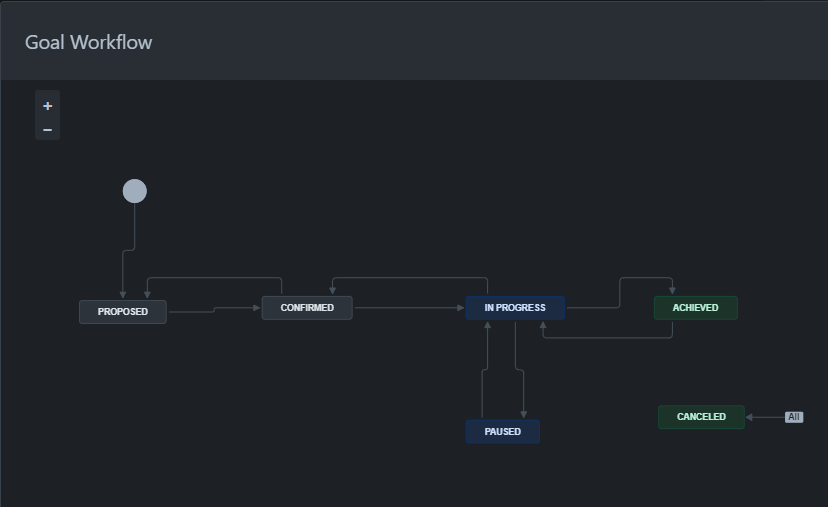
As already mentioned above, goals are no real issues.
Because of this, they have their own state machine:
| Goal state | Description |
|---|---|
PROPOSED |
The collaboration working team has agreed on a common goal. |
CONFIRMED |
The decision makers on the customer and Proemion side have confirmed the defined goal. |
IN PROGRESS |
Work to achieve the goal is ongoing. |
ACHIEVED |
The goal is achieved as defined. |
PAUSED |
It was decided to pause the work on a goal. |
CANCELLED |
The decision-makers decided to not pursue the goal anymore. |
How-To - File sharing via Confluence
Confluence for File sharing
Please use created Confluence pages for file hosting.
When a new file has to be added, drop the file on the correct page and add a description.
Feel free to use other Confluence items to create content on a page (type "/" to see all available options).
Example: You can directly upload Excel files in the format .xlsx or images within the Confluence page.
-
Updating of files with new version is done by clicking on 3 dots in the upper right corner … → Attachments → Files.
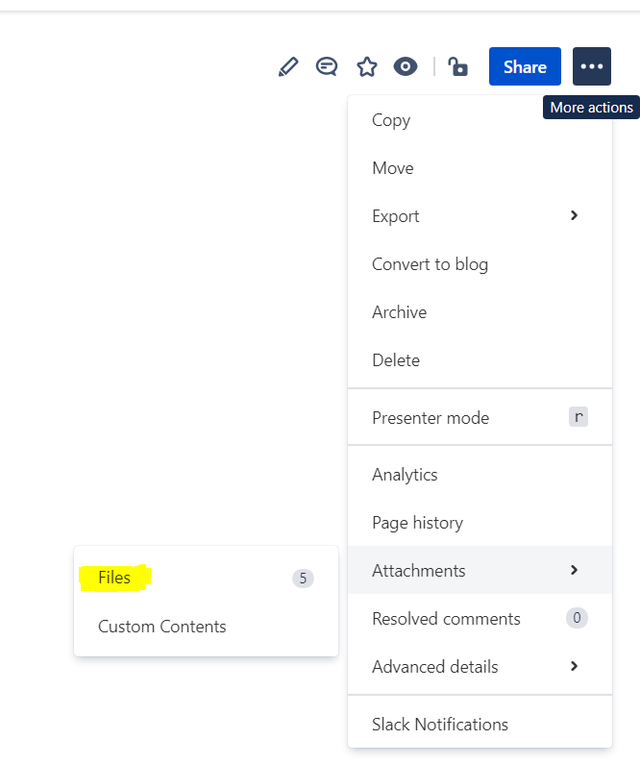
Figure 1: Attachments > Files -
After uploading a new version, the new version will be shown on a confluence page and the old version can be found in the same menu.
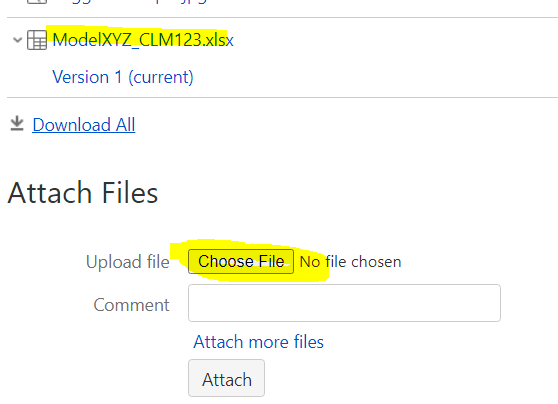
Figure 2: New version of an attachment
Why invest into requirements engineering and implementation documentation matters?
The complexity of the connectivity applications is evolving, so without appropriate countermeasures, this can result in a disproportionate increase of the costs to maintain and expand the applications.
Investing in requirements engineering and implementation documentation is like laying a strong foundation before building a house…
Clarity and Focus
Requirements engineering helps in understanding what needs to be done. Clear, well-defined requirements reduce ambiguity, ensuring everyone involved has a shared understanding of the project's goals and scope.
Detailed requirements help break down complex projects into manageable tasks. This clarity ensures that every team member knows exactly what to do and when to do it. It helps avoid scope creep, where new features are added without proper evaluation, leading to delays and budget overruns.
Having well-documented requirements helps to market and support the production of the applications built for:
- marketing and documentation teams have precise input for their work
- customer support teams have a solid base for handling customer requests
Risk Mitigation
Thorough detailed documentation helps identify potential risks and challenges early on. By addressing these issues in the planning phase, you can avoid costly mistakes and delays later.
Documentation can include risk assessments, impact analysis, and mitigation strategies.
Efficient Communication
Good documentation acts as a reference point for the team, stakeholders, and future developers. It facilitates clear communication, reducing the chances of misinterpretations and misunderstandings.
Clear documentation serves as a common language for all stakeholders, from developers to project managers to clients. It ensures that everyone is on the same page, reducing the chances of miscommunication. It can include flowcharts, diagrams, and other visual aids to make complex ideas easier to understand.
Quality Assurance
Well-documented requirements provide a basis for testing and validation: testers can create test cases to ensure the product meets the expected standards. It helps in identifying defects early in the development process. Documentation can also include acceptance criteria, defining the conditions that the product must satisfy to be accepted by the client.
It ensures that the final product meets the initial specifications and delivers the desired value to users.
Change Management
Projects normally evolve over time. With detailed documentation, managing changes becomes easier. It helps in tracking what changes were made, why they were made, and how they impact the overall project.
The quality of applications suffers without proper requirements and implementation documentation as there is a significant risk that any change in the application will break existing functionalities.
Project Management
Requirements engineering and documentation help in planning, estimating, and managing the project effectively. It allows for better resource allocation, timeline management, and cost control. It also helps in identifying critical paths and dependencies, ensuring that tasks are completed in the right order.
Future Maintenance
Comprehensive documentation aids in the long-term maintenance of the system. It provides future developers with the necessary information to modify, or extend the system without starting from scratch and spend long time to understand how it works ensuring that changes can be made efficiently without introducing new issues. It's a fundamental need for support in case of bug-tracing/bug-fixing.
Summary
Overall, requirements engineering and implementation documentation is about reducing uncertainty and aligning the project's goals with stakeholders' needs, leading to smoother execution, reduced risk, and better outcomes, so is crucial for delivering successful, high-quality projects and provides a solid foundation for ongoing improvements and maintenance.
It is an initial invest but will increase development speed and decrease costs in the future.
Service and Support
The latest versions of the drivers, software, firmware, and documentation are available at Document Library.
Do you need help or want to report a bug?
Visit Proemion for more information, or raise a ticket via Support.
Firmware Updates and Support
To ensure the best performance and security of your devices, we strongly recommend always installing the latest firmware provided by Proemion.
Please note:
We do not provide technical support for issues caused by outdated firmware.
Errors resulting from outdated firmware are considered non-qualified errors and are not covered by warranty or support.
Regular firmware updates are essential to maintaining the functionality of your devices.
If you need assistance with the update process, please contact our Service and Support.
For more information on the Firmware Update, check the device manual of your device at the Document Library.