Device
The Device tab configures the CAN baud rate and CANopen settings.
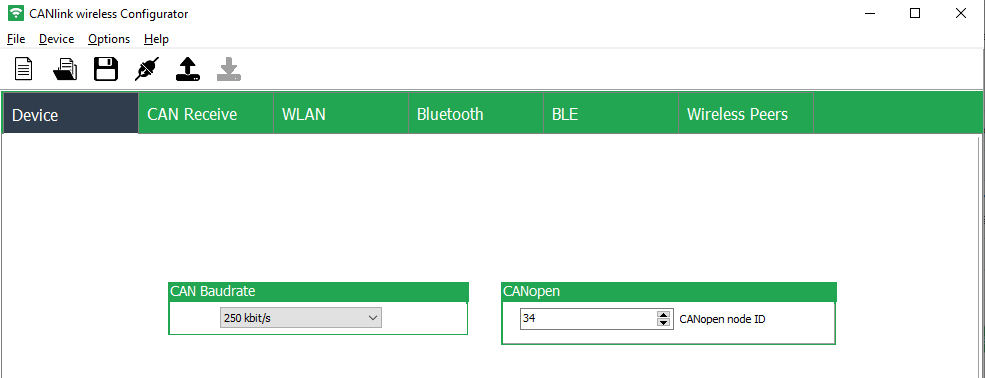
CAN Baudrate
The CAN baud rate is the speed at which data is transmitted on the CAN bus.
When integrating the device into the desired CAN network, make sure the configured CAN baud rate matches the CAN baud rate of the local CAN bus. Otherwise, the device changes to error mode.
Note
Devices with the factory configuration installed have a default CAN baud rate of 250 kbit/s. After a reset to factory settings, the CAN baud rate is set back to 250 kbit/s.
CANopen
The CANopen node ID (address) of a CANopen device on the local CAN bus must be unique and within the range from 1 to 127.
Note
With the factory configuration installed, as well as after a device reset, the default CANopen node ID is 33 (decimal).
Advanced Settings
Select Options > Advanced Settings to configure the following fields. Hover over the fields and check marks to find the tooltips.
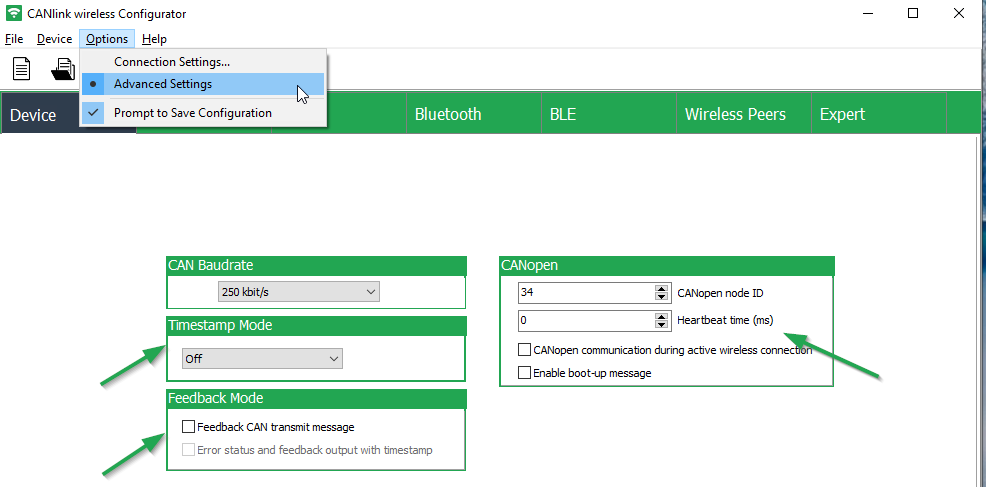
- Timestamp Mode
- Feedback Mode
- Feedback CAN transmit message: activating this option may cause a significant performance decrease in a CAN-CAN bridge setup.
-
CANopen
- Heartbeat time
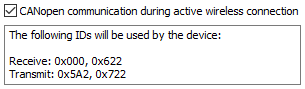
- CANopen communication during active wireless connection: enables the CANopen stack and sending messages.
The SDO server is displayed as
0x600with the Node ID as hexadecimal22. For more details, see Enabling the CANopen Stack and the other sections of the "CAN functions" chapter in CANlink wireless 4000 Device Manual.
 - Enable boot-up message