CAN Receive
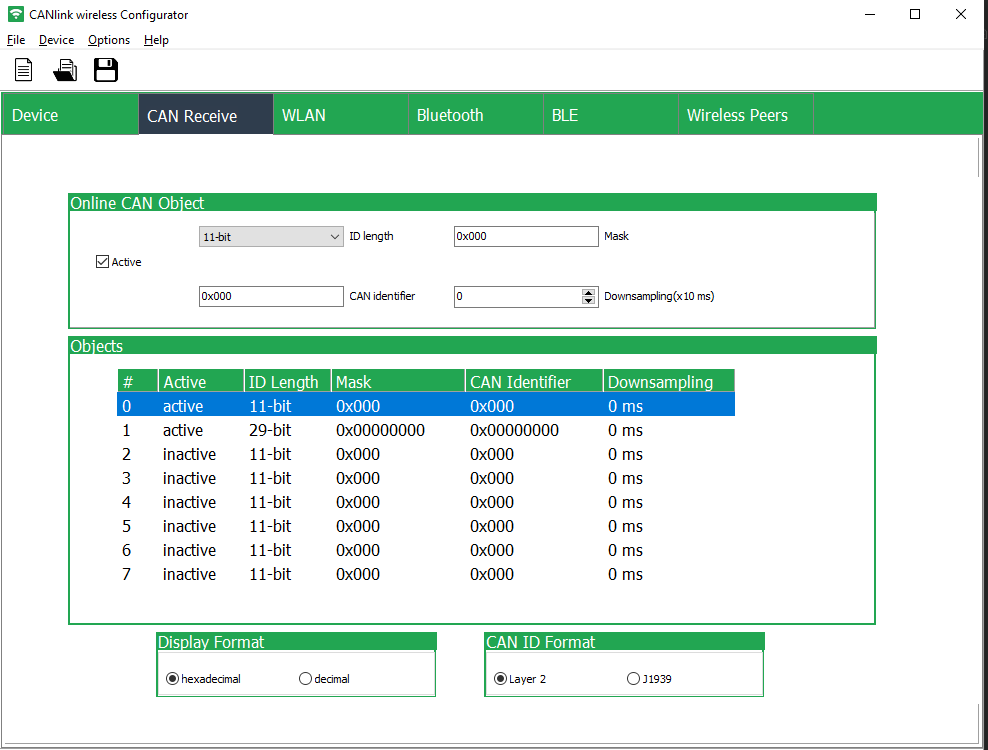
The CAN Receive tab shows the active and inactive receive objects for 11-bit and 29-bit CAN message identifiers, and lets you filter selected CAN messages to improve message throughput.
The default configuration for the CAN Receive settings already includes active receive objects with open filter masks for all 11-bit and 29-bit CAN message identifiers. With this setting, all CAN messages are transmitted. If the device is connected to a CAN bus with a high bus load, filter specific messages to reduce it.
For a detailed description and examples, see Filter received CAN messages in CANlink wireless 4000 Device Manual.
Configuration
In the Online CAN Object section, you can configure the following fields:
- ID length: selects the 11-bit or extended 29-bit CAN message identifier.
- Mask: sets a filter mask for single messages or specific groups of messages, so that only application-relevant messages are transferred.
- CAN identifier: filters by CAN IDs, in hexadecimal (
0x) or decimal format. Change the format in the Display Format field. - Downsampling: limits the transmission rate in case of a high message frequency.
Note
Downsampling is only recommended for filtering single messages.
Note
CAN messages are transmitted via block transfer. Depending on the message load and the radio technology used, some latency is unavoidable. Test your configuration and application under real operating conditions.