ECU FOTA Overview
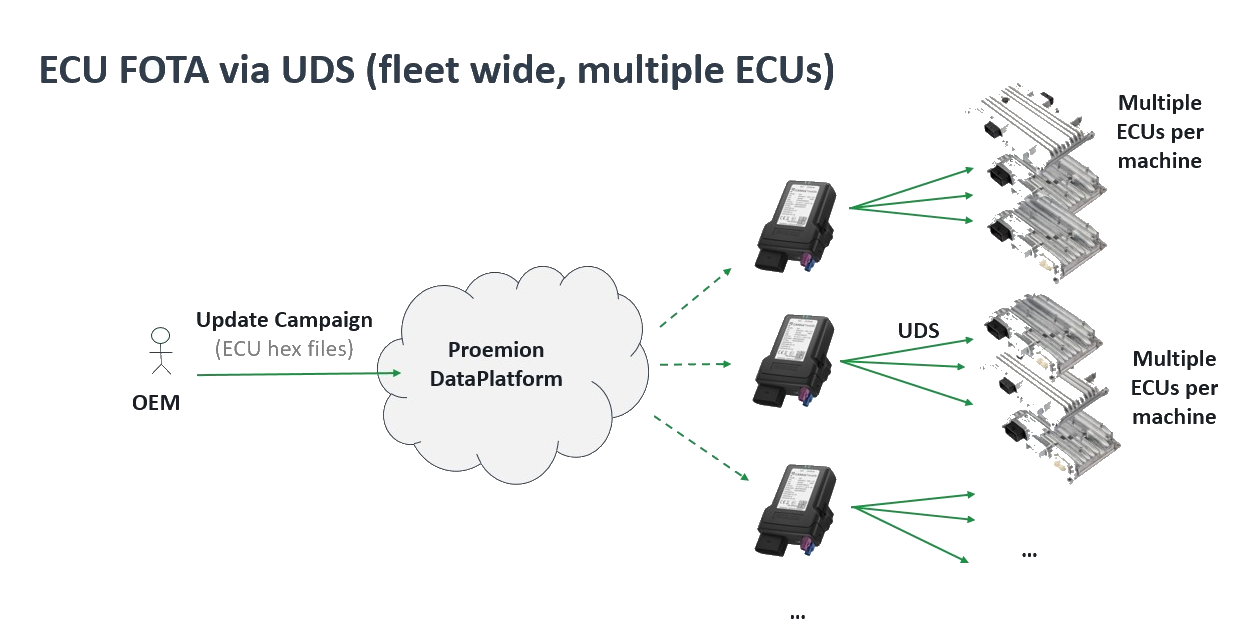
ECU Firmware Over-The-Air (ECU FOTA) enables OEMs to remotely update the firmware of Electronic Control Units (ECUs) installed in their machines without requiring physical access or on-site service visits.
By enabling remote firmware distribution, ECU FOTA allows OEMs to efficiently deploy bug fixes, security patches, and new features across entire fleets - without service-truck rolls, reducing maintenance effort and minimizing machine downtime. Starting December 2027, the EU Cyber Resilience Act (CRA) will additionally require OEMs to provide security updates throughout a product's lifetime, making remote update capability a regulatory necessity.
How it works at Proemion: Firmware updates are initiated through the DataPortal and delivered wirelessly to the target ECU via the Telematics Control Unit (TCU). The machine operator approves the update on-site before flashing begins, and OEM-side software confirms the result afterwards. Together, this gives OEMs a traceable, low-effort path to fleet-wide firmware updates while ensuring operators are never caught off guard by unplanned downtime.
ECU FOTA uses the Unified Diagnostic Services (UDS) protocol (ISO 14229) for ECU reprogramming - an industry standard that ensures out-of-the-box compatibility with existing ECU bootloaders and established firmware update workflows, without requiring proprietary flashing tools.
Note
ECU FOTA is currently in a BETA phase and available as part of an early access program. Functionality, interfaces, workflows, and integration behavior may change during the beta program. This documentation applies to CANlink® mobile 3600, firmware release 4.2 or later. Customers interested in ECU FOTA must contact their Account Manager or Field Application Engineer (FAE) at Proemion.
See Onboarding for details on how to participate and what to expect.
Terminology
The following terms are specific to ECU FOTA and are used throughout this documentation.
| Term | Definition |
|---|---|
| ECU | Electronic Control Unit. An embedded controller installed in a machine that manages specific functions such as hydraulics, drive, or engine control. ECU firmware can be updated remotely via ECU FOTA. |
| ECU FOTA | ECU Firmware Over-The-Air. The capability to remotely update ECU firmware without physical access to the machine, using the UDS protocol delivered via the Proemion TCU. |
| TCU | Telematics Control Unit. The Proemion CANlink® mobile that downloads firmware from the DataPlatform, manages CANopen communication, and performs UDS flashing of the target ECU. |
| UDS | Unified Diagnostic Services (ISO 14229). Industry-standard communication protocol used in automotive and industrial electronics for diagnostics, reprogramming, and testing of ECUs. Used by the TCU to flash new firmware to the ECU. |
| Electronic Architecture (EA) | A DataPlatform definition of the ECU topology for a specific machine type — which ECUs are present, how they are addressed on the CAN bus, and which firmware is compatible with each. |
| Software Repository | A version-managed collection of firmware files in the DataPlatform for one specific ECU type, identified by ECU Brand and Model. |
| ECU Update Request | An instruction created in the DataPlatform to deploy a specific firmware version to a specific ECU on a specific machine. |
| Bootloader Address | The CAN address the ECU uses during programming mode. Distinct from the application address used during normal operation. |
| Checkpoint 1 | Operator approval required before flashing begins. The machine operator explicitly approves or rejects the update via HMI or CANopen client. |
| Checkpoint 2 | Health verification required after flashing. OEM software confirms the new ECU application is running correctly. |
| OEM Logic | Customer-side software responsible for implementing Checkpoint 2 and reporting the verification result to the TCU. |
| ECU:Admin | DataPortal permission set required to access Software Repositories, Electronic Architectures, and ECU update requests. |
High-Level Workflow
The update process involves three parties: the DataPortal user who triggers the update, the machine-side operator who approves it, and the OEM software that confirms the result.
- Upload ECU firmware to a Software Repository
- Configure the Electronic Architecture and ECU mappings
- Trigger an ECU update in the DataPortal
- TCU downloads and verifies the firmware package
- Checkpoint 1: Machine operator approves the update via HMI
- TCU flashes the new firmware to the ECU
- ECU reboots and starts the new application
- Checkpoint 2: OEM software verifies ECU health and reports the result
- Update is finalized and the result is reported to DataPlatform
Note
In the event of a flashing failure, the ECU bootloader is always preserved, ensuring the ECU remains accessible for a subsequent remote update attempt.
The following diagram illustrates the high-level workflow.
flowchart TD
    classDef default fill:#f5f5f5,color:#1E2A3A,stroke:#ccc
    classDef checkpoint fill:#fff8e1,color:#1E2A3A,stroke:#f0a500

    subgraph DataPortal["DataPortal (Fleet Manager)"]
        A[Upload firmware] --> B[Configure architecture]
        B --> C[Trigger update]
    end
    subgraph Machine["On-machine (OEM integration)"]
        D[TCU downloads firmware]
        E[Checkpoint 1 — operator approves]
        F[UDS flashing via TCU]
        G[ECU reboots]
    end
    subgraph DataPlatform["DataPlatform"]
        H[Checkpoint 2 — health verified]
        I[Update successful]
    end

    C --> D
    D --> E
    E --> F
    F --> G
    G --> H
    H --> I

    style DataPortal fill:#dce8f5,color:#1E2A3A,stroke:#1E2A3A
    style Machine fill:#d6f0e2,color:#1E2A3A,stroke:#22A652
    style DataPlatform fill:#eae8f5,color:#1E2A3A,stroke:#2A3A50

    class E,H checkpoint
Documentation Overview
This manual covers the following topics:
- Onboarding — Beta program access, integration responsibilities, and prerequisites.
- Upload and Manage ECU Firmware — Creating Software Repositories and uploading HEX files.
- Configure Electronic Architecture — Defining ECU topology, CAN addressing, and machine assignments.
- Trigger ECU Update — Triggering and monitoring firmware deployments from the DataPortal.
- HMI Approval Interface — Machine-side operator approval and OEM health verification workflow.
- CANopen Specification — Full CANopen object dictionary, state machine, and integration reference.