ECU FOTA CANopen Specification
This document is the technical reference for the CANopen objects used in ECU FOTA. It covers object definitions, addresses, data types, the update state machine, and SDO command examples.
For the integration workflow, what to implement and when, refer to the HMI Approval Interface.
This document is intended for:
- CANopen integrators
- OEM software developers
- PLC developers
- HMI developers
- embedded integration teams
- field application engineers
Warning
As ECU FOTA is currently in BETA phase, CANopen objects, semantics, and workflows may change during the BETA program.
Overview
The ECU FOTA workflow is controlled through CANopen objects exposed by the CANlink® mobile 3600 TCU under index 0x5FF3.
The objects support update availability signaling, update approval handling, flashing status monitoring, OEM verification handling, diagnostic logging, and timeout handling.
All CANopen objects described in this document are persistent: values are retained across power cycles and stored in non-volatile memory. Persistence is handled internally by the TCU — the standard CANopen store/restore mechanism is not required.
A full CANopen stack is not required on the machine side.
The ECU FOTA objects can be accessed using individually constructed CAN messages via SDO — the example workflow below uses cansend to demonstrate this directly.
ECU FOTA State Machine
The ECU FOTA workflow transitions through the following states during the update lifecycle.
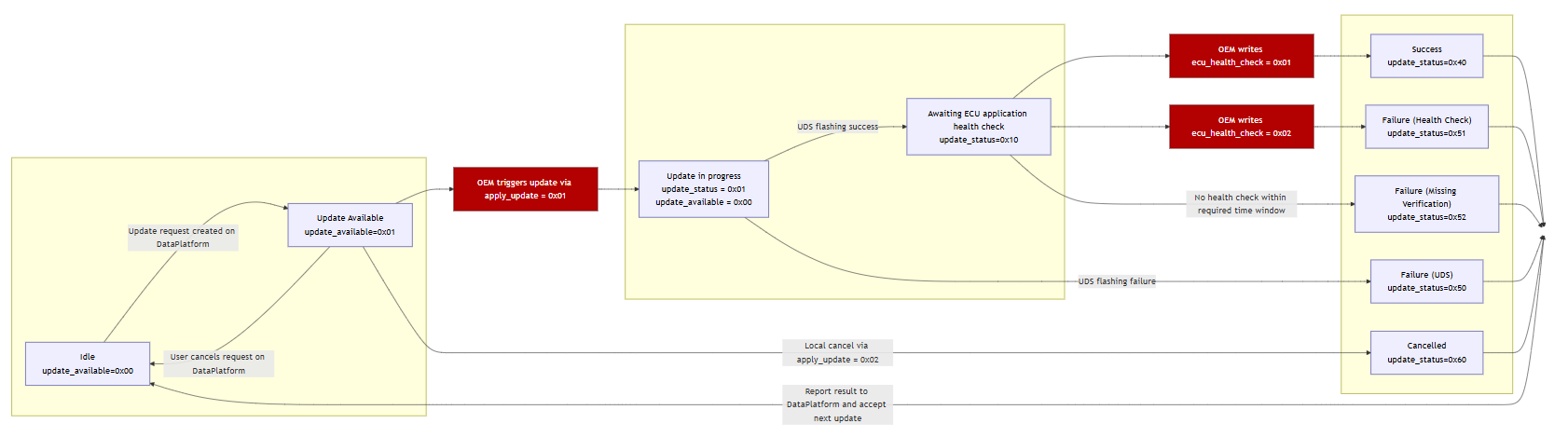
State Overview
| State | update_status |
Description |
|---|---|---|
| Idle | 0x00 |
No ECU update active |
| Update Available | — | Update available and waiting for operator approval (update_available = 0x01, update_status remains 0x00) |
| Bootloader Transition | 0x01 |
TCU sends bootloader CAN frame and waits configured delay — no dedicated status value; reported as Flashing in progress |
| Flashing | 0x01 |
ECU flashing in progress |
| Waiting for Verification | 0x10 |
OEM application verification pending |
| Successful | 0x40 |
Update completed successfully |
| Flashing Failed | 0x50 |
ECU flashing failed (includes bootloader transition failures) |
| Verification Failed | 0x51 |
OEM application verification failed |
| Verification Timeout | 0x52 |
OEM verification timed out |
| Cancelled | 0x60 |
Update rejected or cancelled — only reachable from Update Available state |
Values ≥ 0x40 are final states. Once a final state is reached, the update cycle is complete and a new ECU update request is required.
CANopen Address Reference
Use the following CAN ID mappings when constructing SDO commands:
| Parameter | Example Value |
|---|---|
TCU node ID (default, CAN1) |
0x27 |
| TCU SDO request CAN ID | 0x627 |
| TCU SDO response CAN ID | 0x5A7 |
| ECU UDS CAN ID (example) | 0x701 |
The TCU communicates with the ECU via UDS over CAN. The ECU UDS CAN ID is included here for reference when verifying CAN traffic during integration — it is not used in the SDO commands to the TCU.
Replace <TCU_CAN_ID> with your actual configured value in all cansend commands below.
The examples below use cansend (Linux SocketCAN).
The same SDO frames can be sent using any CANopen tool, including PCAN View, Vector CANalyzer, or custom CANopen stacks
— the frame content is identical regardless of tool.
Example Workflow
The following cansend commands illustrate a complete successful update sequence.
For full object definitions and valid values, refer to the object descriptions below.
-
Read update availability —
update_availableat0x5FF3:0x01. Response0x01means an update is ready.cansend can1 <TCU_CAN_ID>#40F35F0100000000 -
(Optional) Read update attempts counter —
update_attempts_counterat0x5FF3:0x03. Confirms the update request reached the TCU.cansend can1 <TCU_CAN_ID>#40F35F0300000000 -
Approve the update —
apply_updateat0x5FF3:0x40, write0x01.cansend can1 <TCU_CAN_ID>#2FF35F4001000000 -
Poll update status —
update_statusat0x5FF3:0x50. Poll periodically. Proceed when value is0x10.cansend can1 <TCU_CAN_ID>#40F35F5000000000 -
Report verification result —
ecu_health_checkat0x5FF3:0x60, write0x01. TCU setsupdate_statusto0x40.cansend can1 <TCU_CAN_ID>#2FF35F6001000000 -
Confirm final status — expected response:
0x40(success).cansend can1 <TCU_CAN_ID>#40F35F5000000000
PCAN-View Transmit Message List
A ready-to-import transmit list with the same checkpoint and status frames shown in this workflow is available for PCAN-View:
ECU FOTA PCAN-View transmit message list
Open it via File > Open, then select the downloaded .xmt file to import the list. Double-click a message in the imported list to send it.
Status Objects
Use these objects to monitor update availability, progress, and execution status.
update_available
| Property | Value |
|---|---|
| Object | 0x5FF3:0x01 |
| Access | read-only |
| Type | UINT8 |
Indicates whether an ECU update is available and ready to be applied.
| Value | Meaning |
|---|---|
0x00 |
No update available |
0x01 |
Update available — can be applied via apply_update |
Reset behavior: the TCU resets this object to 0x00 when the update is triggered or cancelled via apply_update, or when cancelled remotely via DataPortal.
update_status
| Property | Value |
|---|---|
| Object | 0x5FF3:0x50 |
| Access | read-only |
| Type | UINT8 |
Reports the current or final status of the ECU update operation. The final status remains stored until the next update is initiated via apply_update.
| Value | State | Type |
|---|---|---|
0x00 |
Idle | Transient |
0x01 |
Flashing in progress | Transient |
0x10 |
Waiting for OEM health verification | Transient |
0x40 |
Update successful | Final |
0x50 |
Flashing failed | Final |
0x51 |
Health verification failed | Final |
0x52 |
Verification timeout | Final |
0x60 |
Update cancelled | Final |
Note
Once update_status reaches a final value (≥ 0x40), identification objects (update_request_id, ecu_can_id) and timestamp objects are overwritten when the next update becomes available. See Update Identification Objects.
Typical successful sequence:
0x00 → 0x01 → 0x10 → 0x40
update_status = 0x60 (cancelled) is only reachable from the "Update Available" state — that is, before apply_update = 0x01 has been written. Once flashing has started, local cancellation via apply_update = 0x02 is rejected with SDO abort 0x08000022.
update_attempts_counter
| Property | Value |
|---|---|
| Object | 0x5FF3:0x03 |
| Access | read-only |
| Type | UINT16 |
Counts the number of ECU update requests received by the TCU. Increments each time update_available transitions from 0x00 to 0x01. Use this counter to confirm that an update request reached the TCU and to track the total number of updates over the machine lifetime.
Update Identification Objects
These objects identify the current update target and request. They are updated each time a new update becomes available (update_available transitions from 0x00 to 0x01).
Note
Once update_status reaches a final value (≥ 0x40), these objects are overwritten when the next update becomes available. Do not interpret them as information about the update that just completed.
update_request_id
| Property | Value |
|---|---|
| Object | 0x5FF3:0x02 |
| Access | read-only |
| Type | STRING (36 characters) |
Globally unique identifier (UUID v4) for the current update request. Provides traceability between DataPlatform, TCU, HMI, and OEM logging systems.
ecu_can_id
| Property | Value |
|---|---|
| Object | 0x5FF3:0x05 |
| Access | read-only |
| Type | UINT32 |
The CAN identifier of the ECU targeted by the current firmware update.
Timestamp Objects
The following objects contain UNIX timestamps in seconds (UTC, seconds since 1970-01-01 00:00:00).
update_available_time
| Property | Value |
|---|---|
| Object | 0x5FF3:0x04 |
| Access | read-only |
| Type | UINT32 |
Timestamp indicating when the TCU detected and made the update available. This reflects TCU detection time, not the DataPlatform request creation time.
update_start_time
| Property | Value |
|---|---|
| Object | 0x5FF3:0x52 |
| Access | read-only |
| Type | UINT32 |
Timestamp indicating when ECU flashing started (when apply_update = 0x01 was accepted).
update_end_time
| Property | Value |
|---|---|
| Object | 0x5FF3:0x53 |
| Access | read-only |
| Type | UINT32 |
Timestamp indicating when the ECU update completed, either successfully or with failure. Updated when update_status transitions to a value ≥ 0x40.
Approval and Verification Objects
apply_update
| Property | Value |
|---|---|
| Object | 0x5FF3:0x40 |
| Access | write-only |
| Type | UINT8 |
Approves or rejects a pending ECU update.
| Value | Meaning |
|---|---|
0x00 |
No effect |
0x01 |
Approve — trigger UDS ECU firmware update |
0x02 |
Reject — cancel and delete the pending update |
This object can only be written when update_available = 0x01. Writing a non-zero value while update_available ≠ 0x01 causes the TCU to return SDO abort 0x08000022. Writing 0x00 is always permitted regardless of state and has no effect.
After a non-zero value is accepted:
update_availableresets to0x00- The TCU reports current update status in
update_status
After approval (0x01), the TCU sends the configured bootloader switch CAN frame (if defined), waits the configured delay, then initiates the UDS programming session (0x10 0x02 per ISO 14229).
Warning
The bootloader trigger must only be activated at the correct point in the update workflow. See Configure Electronic Architecture for details.
ecu_health_check
| Property | Value |
|---|---|
| Object | 0x5FF3:0x60 |
| Access | write-only |
| Type | UINT8 |
Reports the OEM-side ECU application verification result after flashing.
| Value | Meaning |
|---|---|
0x00 |
No effect |
0x01 |
Verification successful — TCU sets update_status to 0x40 |
0x02 |
Verification failed — TCU sets update_status to 0x51 |
This object can only be written when update_status = 0x10. Writing a non-zero value in any other state causes the TCU to return SDO abort 0x08000022.
After a non-zero value is accepted, the TCU reflects the outcome in update_status.
update_progress
| Property | Value |
|---|---|
| Object | 0x5FF3:0x51 |
| Access | read-only |
| Type | UINT8 |
Estimated progress of the current update in percent. Resets to 0 when update_available transitions to 0x01. Starts incrementing after apply_update = 0x01 is accepted.
Timeout Object
ecu_health_check_timeout
| Property | Value |
|---|---|
| Object | 0x5FF3:0x62 |
| Access | read/write |
| Type | UNSIGNED16 |
| Unit | minutes |
Defines the maximum time in minutes the TCU waits for the OEM to write a health check result after update_status = 0x10. If no result is written within this period, the TCU sets update_status to 0x52.
| Value | Behavior |
|---|---|
0 |
Timeout disabled — TCU waits indefinitely |
1–65535 |
Timeout in minutes (maximum ~45 days) |
Default: 10 minutes.
SDO Abort Conditions
SDO abort code 0x08000022 indicates that data cannot be transferred or stored to the application because of the present device state.
The TCU returns this abort code if:
apply_updateis written when no update is available (update_available ≠ 0x01)ecu_health_checkis written when not in verification state (update_status ≠ 0x10)apply_updateorecu_health_checkis written after flashing has already started or the update is already finalizedapply_updateorecu_health_checkis written when any invalid state transition is attempted
Troubleshooting
| Problem | Possible Cause |
|---|---|
update_available always 0x00 |
No pending ECU update request on DataPortal |
apply_update rejected (SDO abort) |
update_available is not 0x01 |
| Flashing does not start after approval | ECU did not accept UDS session — bootloader transition failed |
update_status remains 0x10 |
OEM verification result not written to ecu_health_check |
Verification timeout (0x52) |
ecu_health_check not written within the configured timeout window |
| Update cancelled unexpectedly | Operator rejected via apply_update = 0x02, or remote cancellation via DataPortal |