Device Overview
This section provides an overview of the device components, identification labels, interfaces, and operating functions.
For additional information, see:
Device Elements
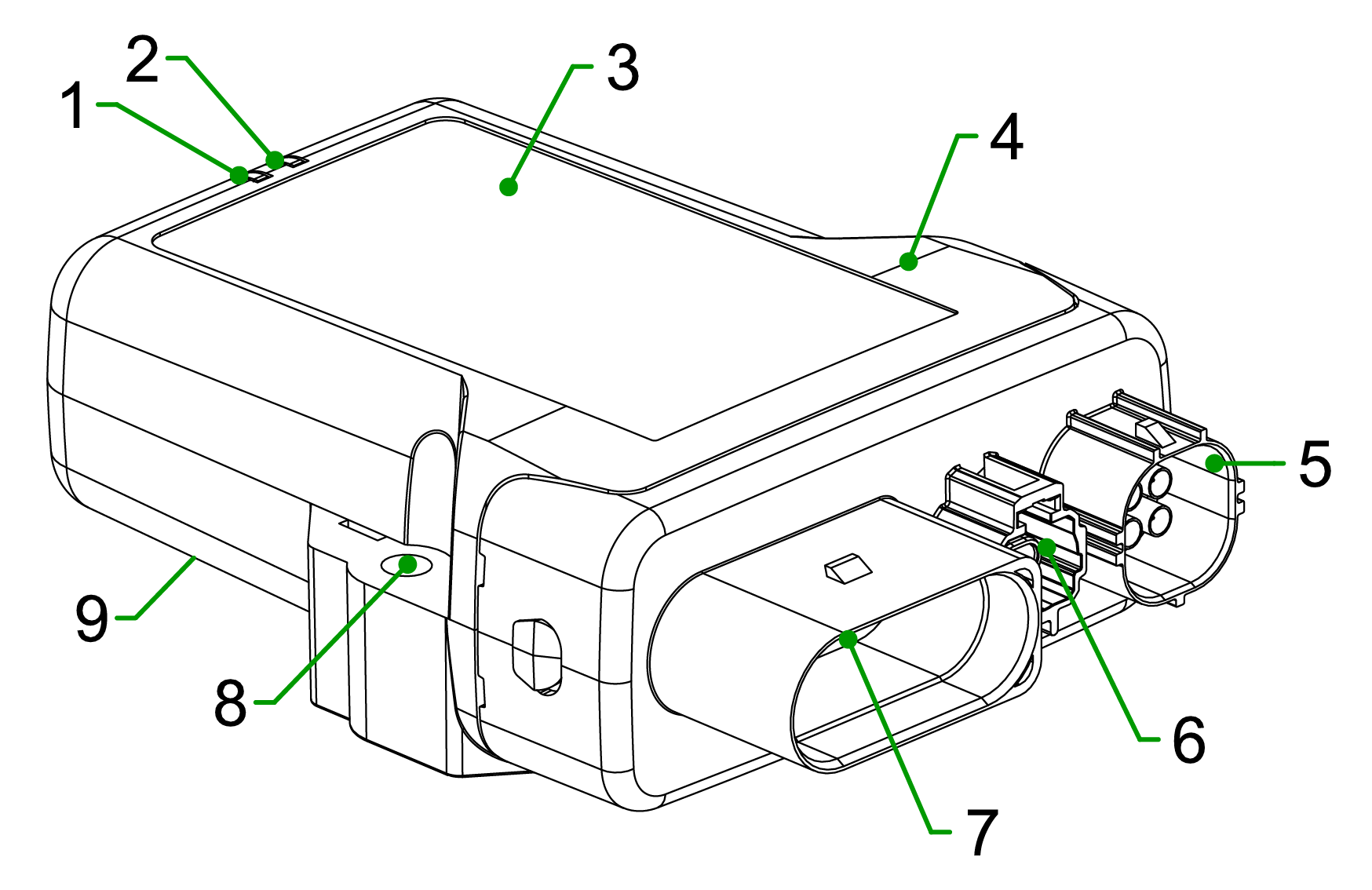
| # | Item | # | Item | |
|---|---|---|---|---|
| 1 | ON LED | 6 | Ethernet connector (SPE) | |
| 2 | STATUS LED | 7 | Main Plug connector | |
| 3 | Type label | 8 | Fixing holes | |
| 4 | Housing | 9 | Back-side label | |
| 5 | Antenna connector (WiFi/BLE, Cellular, GNSS) |
Type Label
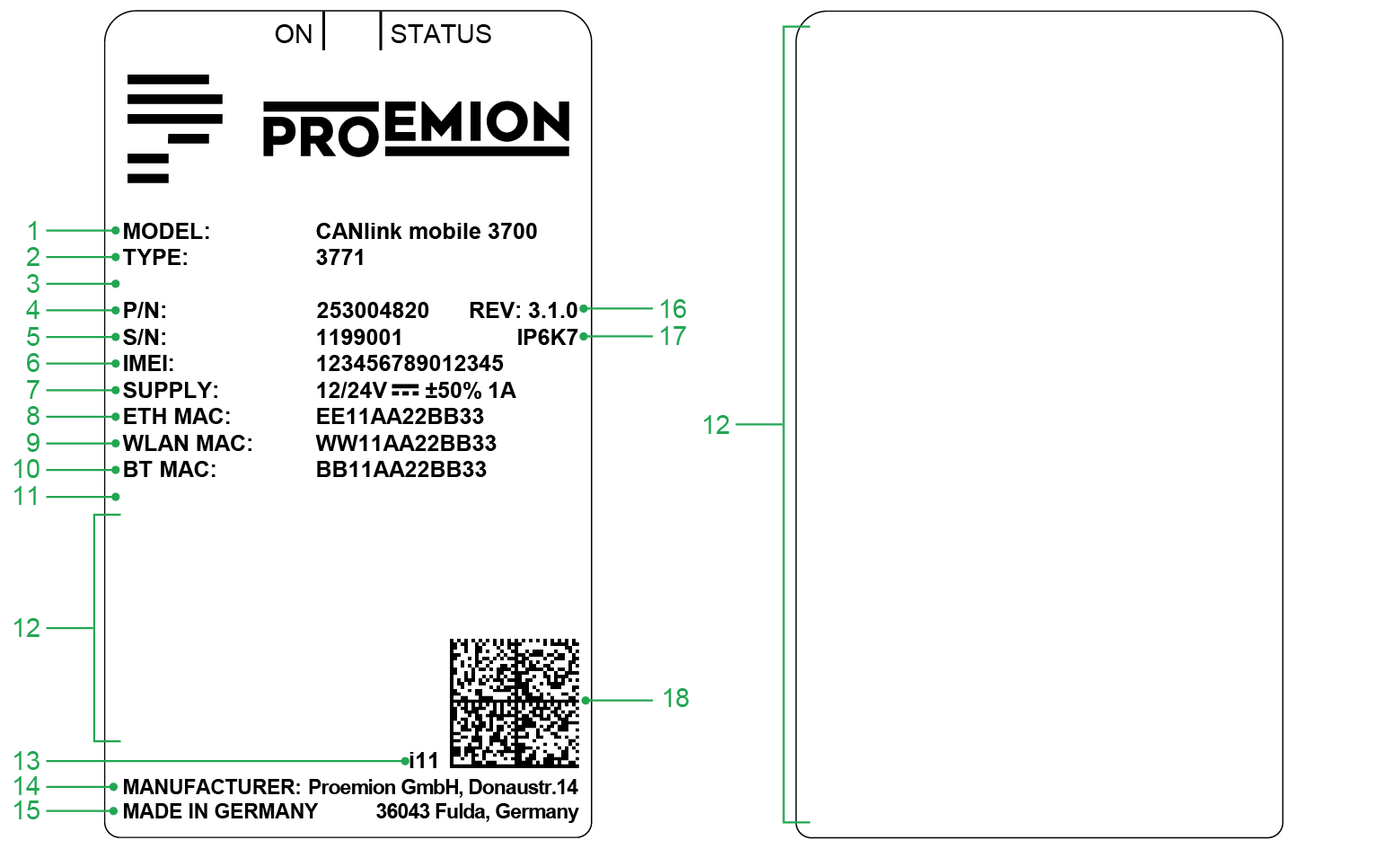
The device type labels are located on the front and the back side of the housing and contain important regulatory information, including:
| # | Item | # | Item | |
|---|---|---|---|---|
| 1 | Model designation | 10 | Bluetooth Low Energy (BLE) MAC address | |
| 2 | Type | 11 | Reserved | |
| 3 | Reserved | 12 | Area of Regulatory and Compliance markings | |
| 4 | Part number | 13 | Product Change Index | |
| 5 | Serial Number | 14 | Manufacturer address | |
| 6 | IMEI number | 15 | Country of origin | |
| 7 | Power supply | 16 | Hardware version | |
| 8 | Ethernet MAC address | 17 | Protection class | |
| 9 | WLAN MAC address | 18 | Traceability code |
Note
Do not use solvents on the type label, as they may remove or destroy product information. The type label must not be removed. Record the information on the type label in case it becomes damaged. This information is required for product setup and support purposes.
Traceability Code
The device type label includes a Data Matrix code that serves as the traceability code. It provides a machine-readable representation of the device identification data.
Example:
253004059000000000001815014(I)357520074597168(W)D4CA6E7D0CAA(B)D4CA6E7D0CA9(E)D4CA6E7D0CAB
| Item | Description | Length |
|---|---|---|
| Part number | 253004059 |
9 |
| Reserved | 00000000000 |
11 |
| Serial number | 1815014 |
7 |
(I) followed by the IMEI Number |
357520074597168 |
15 |
(W) followed by the WLAN MAC Address |
D4CA6E7D0CAA - only certain types |
12 |
(B) followed by the Bluetooth MAC Address |
D4CA6E7D0CA9 - only certain types |
12 |
(E) followed by the Ethernet MAC Address |
D4CA6E7D0CAB – only certain types |
12 |
Options that are not available for a specific type are not shown in the code.
Interfaces and Connectivity
Depending on the device type, the device provides the following interfaces:
- Cellular communication (4G/LTE)
- GNSS for positioning data
- Wi-Fi/BLE
- Ethernet (Single-Pair Ethernet via dedicated connector)
- CAN interface via main connector
External antenna connectors may be available for cellular communication and GNSS and Wi-Fi/BLE.
Some variants include an integrated battery for temporary backup in case of power failure.
The battery is not intended as a permanent power source.
These interfaces allow connection to external devices such as PCs, smartphones, or tablets for data transmission, visualization, and analysis.
Operating Modes
The device supports the following operating modes for wireless CAN data transmission via Wi-Fi and BLE:
- CAN-BLE interface – connection to a BLE central device
Environmental Conditions
The device is designed for use in industrial environments as well as in earth-moving machinery.
Protection class IP6K7 is achieved only when all connectors are properly sealed using appropriate connectors or protection caps.
For installation details, see: