Introduction
This manual describes Proemion SoftGateway version 3.x and its settings.
Proemion SoftGateway enables bidirectional CAN communication between local and remote CAN networks.
It routes messages in RealTime via the CAN interface of one CAN device to the CAN interface of another CAN device.
This way, a local application can connect to a remote machine by using two CAN devices: a (remote) CANlink mobile on the machine and a (local) gateway device connected to the application.
Note
Proemion SoftGateway can also be used as a driver for a "Diagnostics & Service Tool". See Service and Support to get in touch about this integration.
Use Cases
Proemion SoftGateway remotely bridges a CANlink mobile with a supported gateway device connected to the local application, e.g. a service tool, without requiring any changes to the service tool itself.
This setup can be used for proof-of-concept tests, configuring machine parameters, or sending files, all of which would otherwise require being on-site.
A service technician can observe the CAN messages received by a CANlink mobile with SoftGateway as follows: the messages received by the CANlink mobile are sent to a supported gateway device, e.g. a PCAN-USB, over the internet and transmitted through the CAN interface of the gateway device:

Other use cases include:
- Connecting two local CAN networks via SoftGateway, using the same type of gateway device, e.g. PCAN-USB, on each side. See Add and Configure Gateway Devices for setup instructions.
- Transferring files between a service tool and a CANlink mobile. See Transfer Optimization for how to configure the transfer behavior.
Comparing SoftGateway Versions 2.x and 3.x
- Version 3.x ships with predefined filter sets, so SoftGateway is ready to use with an initial operation set.
- Tool updates can now be checked manually via ? > Check for updates....
- Issues can be reported via ? > Report an issue..., which opens the Proemion Support Form, where support can be contacted directly.
Note
Both Remote Service Tool and SoftGateway work with RealTime connections to Proemion devices, but they serve different purposes: Remote Service Tool focuses on CAN bus data visualization for service and analysis, while SoftGateway enables bidirectional communication and file transfers between CAN networks.
Login
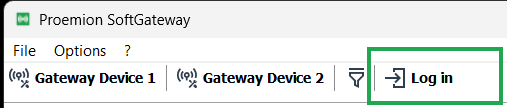
Logging in to the Proemion DataPlatform is supported via SSO:
Note
SSO login is a preliminary feature.
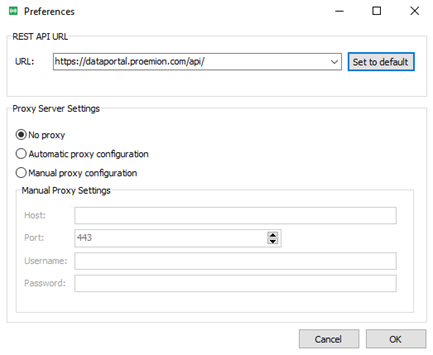
Proemion customers with a full white-label solution must configure their dedicated API address before logging in.
Go to Options > Preferences and set the dedicated REST API URL:
Logging in opens DataPortal in a browser, where the user signs in.
To change the login credentials, clear the browser cache first.
Once SoftGateway is configured and running, the Login/Logout action has no further effect on the tool itself: logging in is only required to retrieve the machine list and select the target of the remote connection.
SoftGateway shows an error if the target machine is not connected to DataPortal, or if a remote reset connection is applied.