Rental Management System
Rental Management System Integration Guide
This documentation describes how to integrate a Rental Management System (RMS) with the Proemion DataPlatform. It explains how to securely connect an RMS to the Proemion DataPlatform without additional hardware, using a single device and a single data source.
The following topics are covered:
- Integration Overview – Provides a high-level overview of the RMS use case and conceptual data flow.
- Basic Data Access Setup – Explains required roles, business unit setup, user permissions, and API client creation.
- Configuring Data Access – Describes how machine data signals are selected, configured, and retrieved as latest or historical values.
Integration Overview
This document provides a high-level overview of integrating a Rental Management System (RMS) with the Proemion DataPlatform.
It focuses on the use case, main objectives, and conceptual data flow, serving as a starting point before following the detailed setup and configuration guides.
Use Case Overview
Many rental companies want to visualize machine data — such as operating hours, GPS location, fuel level, and faults or alerts—directly within their Rental Management System (RMS).
Since the machines are already equipped with a Proemion telematics device (TCU), no additional hardware or retrofitting is required. The RMS connects directly to the Proemion DataPlatform via APIs, allowing multiple systems to consume the same data from a single OEM-approved TCU and centralized source.
Besides that, the OEM remains full control over the TCU and full access to the machine data to support their own use cases like Service Management or fleet-wide DataScience. For further information, refer to the DataScience Manual.
Basic Data Access Setup
This document describes the actors involved in the basic data access setup and outlines their responsibilities in the onboarding and integration process.
Actors and Responsibilities
Three main actors are involved in this process:
- OEM or Dealer
- Rental Company DataPlatform Admin
- Rental Management System (RMS) Admin
Each actor is responsible for a specific part of the onboarding and integration flow.
Actor Responsibilities in Detail
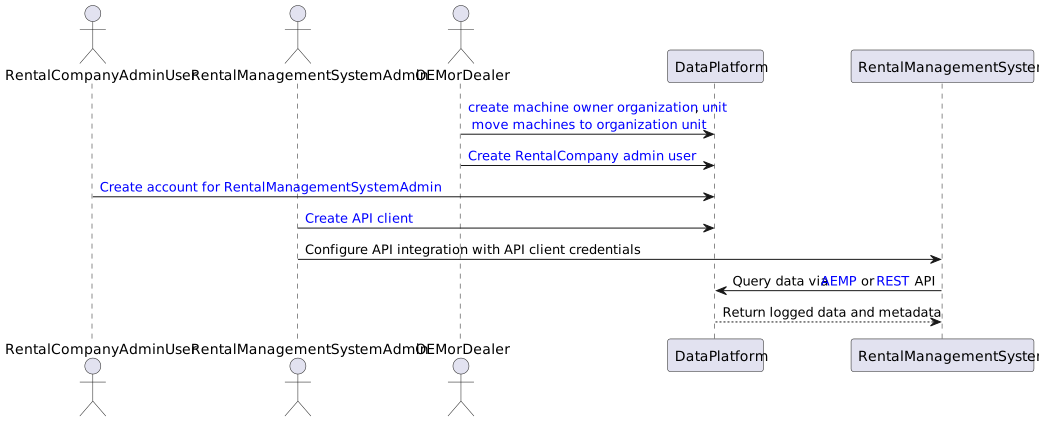
OEM or Dealer
The OEM or Dealer originally supplied the machine with a Proemion TCU.
Note
Ensure that machines are assigned to the correct business unit on the DataPlatform so the rental company can access them.
To do so, proceed as follows:
-
Create a Machine Owner Business Unit (BU). This BU represents the rental company that owns the machines.
-
Assign Machines to the BU by moving the machines into the machine owner BU.
-
Create a Rental Company DataPlatform Admin account by creating a user account for the rental company admin in the machine owner BU on the DataPortal.
This ensures that the rental company is onboarded and has access to its own machines.
Rental Company DataPlatform Admin
The rental company owns the machines and controls access to them. The Rental Company DataPlatform Admin is tasked with this job.
Note
The Rental Company DataPlatform Admin is responsible for granting the RMS Admin user access to the machines and the required data within the DataPortal.
To do so, proceed as follows:
- Create a user account for the RMS Admin user. The account must be created in the same Business Unit (BU) as the machines.
-
Assign the following minimum required Permission Set:
- Machines:View
- Location:Latest
- Organization:Admin
This guarantees that the RMS Admin user will be able to create API clients and access machine data and location.
Rental Management System (RMS) Admin
The RMS Admin is responsible for the technical integration between the RMS and the DataPlatform.
To perform the integration, proceed as follows:
- Create an API Client and generate a Client ID and Client Secret.
- These credentials are used by the RMS to authenticate with and access the Proemion APIs.
The RMS retrieves machine data via the following APIs:
- AEMP API - provides standardized telematics data
- REST API - provides detailed signals and time-series data
This ensures that the RMS can display the same live and historical data as the Proemion DataPlatform inside its own UI.
Configuring Data Access
This document describes how a connected system, such as a Rental Management System (RMS), selects and retrieves machine data signals from the Proemion DataPlatform. The workflow involves the machine owner specifying which signals can be accessed, while the connected system determines how those signals are retrieved and used.
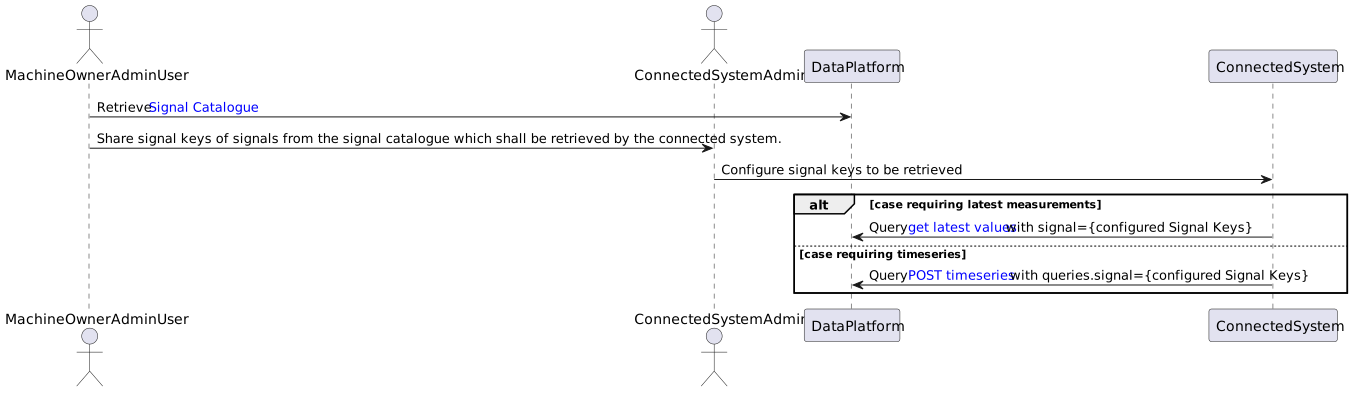
Signal Selection Workflow and Data Retrieval Workflow
Machine Owner Retrieves the Signal Catalog
The Signal Catalog lists all signals available to the machine owner account. Each signal has a unique signal key.
Example Signal Keys:
value.common.machine.hours.operation.totalvalue.common.machine.distance.totalvalue.common.engine.fuel.level
The rental company shares the selected signal keys with the RMS Admin.
RMS Admin Configures Signals in the RMS
The RMS Admin configures the selected signal keys within the RMS configuration. These signal keys are stored and mapped to the corresponding functional elements of the RMS, such as dashboards, reports, alerts, or maintenance views. This mapping defines how the incoming telematics data is interpreted and presented to end users within the Rental Management System.
RMS Retrieves Data via API
The RMS retrieves machine data from the Proemion DataPlatform via the APIs using two main approaches, depending on the required data granularity.
-
Latest Value (Current State)
The RMS uses the latest-value endpoint to retrieve the most recent value of a signal, such as the current fuel level or the last known GPS location of a machine. -
Historical Data (Time Series)
The RMS uses the history endpoint to retrieve historical signal values over a defined time range, for example to analyze engine hours over the last six months, build reports, identify trends, or support maintenance planning.
Service and Support
The latest versions of the drivers, software, firmware, and documentation are available at Document Library.
Do you need help or want to report a bug?
Visit Proemion for more information, or raise a ticket via Support.
Firmware Updates and Support
To ensure the best performance and security of your devices, we strongly recommend always installing the latest firmware provided by Proemion.
Please note:
We do not provide technical support for issues caused by outdated firmware.
Errors resulting from outdated firmware are considered non-qualified errors and are not covered by warranty or support.
Regular firmware updates are essential to maintaining the functionality of your devices.
If you need assistance with the update process, please contact our Service and Support.
For more information on the Firmware Update, check the device manual of your device at the Document Library.