Configuring Data Access
This document describes how a connected system, such as a Rental Management System (RMS), selects and retrieves machine data signals from the Proemion DataPlatform. The workflow involves the machine owner specifying which signals can be accessed, while the connected system determines how those signals are retrieved and used.
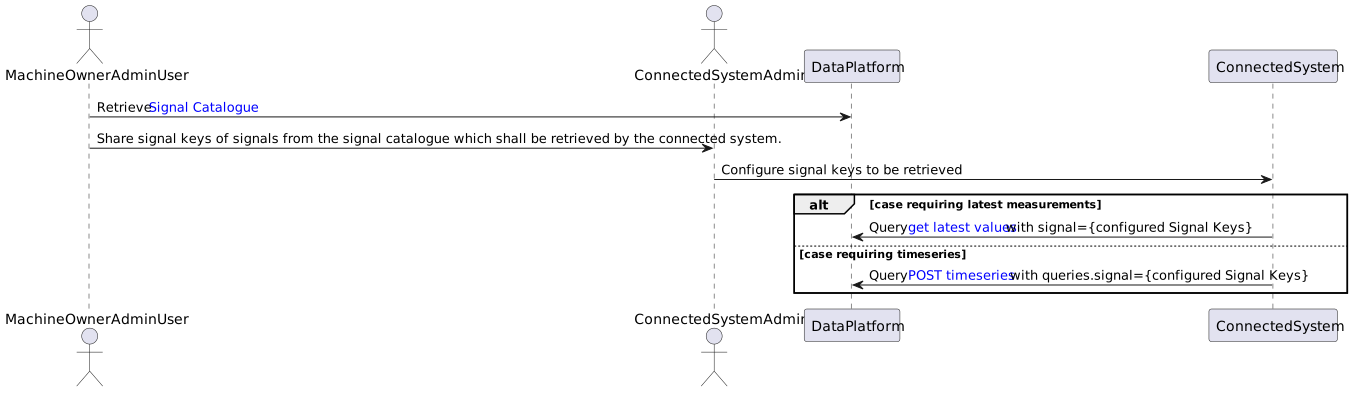
Signal Selection Workflow and Data Retrieval Workflow
Machine Owner Retrieves the Signal Catalog
The Signal Catalog lists all signals available to the machine owner account. Each signal has a unique signal key.
Example Signal Keys:
value.common.machine.hours.operation.totalvalue.common.machine.distance.totalvalue.common.engine.fuel.level
The rental company shares the selected signal keys with the RMS Admin.
RMS Admin Configures Signals in the RMS
The RMS Admin configures the selected signal keys within the RMS configuration. These signal keys are stored and mapped to the corresponding functional elements of the RMS, such as dashboards, reports, alerts, or maintenance views. This mapping defines how the incoming telematics data is interpreted and presented to end users within the Rental Management System.
RMS Retrieves Data via API
The RMS retrieves machine data from the Proemion DataPlatform via the APIs using two main approaches, depending on the required data granularity.
-
Latest Value (Current State)
The RMS uses the latest-value endpoint to retrieve the most recent value of a signal, such as the current fuel level or the last known GPS location of a machine. -
Historical Data (Time Series)
The RMS uses the history endpoint to retrieve historical signal values over a defined time range, for example to analyze engine hours over the last six months, build reports, identify trends, or support maintenance planning.