Basic Data Access Setup
This document describes the actors involved in the basic data access setup and outlines their responsibilities in the onboarding and integration process.
Actors and Responsibilities
Three main actors are involved in this process:
- OEM or Dealer
- Rental Company DataPlatform Admin
- Rental Management System (RMS) Admin
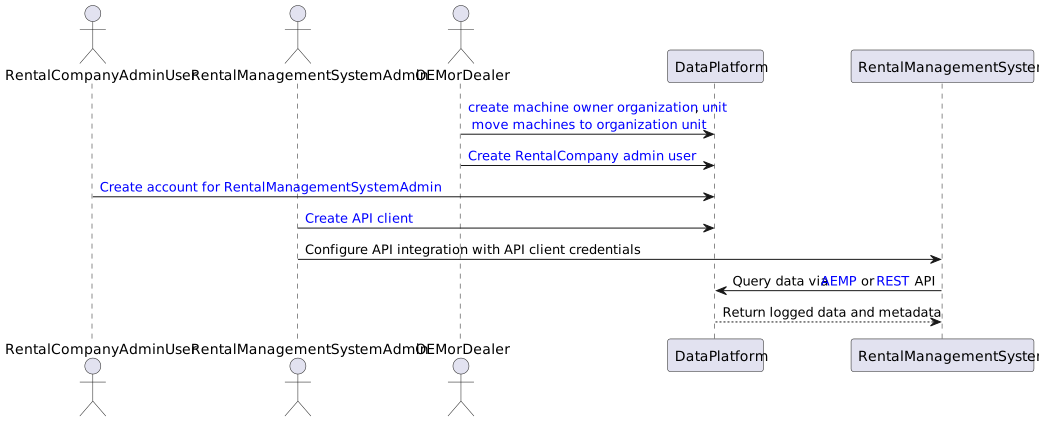
Each actor is responsible for a specific part of the onboarding and integration flow.
Actor Responsibilities in Detail
OEM or Dealer
The OEM or Dealer originally supplied the machine with a Proemion TCU.
Note
Ensure that machines are assigned to the correct business unit on the DataPlatform so the rental company can access them.
To do so, proceed as follows:
-
Create a Machine Owner Business Unit (BU). This BU represents the rental company that owns the machines.
-
Assign Machines to the BU by moving the machines into the machine owner BU.
-
Create a Rental Company DataPlatform Admin account by creating a user account for the rental company admin in the machine owner BU on the DataPortal.
This ensures that the rental company is onboarded and has access to its own machines.
Rental Company DataPlatform Admin
The rental company owns the machines and controls access to them. The Rental Company DataPlatform Admin is tasked with this job.
Note
The Rental Company DataPlatform Admin is responsible for granting the RMS Admin user access to the machines and the required data within the DataPortal.
To do so, proceed as follows:
- Create a user account for the RMS Admin user. The account must be created in the same Business Unit (BU) as the machines.
-
Assign the following minimum required Permission Set:
- Machines:View
- Location:Latest
- Organization:Admin
This guarantees that the RMS Admin user will be able to create API clients and access machine data and location.
Rental Management System (RMS) Admin
The RMS Admin is responsible for the technical integration between the RMS and the DataPlatform.
To perform the integration, proceed as follows:
- Create an API Client and generate a Client ID and Client Secret.
- These credentials are used by the RMS to authenticate with and access the Proemion APIs.
The RMS retrieves machine data via the following APIs:
- AEMP API - provides standardized telematics data
- REST API - provides detailed signals and time-series data
This ensures that the RMS can display the same live and historical data as the Proemion DataPlatform inside its own UI.