CANlink mobile 3600
Introduction
In this chapter you will learn how to:
- reduce the number of CAN messages received by the TCU for further processing, using on-change and optionally cyclic input downsampling
- consider signal profiles to help with deciding the appropriate downsampling method
- use DOD versioning
Signal Profile
Suppose we have a hydraulic excavator with a 500 liter fuel tank capacity and an average fuel consumption of 20 liters per hour. If the smallest change measurable by the fuel level signal 1%, a new fuel level value (reduced by 1% every time) should be sent to the TCU every about 10 minutes to 20 minutes for when the engine is operating at high power or idling respectively.
We define the term Signal Profile as the time difference Δt, and the magnitude difference |Δx|, between value changes of a signal (i.e. the signal's value change distribution).
In the case of the fuel level described above:
Δt-min = 10 minutes,Δt-mean = 15 minutes,Δt-max = 20 minutes(unless refueling)|Δx-min| = |Δx-mean| = |Δx-max| = 1%(unless refueling)
Summarizing in a concise manner, the profile of the fuel level is such that it decreases by 1% every 10 to 20 minutes during machine operation.
Info
Since the signal resolution is 1% per bit, and we are interested in seeing changes of 1%, any complexity is avoided. Cases where the signal resolution does not match the required observable minimum change, will be looked at in another chapter.
Note
In a real system, the fuel level would probably fluctuate up and down and even change by more than 1% at a time due to sensor inaccuracy. We will explore how to deal with such situations in a later chapter.
On-Change Downsampling
In the previous chapter we saw how the fuel_level signal, which is transmitted on the CAN bus once per second, can be downsampled to log one CAN message per minute, saving some significant cost.
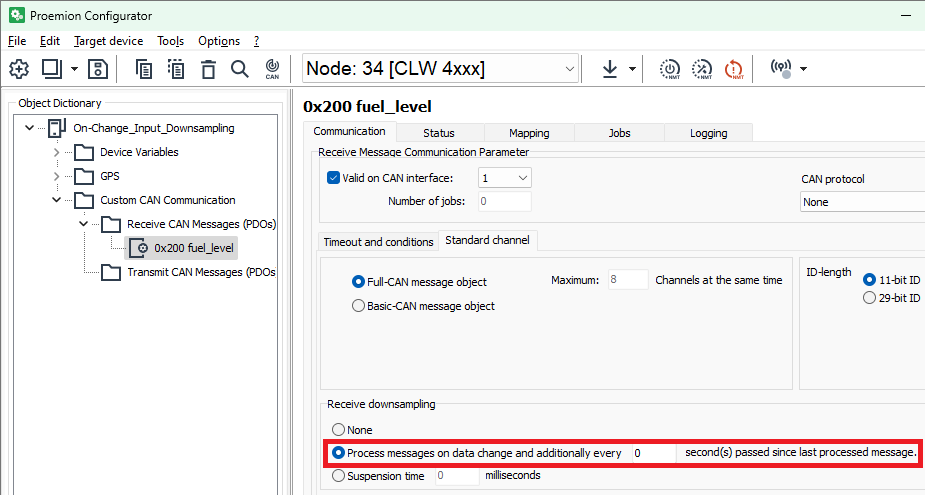
Due to the signal's profile however, logging at a rate of once a minute is probably more than actually needed. Using on-change downsampling, the TCU can be configured to receive the CAN message for further processing only when the data bytes change, i.e. when the value of the signal changes.
Use the DOD created in the previous chapter and change the downsampling method.
DOD Versioning
Before proceeding with sending the DOD to the TCU and testing the new functionality, it is important to emphasize the need for versioning. With a single TCU, it is easy to know which DOD has been written to it, but it can be a daunting task to manage 10,000 TCUs without DOD versioning.
The value of the Device Configuration Version String parameter is written to every log file transmitted to the DataPlatform. Every time the TCU sends some data to the DataPlatform, it is known which DOD was used to log the data.
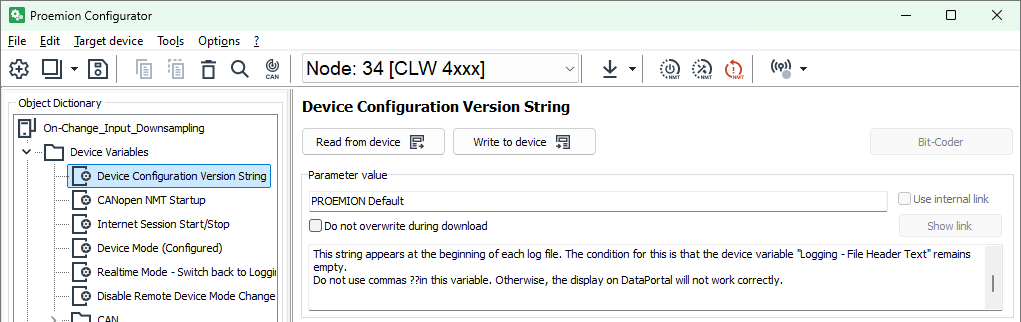
The DOD version of the template DOD is set to PROEMION Default. Let's change it to 1a.
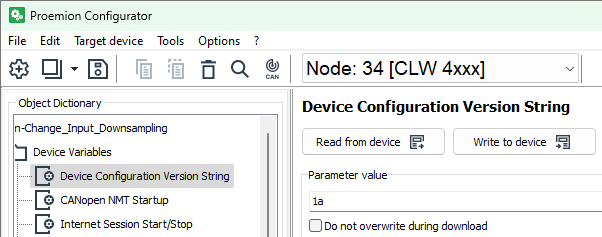
A simple DOD versioning strategy is to use:
#afor Alpha versions, intended only for the engineers developing the DOD#bfor Beta versions, intended to be tested more widely, usually in a small subgroup of the whole fleet#rfor normal releases, intended to be deployed to the whole fleet
where # is always incrementing.
Tip
Save the DOD as a different file before even starting making any changes in order not to overwrite the previous one by mistake.
Send CAN Data
In the previous chapter we learnt how to send the DOD via CAN to the TCU. Let's do the same for version 1a and prepare some test data.
We will send the fuel_level values of 100%, 99%, 98%, and back to 100% in quick succession.

https://dataportal.proemion.com > Reports > Reporting Tools > Plots can be used to view the logged points.
Warning
If no data appears on the DataPortal, it is probably because the TCU has not yet sent the log file to the DataPlatform. Use the Configurator to set parameter Logging - Send File Command as described in the previous chapter.
Tip
To verify new functionality, it is often useful to send a single CAN message followed by setting the Logging - Send File Command and inspecting the result on the DataPortal machine page.
DOD Version Inspection
The date and time each DOD was installed to the TCU can be seen on the DataPortal.
https://dataportal.proemion.com > Settings > Communication Unit Management > Firmware and Configuration Updates > Details