CANlink® wireless 4000 Datasheet
Introduction
In the following, you find the Technical Datasheet for the CANlink® wireless 4000 series.
Rugged Short Range Devices for Industrial & Mobile Equipment
Material handling equipment (EN 12895), earthmoving machinery (ISO 13766-1), industrial systems (EN 61000-6-2), and road-approved work machines (ECE R10) operate in demanding conditions. The CANlink® wireless 4000 is a rugged short range device engineered for exactly these environments.
Key Advantages
- Certified with international radio type approvals for almost worldwide market access, see Certifications.
- Exceeds regulatory immunity requirements in multiple EMC and interference resilience categories.
- Engineered and qualified for extreme environmental conditions including temperature, climate exposure, mechanical shock, vibration, ingress protection, and long-term operational reliability (EN 60068-2 series).
- Optimized for harsh industrial and off-highway environments with stable performance under continuous operation (ISO 16750-2).
For the configuration and mounting of the device and functional descriptions, please read the device manual: CANlink wireless 4000 Device Manual.
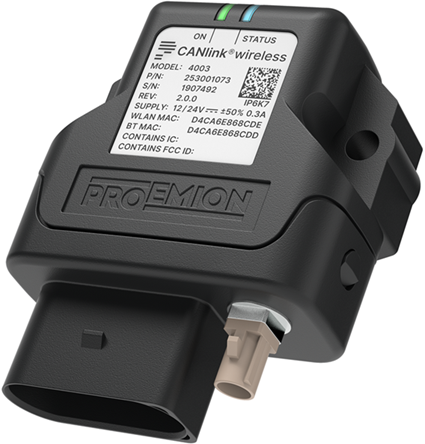
All assembly drawings can be found in the Annex.
Datasheet
General
| Type | Part number |
|---|---|
| 4001 | 253001072 |
| 4003 | 253001073 |
Mechanical Specification
The following mechanical specifications apply to both types:
| Parameter | Value |
|---|---|
| Dimensions width / height / depth (mm) | 67 / 84 / 32 |
| Degree of protection | IP6K7 (with mounted vehicle plug) |
| Temperature range | -40 − +80 °C / -40 − +176 °F |
| Weight | ≤ 80 g |
Electrical Specification
The following electrical specifications apply to both types:
| Parameter | Value |
|---|---|
| DC power supply | 6 V -- 36 V |
| Power input at 24 V (Operating Ø) | < 100 mA |
| Power input at 24 V (Sleep Mode) | < 1 mA |
| Status LEDs (2-colors) | 2 (RGB) |
Processor and Memory
The following specifications regarding the processor and memory apply to both types:
| Parameter | Value |
|---|---|
| Processor | ARM® Cortex M7 based STM32 (400 MHz) |
| Program Flash | 1024 kB |
| Data Flash | 16 MB |
| FRAM | 8 KB |
| SRAM | 564 KB |
CAN Specification
The following CAN specifications apply to both types:
| Parameter | Value |
|---|---|
| CAN1 (2.0 A/B) | ISO 11898-2 |
| CAN2 (2.0 A/B) | ISO 11898-2 |
| CANopen, Layer 2 | ✓ |
| Customized CAN protocols | On request |
Wireless Connectivity
The following specifications regarding wireless connectivity apply to both types:
| Parameter | Value |
|---|---|
| Wi-Fi | - IEEE 802.11 a/b/g/n - Dual band: 2.4 GHz / 5 GHz - Support of Mini-Access-Point mode - Security: WPA2 |
| Bluetooth | - Classic Bluetooth Version: 2.1 + Enhanced Data Rate (EDR) - Serial Port Profile (SPP) - Bluetooth Low Energy (BLE) V5.0 with long range support |
| Range | Each wireless interface is tested to verify full performance over a range of 100m. Longer range may be expected under certain environmental conditions, and local weather and choice of antenna can affect range. |
Connectors
Main Connector
The following specifications regarding the main connector apply to both types:
| Parameter | Value |
|---|---|
| Main Connector | Microtimer II 14-Pin |
| Inputs (analog) | 1x D/A-IN (CL15), 2x A-IN (0 -- 15 VDC) (Resolution 12 Bit) |
| Outputs (digital) | 1x D-OUT (6 -- 36 VDC / 500 mA) incl. Feedback |
Antenna
The following specifications regarding antenna apply to the types as follows:
| CANlink® wireless | 4001 | 4003 |
|---|---|---|
| Antenna Connector | internal | external (FAKRA I coded) |
More detailed information can be found in the CANlink wireless 4000 Device Manual's Annex.
Software and Accessories
Software and Web Interface
The following Proemion software applies to both types:
- Remote Service Tool
- Proemion CAN Device Monitor
- Proemion Configurator
- Proemion Tools CD (Download Center)
Accessories
The following accessories apply to both types:
| Parameter | Value |
|---|---|
| MT II socket 14-pin, COD.1, open, 30 cm | 136000188 |
| MT II socket 14-pin, COD.1, open, 2 m | 136000198 |
| CLW4K Starter Cable 6open 2dsub 1pw 2 m | 136000197 |
| CANlink® Connector Kit | 132600031 |
| Mounting kit M6 Enclosure GH0806 | 141000021 |
| ANT WLDB DA 2M0 FAKRA-I FA (only available to type 4003) |
157000126 |
Launch Kit
The CANlink® wireless 4000 Launch Kit with part number 253000187 is available for both types.
For a list of the included material in the Launch Kit, see Launch Kit.
Bridge Sets
The following bridge sets apply to the types as follows:
| CANlink® wireless | 4001 | 4003 |
|---|---|---|
| CANlink® wireless 4000 Bridge (includes two devices of the same model) | 253001193 | 253001194 |
Info
Both devices are pre-configured in the factory to connect to each other using a Bluetooth connection.
Certifications
The following certifications apply to both types.
For a full list of countries where CANlink® wireless 4000 devices have a radio type approval/certification, refer to our Download Center under: 01_Proemion_Devices > 08_CANlink wireless 4000 > 01_Documentation > CANlink wireless 4003_4001 Type Approvals Country List.pdf.
| Parameter | Value |
|---|---|
| CE (EU) | ✓ |
| FCC (US) | ✓ |
| E1 (ECE R10 Type Approval) | ✓ |
| ISED (Canada) | ✓ |
| ACMA/R-NZ (Australia, New Zealand) | ✓ |
| ICASA (South Africa) | ✓ |
| TELEC (Japan) | ✓ |
| KC (Republic of Korea) | ✓ |
Ruggedness Standards
The following standards apply device-wide to all CANlink® wireless 4000 types.
| Standard | Scope |
|---|---|
| EN 12895 | Material handling equipment |
| ISO 13766-1 | Earth-moving machinery |
| EN 61000-6-2 | Electromagnetic compatibility (EMC) - immunity for industrial environments |
| ISO 16750-2 | Road vehicles - environmental conditions and testing for electrical and electronic equipment |
Service and Support
The latest versions of the drivers, software, firmware, and documentation are available at Document Library.
Do you need help or want to report a bug?
Visit Proemion for more information, or raise a ticket via Support.
Firmware Updates and Support
To ensure the best performance and security of your devices, we strongly recommend always installing the latest firmware provided by Proemion.
Please note:
We do not provide technical support for issues caused by outdated firmware.
Errors resulting from outdated firmware are considered non-qualified errors and are not covered by warranty or support.
Regular firmware updates are essential to maintaining the functionality of your devices.
If you need assistance with the update process, please contact our Service and Support.
For more information on the Firmware Update, check the device manual of your device at the Document Library.
Annex - Assembly Drawings
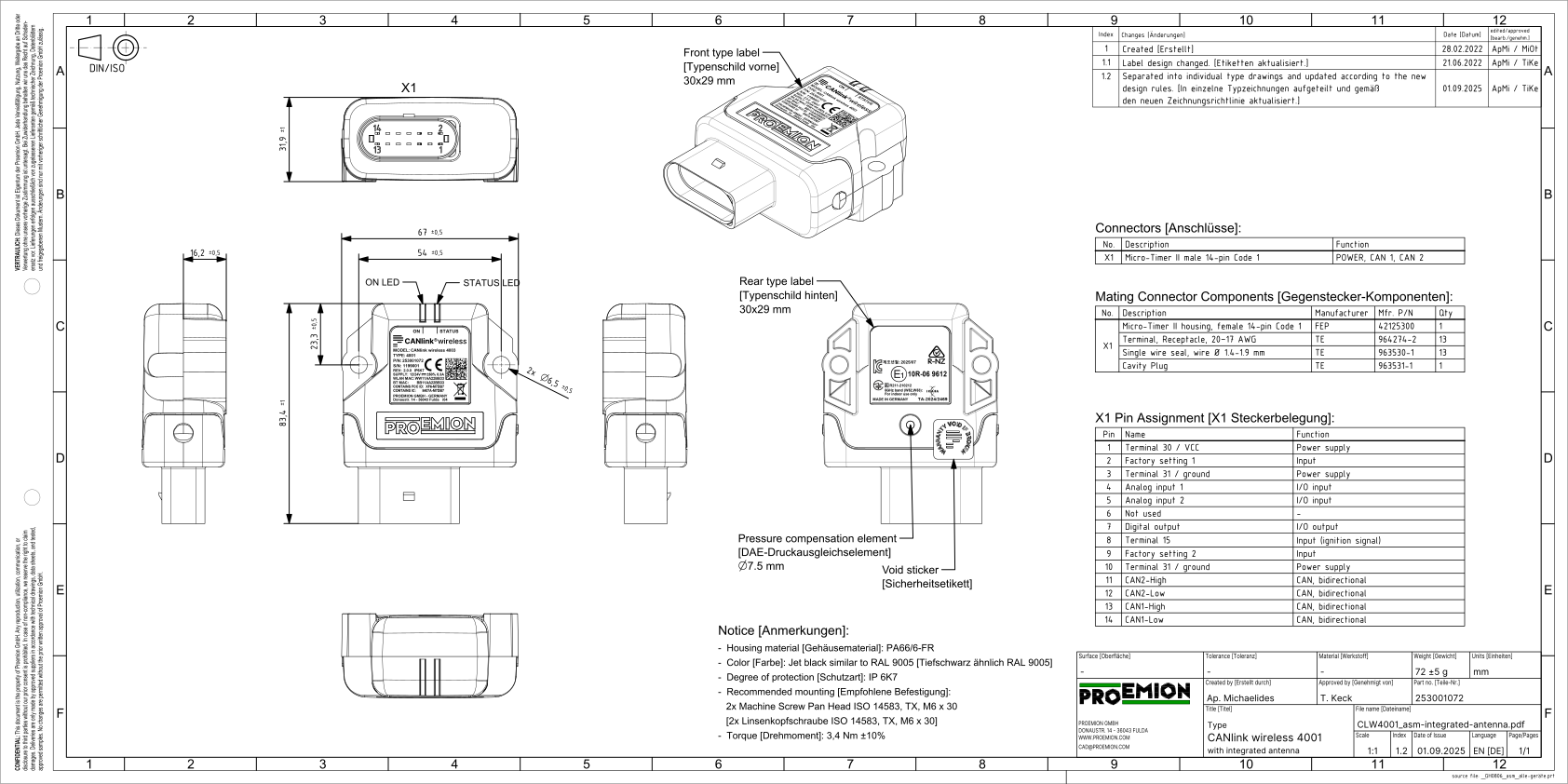
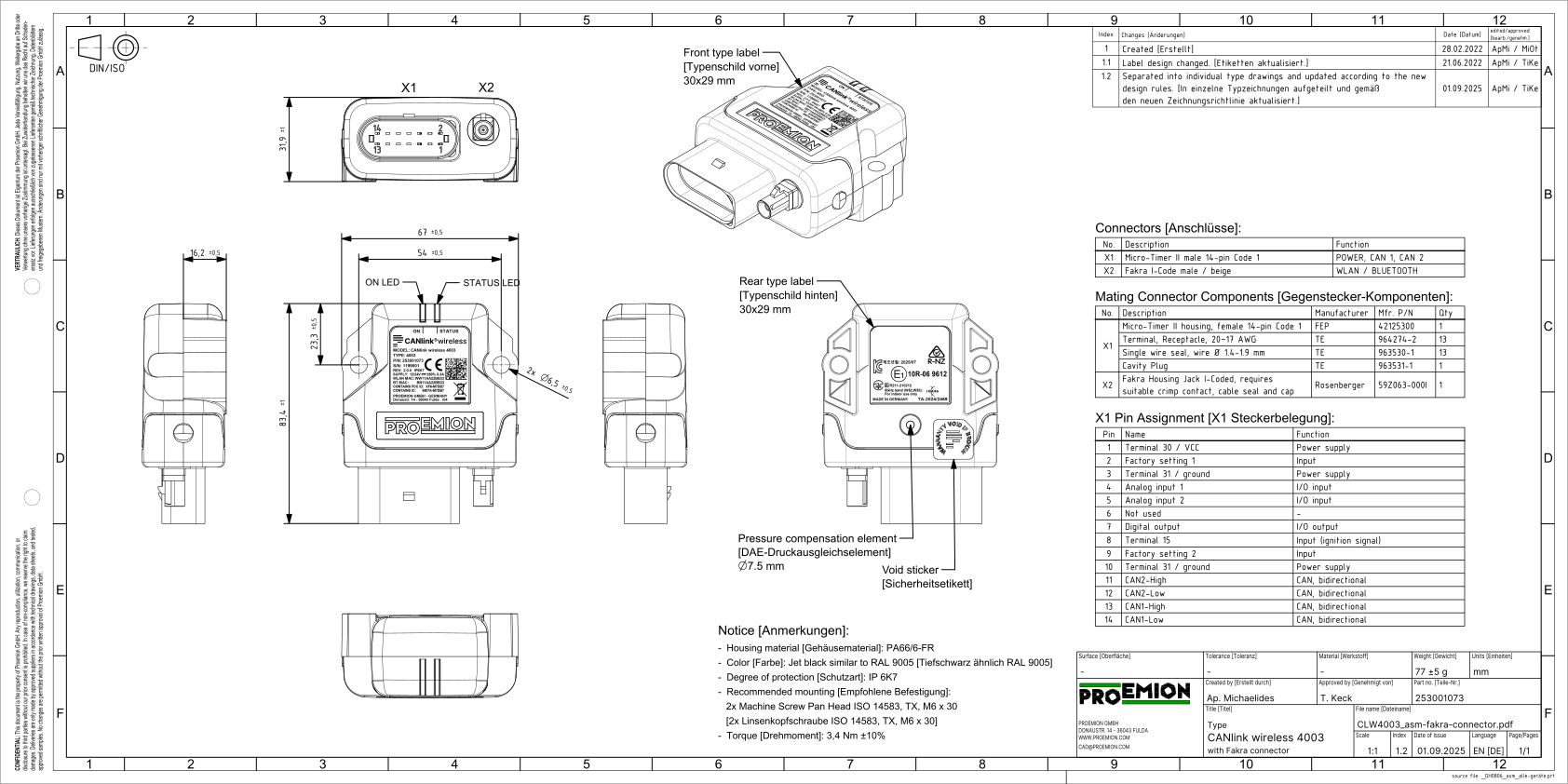
This chapter contains the assembly drawings of the two available types of the CANlink® wireless 4000, including their dimensions, connector interface, and pin assignment.
Type 4001 (internal antenna)
Type 4003 (external antenna connector)
PDF files of the assembly drawings are available in the Download Center under:
01_Proemion_Devices > 08_CANlink wireless 4000 > 01_Documentation > Drawings