Proemion Accessories
Proemion Accessories
This manual lists the accessories and tools that can be used for several Proemion devices. It covers:
CANlink® mobile Opening Tool
The CANlink® mobile Opening Tool (part number 157012001) is especially designed for opening a CANlink mobile device in a GH1209 housing, recognizable by the square holes on the mounting tabs.
You can order it at Proemion or print it yourself, see References.
Note
Do not use the tool for any other housings, even if they appear similar.
How to open CANlink® mobile housing
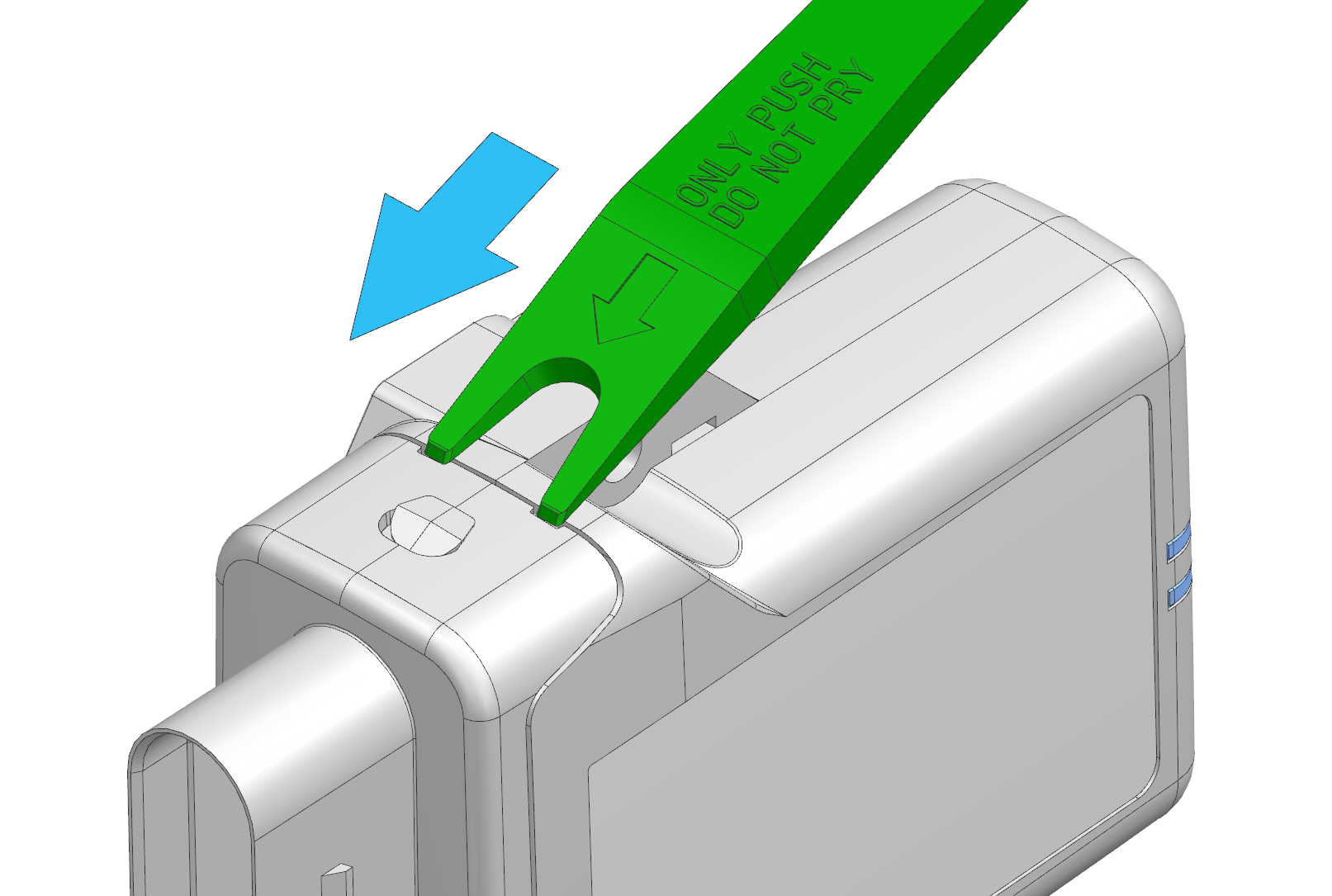
- Insert the tool into the appropriate slots of the housing.
- Push the tool in the direction of the arrow until it clicks.
- Repeat the procedure on the opposite side.
- Pull out the lid including the PCB.
Note
Do not pry with the tool — this may damage the tool.
Gently remove the lid to avoid damaging sensitive internal components.
Tutorial video
Watch the video to see how it works:
References
You will find the following reference material in the Download Center under: 01_Proemion_Devices > 90_Accessories
-
3D file (STL) for 3D printing
-
3D file (STEP) for customer modification
-
Drawing with recommended 3D printing settings
-
Tutorial video “How to open a CANlink mobile housing”
External Roof Antenna
The External roof antenna, LTE/GNSS/Wi-Fi, 3 m cable, HFM-Quad connector (Z-code) (part number 157000136) is compatible with CANlink® mobile 3700 devices with an external antenna connector (Housing Form B/D). See Available Models and Types for available model types.
Technical Specifications
The following tables list the antenna's electrical, mechanical, and environmental specifications.
Cellular
| Parameter | Value |
|---|---|
| Standards | 5G, 4G, 3G and 2G |
| Frequency range (Peak Gain) | 617-960 MHz (~3.1 dBi) 1427-2690 MHz (~2.7 dBi) 3300-5000 MHz (~0.9 dBi) 5150-5925 MHz (~-0.4 dBi) |
The antenna's broadband cellular design covers 2G to 5G frequency ranges; CANlink® mobile 3700 itself uses 4G LTE Cat 1bis.
Wi-Fi/ISM
| Parameter | Value |
|---|---|
| Standards | Wi-Fi, BT, ZigBee, ISM |
| Frequency range (Peak Gain) | 2410-2490 MHz (~-0.2 dBi) 4920-5925 MHz (~1.7 dBi) 5925-7125 MHz (~1.6 dBi) |
GNSS
| Parameter | Value |
|---|---|
| Standards | GPS/QZSS/Galileo, GLONASS |
| Frequency range (Passive Gain) | GPS/QZSS/Galileo: 1575.42 MHz (~3.6 dBi) GLONASS: 1598-1606 MHz (~3.6 dBi) |
Mechanical
| Parameter | Value |
|---|---|
| Mounting | Screw mount, M18 x 1, max. 5 Nm tightening torque |
| Ground plane | Independent - no metallic mounting surface required |
| Dimensions (W x L x H) | 80 x 74 x 25.6 mm |
| Housing material | PC/ASA |
| Radome color | Black |
Environmental
| Parameter | Value |
|---|---|
| Operating/storage temperature | -40 °C to +85 °C |
| Protection level | IP67, IP69 |
| Substance compliance | RoHS |
Mount the Antenna
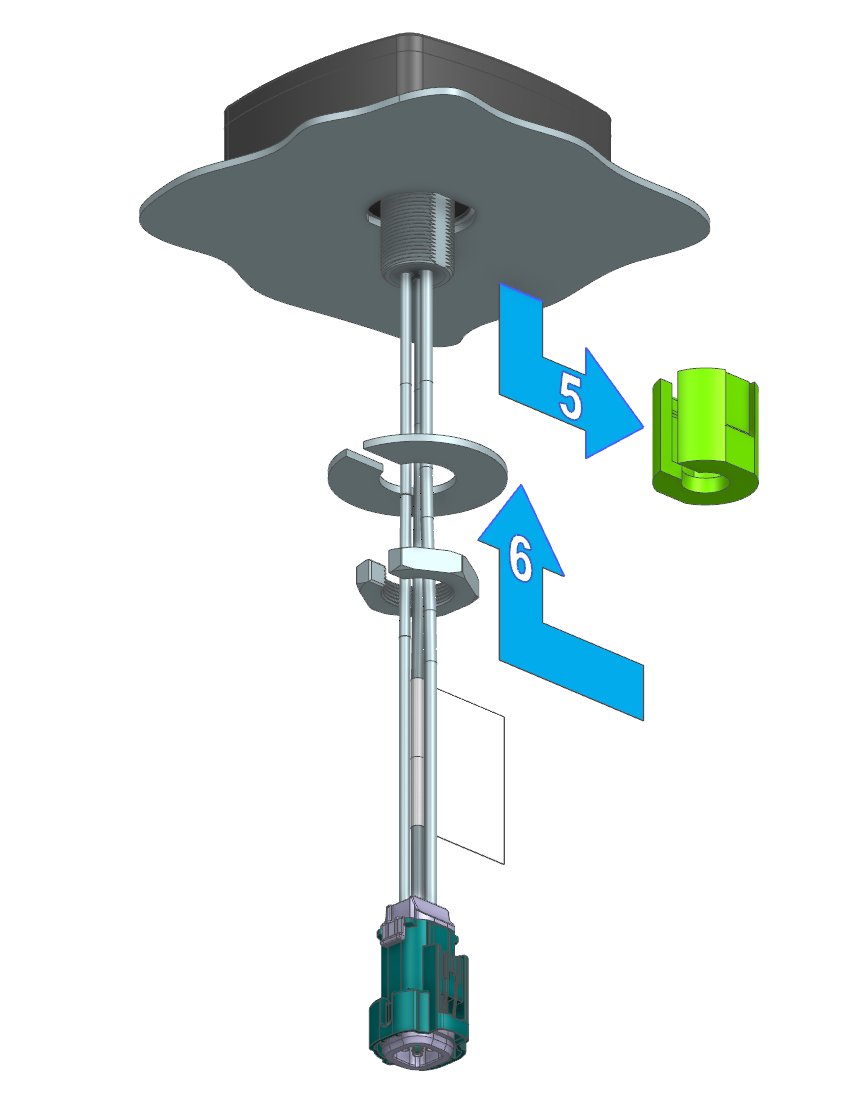
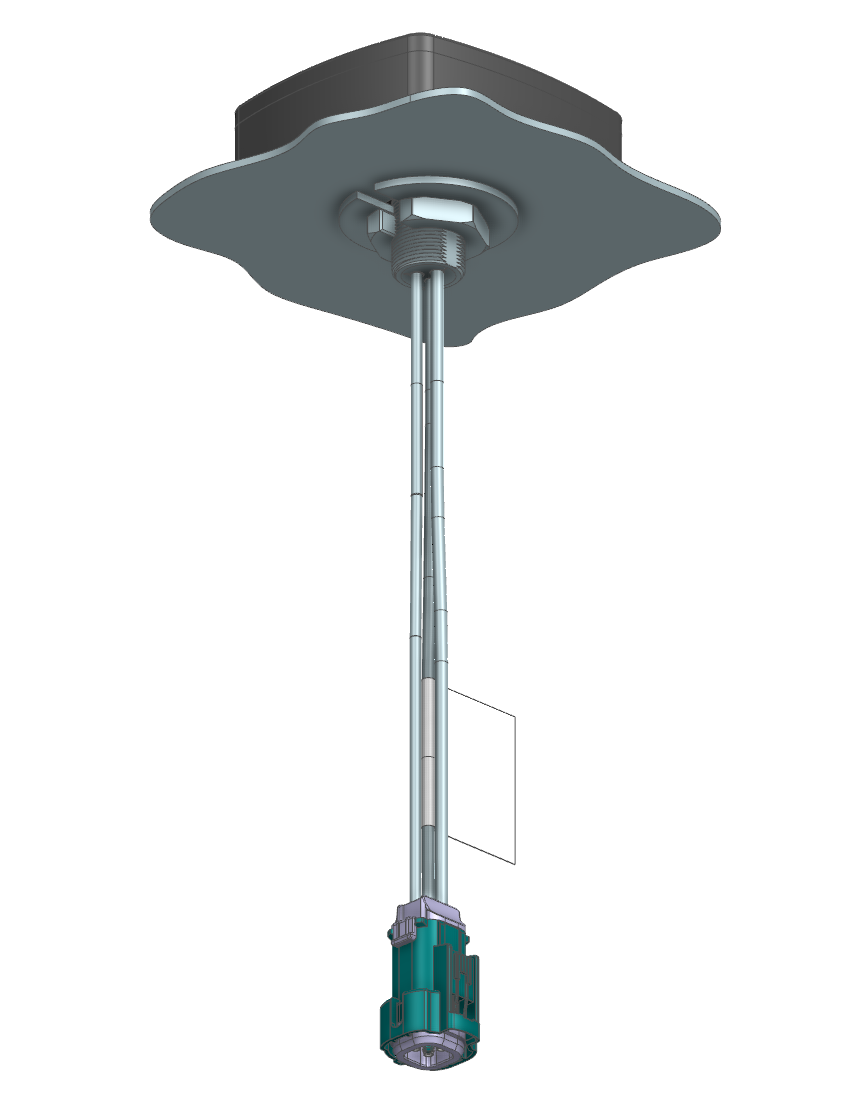
The antenna is designed for permanent mounting through a panel, e.g. a vehicle roof, using its M18 x 1 threaded stud, washer, and nut. Since the antenna's connector is wider than the stud itself, the Antenna Mounting Aid (part number 157012002) is required during installation to center the antenna in an oversized mounting hole, for mounting surfaces between 0.6 and 12 mm thick.
Preparation: Make the mounting hole according to the following detail, optionally including a 24 mm flat as an anti-rotation feature that matches a corresponding flat on the Antenna Mounting Aid.
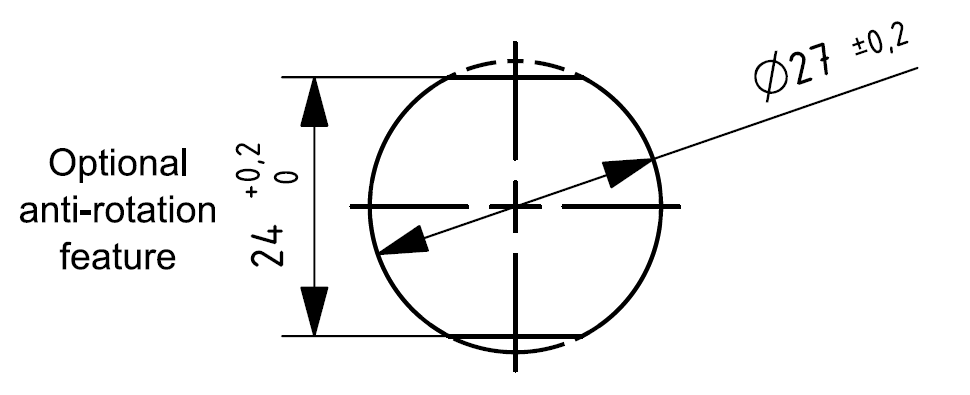
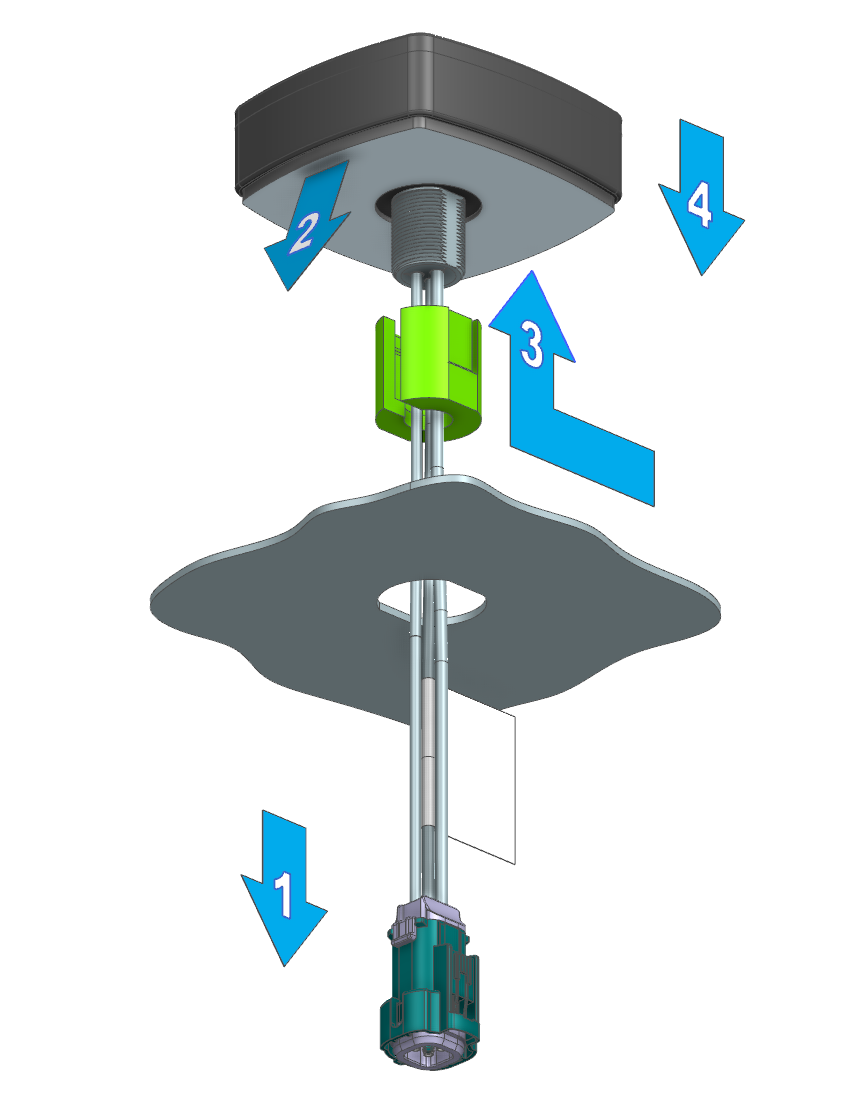
To mount the antenna, proceed as follows:
- From the outside, feed the antenna's connector and cable through the mounting hole.
- Remove the protective film from the antenna's foam sticky pad.
- Feed the cable through the Antenna Mounting Aid's slot, then fit the Antenna Mounting Aid onto the antenna's threaded stud to center the antenna in the hole.
-
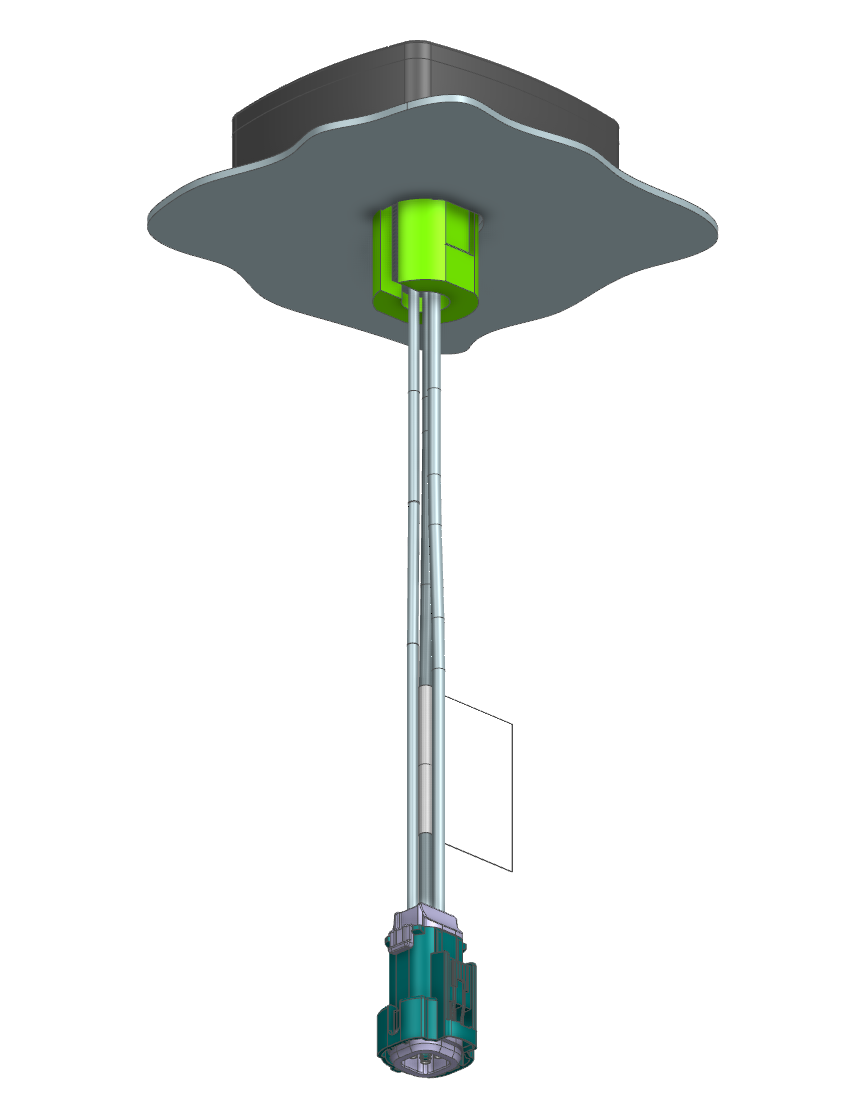
Press the antenna, together with the Antenna Mounting Aid, onto the mounting surface.
-
Remove the Antenna Mounting Aid.
-
From the inside, install the washer and nut, and tighten to the maximum torque of 5 Nm using a size 27 wrench.
Warning
Do not exceed the maximum tightening torque of 5 Nm - this can damage the antenna housing.
References
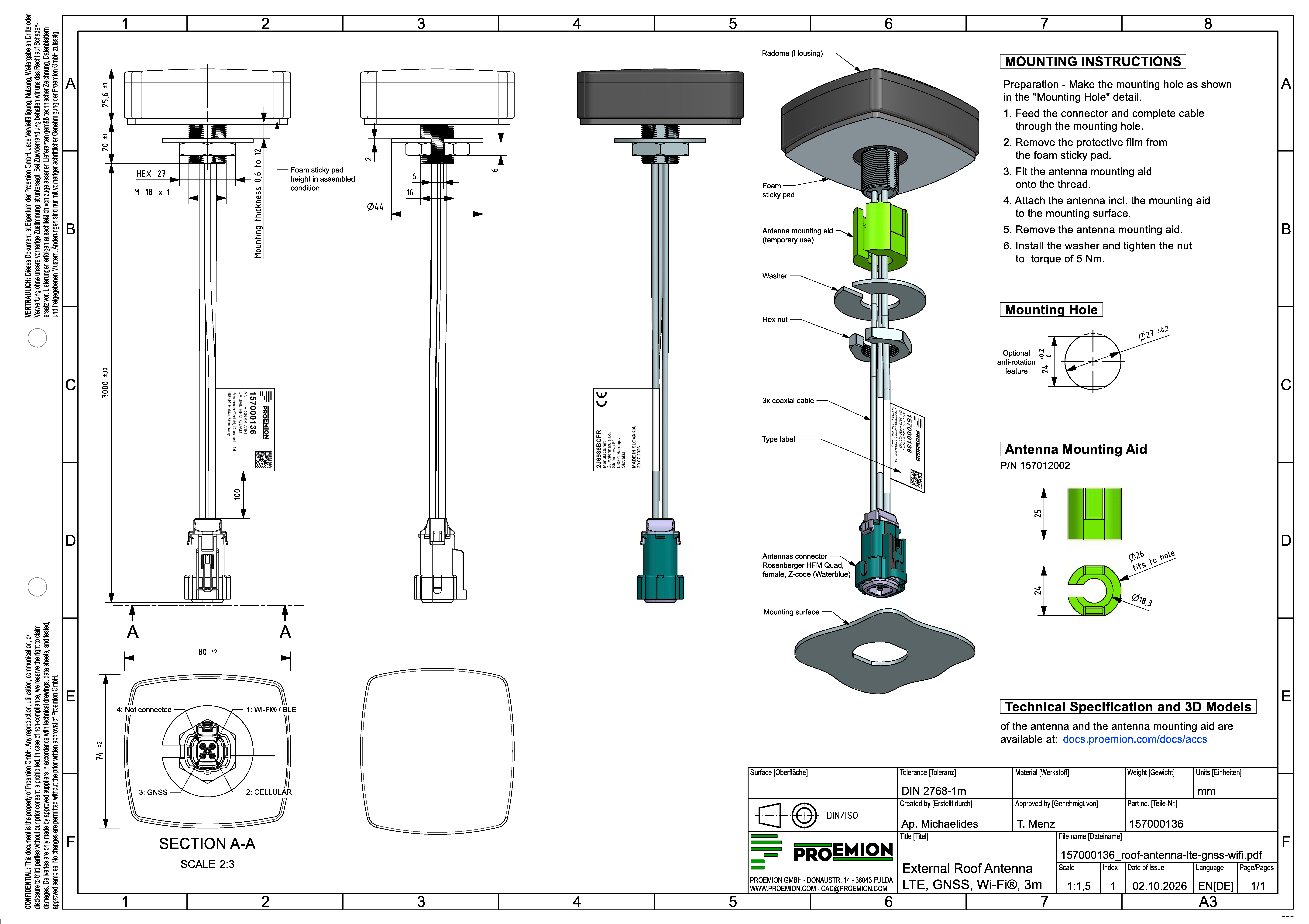
The following drawing provides the full mechanical reference, including dimensions, pin assignment, and the Antenna Mounting Aid detail.
You will find the following reference material in the Download Center under: 01_Proemion_Devices > 90_Accessories
-
3D data of the antenna
-
3D data of the Antenna Mounting Aid, for 3D printing
Service and Support
The latest versions of the drivers, software, firmware, and documentation are available at Document Library.
Do you need help or want to report a bug?
Visit Proemion for more information, or raise a ticket via Support.
Firmware Updates and Support
To ensure the best performance and security of your devices, we strongly recommend always installing the latest firmware provided by Proemion.
Please note:
We do not provide technical support for issues caused by outdated firmware.
Errors resulting from outdated firmware are considered non-qualified errors and are not covered by warranty or support.
Regular firmware updates are essential to maintaining the functionality of your devices.
If you need assistance with the update process, please contact our Service and Support.
For more information on the Firmware Update, check the device manual of your device at the Document Library.