J1939
J1939 DM1_DM2
The Diagnostic Messages (DM) will be transmitted in CAN-Messages. The {company_name} System interprets these CAN-Messages in the PDC. To interpret the correct arrangement in the SPN, you must choose the "SPN Conversion Method” according to your engine or ECU datasheet. In the tables below, you can see the four standard conversion methods. We recommend using Version 4.
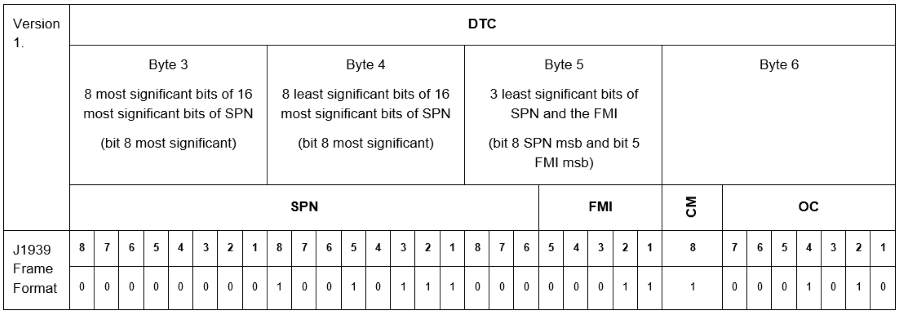
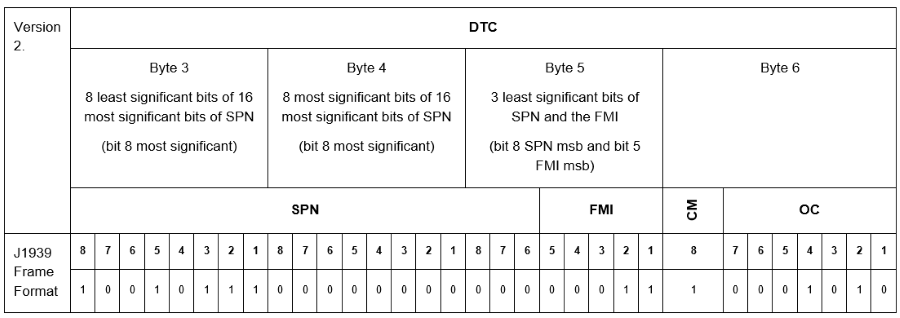
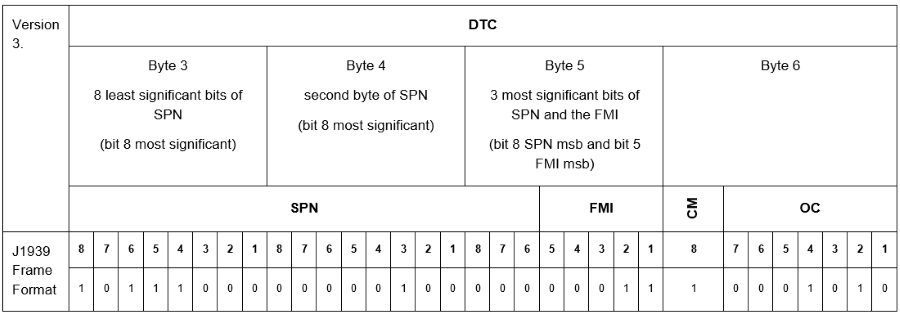
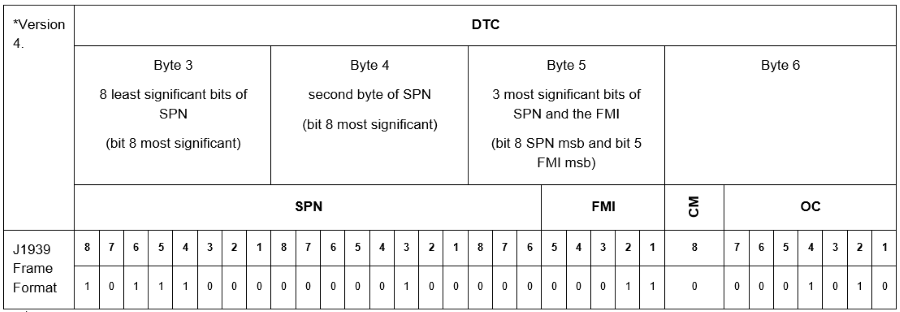
If the CM-Bit (Conversion Method) is set to 1 in the CAN-Message, you have to indicate the relevant conversion method (Version 1 to 3) at conversionMode=" ".
If the CM-Bit is set to 0, Version 4 is set by default and the adjustment of the PDC will be ignored.
Note
Conversion modes 3 and 4 are identical. The CAN messages are interpreted in the same manner. The difference is that mode 4 is used automatically while mode 3 can be set manually. So instead of setting mode 4, you can use mode 3. Then there is also no error when checking the PDC.
In addition to the J1939 conversion modes (1-4) a proprietary mode 100 to convert DM1 like messages can be used. In conversion mode 100 every 4 byte DM1 DTC junk is interpreted as UINT32 number and is set as SPN ID. As default FMI is set to 0. In case FMI shall be derived from a lookup file please contact customer care.
The following example shows how messages for DM1_DM2 will be implemented in the PDC.
Note
In order to parse the CAN message received at the DataPlatform, the channel number defined in the <BinaryStreamDefinition> is used as the designator for the matching <DM1_DM2Message> or <CanMessage>.
The channel number in the <BinaryStreamDefinition> must match with the receiving CAN message.
Do not use only the <BinaryStreamDefinition> for messages from this channel in parallel;
it is recommended to define the CAN message parsing for each channel separately instead of using a combination of channel agnostic and channel specific <BinaryStreamDefinition>.
Consider that if there is no matching <DM1_DM2Message> or <CanMessage> but matching channel number, the receiving CAN message won't be parsed.
<!-- ParsingDefinition -->
  <ParsingDefinition>
    <BinaryStreamDefinition src="CAN" channel="1">
      <CanMessage canId="0x101" canIdLength="11" mask="0x7FF" protocolStyle="GENERIC"> [18 lines]
      <CanMessage canId="0x102" canIdLength="11" mask="0x7FF" protocolStyle="GENERIC">
        ...
      </CanMessage>
      <DM1_DM2Message conversionMode="2" sourceAddress="0x83" readLampStatus="false"/>
      <DM1_DM2Message conversionMode="1"/>
    </BinaryStreamDefinition>
  </ParsingDefinition>
Support of DM53 messages for DTCs
The Diagnostic Message DM53 is used for Active Service Only DTCs (DM53).
It is a subset of DM1_DM2Message and shows actual DTCs, not only the available diagnostic messages.
The following snippet shows how messages for DM53 messages will be implemented in the PDC.
<ParsingDefinition>
    <BinaryStreamDefinition src="CAN">
        <DM53Message conversionMode="1" sourceAddress="0x34"/>
  </ParsingDefinition>
Note
For DM1 messages, the same values as for DM53 are valid for conversionMode: "1", "2", "3" and "4".
J1939 Specification
| Declaration | Description |
|---|---|
<ParsingDefinition> |
Collector for the "ParsingDefinition". |
<BinaryStreamDefinition> |
Collector for the parsing definitions for a channel. For information on the channe |l attribute, see < |
src |
Specifies the source of the message (only supports CAN). |
<CanMessage> |
Collector for the CAN message definition. |
canId |
Identifier of the CAN message. |
canIdLength |
Length of the CAN identifier. |
mask |
Defines the mask according to the length of the CAN identifier (11 or 29 bit). |
protocolStyle |
Needs to be set to "GENERIC”. |
<DM1_DM2Message> |
DM1 -> Active Diagnostic Trouble Codes. DM2 -> Previously Active Diagnostic Trouble Codes. NOTE: DM1 messages contain a list of DTCs currently active on the machine. DTCs present in the DM1 message which are not already known as active will be stored as newly active DTCs in the DataPlatform. Already considered DTCs will be ignored. DataPlatform's currently active DTCs that are not present in a newly received DM1 message will be deactivated. Therefore, an empty DM1 message closes all active DTCs on DataPlatform. DM2 messages contain a list of DTCs previously active on the machine. On DataPlatform these messages are used for closing potentially active DTCs. If a currently active DTC is present in the DM2 message, the DTC will be deactivated. Currently, there is no other function for DM2 messages on the DataPlatform. |
<DM53_Message> |
Active Service Only DTCs. |
conversionMode |
Specifies the type of arrangement of information in the SPN. The value range is 1 to 3 (according to the tables above). |
sourceAddress |
Optional: If set, the conversion mode will be used only for this address. If the "sourceAddress” is not set, all addresses will use the same conversion mode. If one message is configured, there are no further configurations needed for these messages. |
readLampStatus |
If it is set to "false” the lamp status value is not read from the J1939 DM1/2 messages. If no lamp status is available in the database, the lamp status will not be displayed in the DataPortal Views and Widgets. |
In order to display the J1939 error codes (source address, SPN and FMI) textually in the DataPortal, the following lines must be integrated in the PDC immediately before the
<J1939>
  <xi:include href="https://xml.proemion.com/ProemionDataConfiguration/J1939_202503_SpnLabels.xml"/>
</J1939>
It is possible to change the texts of source address, SPN and FMI to your own, deviate to J1939 standard. You have to add the following lines according to the example below to your PDC. The content of the "value” attribute can be defined freely by the customer.
<!-- J1939 -->
<J1939>
  <xi:include href="https://xml.proemion.com/ProemionDataConfiguration/J1939_202503_SpnLabels.xml"/>
  <SpnLabelOverrides>
    <Spn id="6">
      <message>
        <Label lang="fr" value="My new SPN 6"/>
      </message>
    </Spn>
    <Spn id="7" forSourceAddress="7">
      <message>
        <Label lang="fr" value="My new SPN 7"/>
      </message>
    </Spn>
  </SpnLabelOverrides>
  <FmiLabelOverrides>
    <Fmi code="13" forSourceAddress="12">
      <message>
        <Label lang="en" value="My new FMI 13"/>
      </message>
    </Fmi>
    <Fmi code="14">
      <message>
    <Label lang="en" value="My new FMI 14"/>
      </message>
    </Fmi>
  </FmiLabelOverrides>
  <SourceLabelOverrides>
    <Source address="1">
      <message>
        <Label lang="de" value="My new Source 1"/>
      </message>
    </Source>
    <Source address="2">
      <message>
        <Label lang="de" value="My new Source 2"/>
      </message>
    </Source>
  </SourceLabelOverrides>
</J1939>
| Declaration | Description |
|---|---|
<SpnLabelOverrides> |
Between |
Spn |
Defines that a SPN should be changed. |
id |
Defines which SPN should be changed to a different value. |
lang |
In the example English (en), German (de) and French (fr) are defined. Depending on the DataPortal language settings the equivalent value is displayed. |
value |
Equivalent new label for the specified language. |
forSourceAddress |
Defines the "sourceAddress" of the CAN message. |
<FmiLabelOverrides> |
Between |
Fmi |
Defines that an FMI should be changed. |
code |
Defines which FMI code needs to change the value. |
<SourceLabelOverrides> |
Between |
address |
Defines the source address which should be changed. |