Set up Machine in DataPortal
Set up a machine with the Teltonika Eye Beacon/Sensor installed to make it available in DataPortal: create a model, then provision the machine.
Create Model
Create a model and bind it to the machine. Creating a model is required to manage your machines.
Create Model in the DataPortal manual describes how to create a model.
To create a model through the REST API, see Create Model.
Provision/Go Live
Provision the machines with the Teltonika Eye Beacon/Sensor installed to make them available in DataPortal. Provisioning requires the MAC address and serial number.
Provisioning in the DataPortal manual describes how to provision a machine.
To provision a machine through the REST API, see Provision a machine.
Machine Data
After provisioning, the devices appear in the following DataPortal menus.
List and Map View
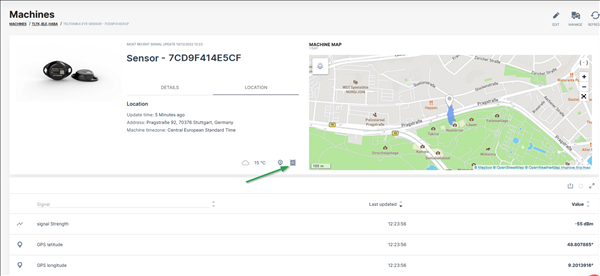
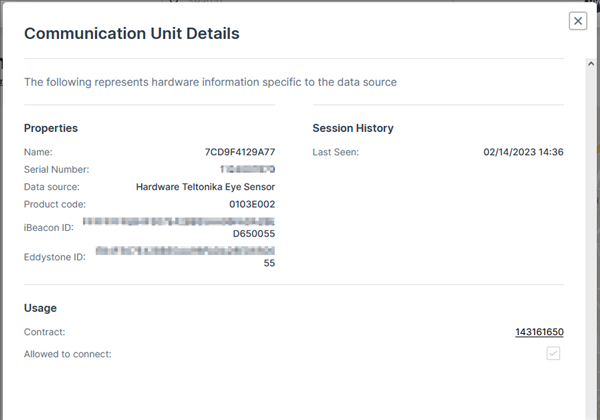
In Machines > List and Map view, view the signals, CU details, and activity of a machine.
- Signals: for example, signal strength via the metric
value.common.cu.beacon.signal.strength. - CU Details: name, serial number, product code, iBeaconId, eddystoneId.
- Activity: session history and usage (contract, allowed to connect).
Note
Because the Teltonika Eye Beacon/Sensor devices don't have a constant connection to DataPlatform, they show cu.LastSeen instead of the Online/Offline, Logged in/Logged out, or RealTime state.
Contracts
In Settings > Administration > Contracts, manage the contracts for the devices, for example to renew a contract or change the OEM name.
To renew a machine's contract through the REST API, see Contract Renewal.
