Beacon & Sensor Manual
Introduction
The Teltonika Eye Beacon/Sensor devices are two types of Bluetooth Low Energy ID devices, used to measure different signals.
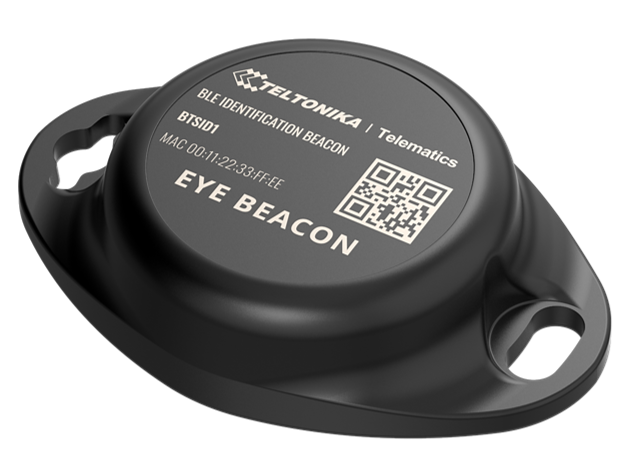
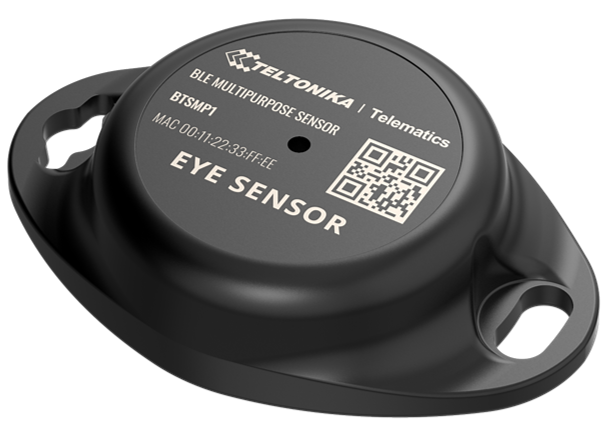
Other Bluetooth-capable devices can forward the signals of the Teltonika Eye Beacon/Sensor devices to DataPlatform, which also allows tracking the location of a machine.
The Teltonika Eye Beacon transmits only the eddystone/beacon IDs, whereas the Teltonika Eye Sensor transmits additional signals, see About the Devices for the full signal comparison between the two device types.
Use Cases
Teltonika Eye Beacon/Sensor devices suit customers who want to introduce telematics to their machines, or equip and retrofit lower-end products with basic telematics.
Because Teltonika Eye Beacon/Sensor devices are not connected to a CAN network, they cannot support RealTime, and they use their own hosting plans.
This manual describes the signal set, how to set up the Teltonika Eye Beacon/Sensor devices in DataPortal, and how tracking works with these devices. Contact your Sales representative at Proemion for more information.
About the Devices
Both Teltonika Eye Beacon/Sensor devices have a waterproof casing and are equipped with batteries that last up to 5 years.
- Bluetooth Eye Beacon: provides the basic functionality for Tracking and is equipped with the Beacon ID.
- Bluetooth Eye Sensor: provides the Beacon ID, basic functionality for tracking, and additionally transmits the following metrics:
- Sensor Battery State
- Sensor Battery Voltage
- Device Pitch
- Device Roll
- Humidity
- Magnet Field Detection/State
- Movement Counts
- Movement Detection
- Temperature
Signal Set
The following signals and features are enabled by the Teltonika Eye Beacon/Sensor devices (x = enabled, - = not enabled).
| Signal/Feature | Bluetooth Eye Sensor | Bluetooth Eye Beacon |
|---|---|---|
| Equipment movement | x | - |
| Battery state and voltage | x | - |
| Humidity | x | - |
| Temperature | x | - |
| Accelerometer | x | - |
| Magnet detection | x | - |
| Signal strength | x | x |
| DataPlatform integration | x | x |
| Waterproof | x | x |
| Dustproof | x | x |
Both devices also support geo location indirectly, via a second device that receives the Bluetooth signal.
The Teltonika Eye Beacon/Sensor devices do not support fuel consumption, towing detection, ignition status, machine operating hours, or battery charging state.
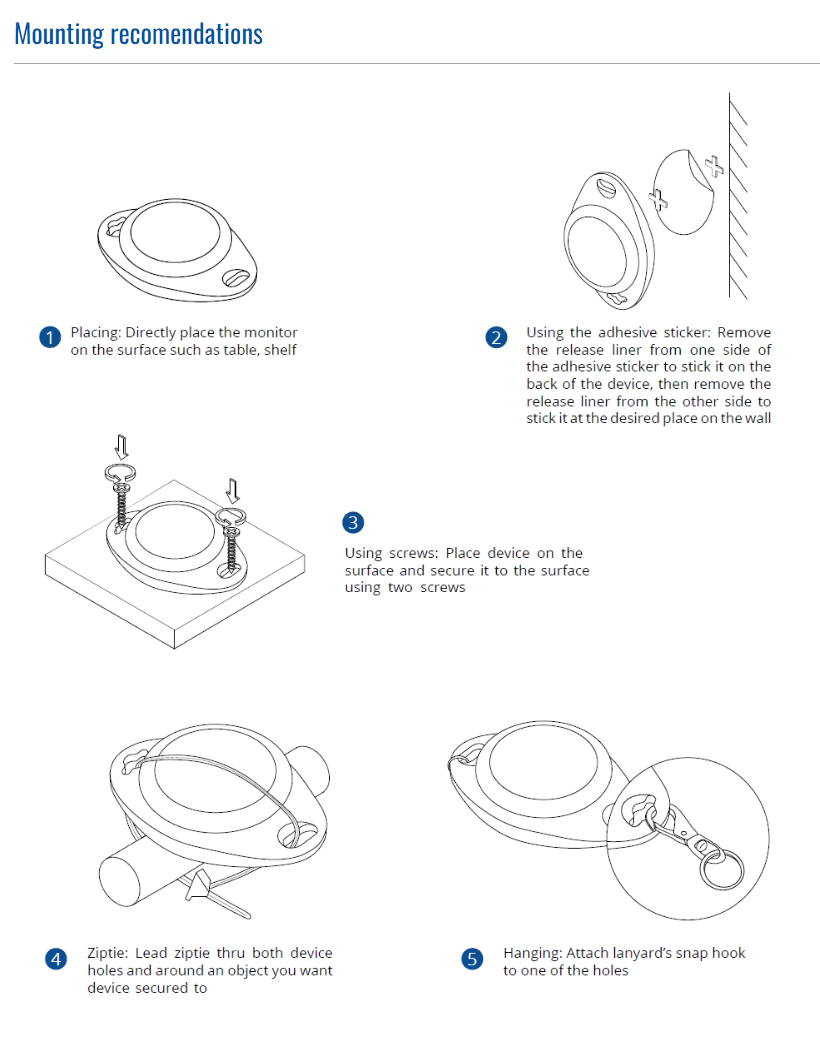
Mounting
Refer to the manufacturer's mounting recommendations:
Operation
Both Teltonika Eye Beacon/Sensor devices are active and send data only when a machine is connected and ignition is on. When the machine is on, the Teltonika Eye Beacon/Sensor devices always send their signal and cannot be turned off.
Their signals are captured every 60 seconds and sent every 1 hour while the machine is working.
Otherwise, the device enters sleep mode and wakes up every 6 hours, or by ignition, or if the machine is towed or rocked by an earthquake.
Note
The devices have no dedicated power supply and, therefore, do not maintain a constant connection. They are listed as "Offline" in the meantime.
For the data from a Teltonika Eye Beacon/Sensor device to reach the cloud, a higher-level device must receive the announcement, enrich it at least with the signal strength, and send it to the cloud.
Technical Data
Refer to the manufacturer's technical data:
Safety Information
This chapter contains important information on how to avoid life-threatening situations and injuries, and how to prevent product damage.
Safety Instructions
Warning
Adhere to the manufacturer's safety instructions: Teltonika Beacon Safety Information and Teltonika Sensor Safety Information.
Warranty and Liability
Proemion assumes no liability for defects caused by normal wear, external influences, or incorrect installation, operation, or maintenance. This also applies if the customer or a third party modifies the devices, any accessories, or the software without permission from Proemion.
Conformity
For conformity details, see Teltonika Beacon Conformity and Teltonika Sensor Conformity. The Teltonika Eye Sensor has additional certifications and approvals compared to the Teltonika Eye Beacon.
Set up Machine in DataPortal
Set up a machine with the Teltonika Eye Beacon/Sensor installed to make it available in DataPortal: create a model, then provision the machine.
Create Model
Create a model and bind it to the machine. Creating a model is required to manage your machines.
Create Model in the DataPortal manual describes how to create a model.
To create a model through the REST API, see Create Model.
Provision/Go Live
Provision the machines with the Teltonika Eye Beacon/Sensor installed to make them available in DataPortal. Provisioning requires the MAC address and serial number.
Provisioning in the DataPortal manual describes how to provision a machine.
To provision a machine through the REST API, see Provision a machine.
Machine Data
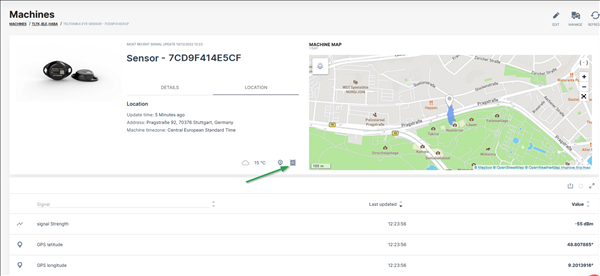
After provisioning, the devices appear in the following DataPortal menus.
List and Map View
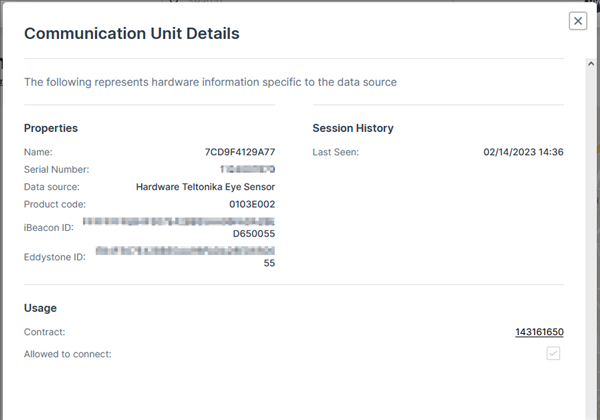
In Machines > List and Map view, view the signals, CU details, and activity of a machine.
- Signals: for example, signal strength via the metric
value.common.cu.beacon.signal.strength. - CU Details: name, serial number, product code, iBeaconId, eddystoneId.
- Activity: session history and usage (contract, allowed to connect).
Note
Because the Teltonika Eye Beacon/Sensor devices don't have a constant connection to DataPlatform, they show cu.LastSeen instead of the Online/Offline, Logged in/Logged out, or RealTime state.
Contracts
In Settings > Administration > Contracts, manage the contracts for the devices, for example to renew a contract or change the OEM name.
To renew a machine's contract through the REST API, see Contract Renewal.

Tracking
Beacons do not have a GPS sensor. They only announce their presence locally via BLE by constantly sending Bluetooth packets, optionally with a small set of data attached.
Whenever a Basic Tracker captures these Bluetooth packets, it sends the recorded data to DataPlatform.
The location visible in DataPortal is the location of the Basic Tracker that sent the signal, not the Teltonika Eye Beacon/Sensor device itself. Therefore, a Basic Tracker is always required to capture the data of the Teltonika Eye Beacon/Sensor devices.
As soon as the Basic Tracker sends its data to DataPlatform, it also sends the recorded Teltonika Eye Beacon/Sensor data in a time interval of 60 seconds, see Operation for the device's wake and send cycle.
Service and Support
The latest versions of the drivers, software, firmware, and documentation are available at Document Library.
Do you need help or want to report a bug?
Visit Proemion for more information, or raise a ticket via Support.
Firmware Updates and Support
To ensure the best performance and security of your devices, we strongly recommend always installing the latest firmware provided by Proemion.
Please note:
We do not provide technical support for issues caused by outdated firmware.
Errors resulting from outdated firmware are considered non-qualified errors and are not covered by warranty or support.
Regular firmware updates are essential to maintaining the functionality of your devices.
If you need assistance with the update process, please contact our Service and Support.
For more information on the Firmware Update, check the device manual of your device at the Document Library.